Fume hood operator display panel interface, QMX3.P88 (FhOdpItf12)
Overview
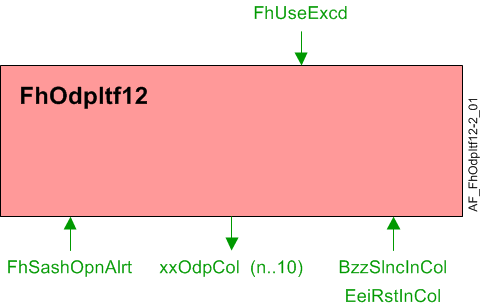
The application function "Fume hood operator display panel interface 12, QMX3.P88" (FhOdpItf12) is connected to a fume hood controller. The display, alarm lights, alarm horn, and green leaf indicator are controlled based on the current state of the fume hood. The QMX3.P87 provides buttons to put the fume hood in emergency mode, silence alarms and, provide energy efficiency request.
Note
The ODP is not fully functional during setup and commissioning when the administrative mode of the fume hood is "Startup". See the room segment AF Hvac16 for information on the fume hood administrative mode object.
Main features:
- LED Display
Function
| Command or request (or related) |
| Notification of condition or status, or availability |
| Device mode |
| Interlock (internal signal, not a BACnet object; see Interlocks section for additional information) |


LED Display
Alarm indication: The alarm indication screen will display a graphic icon that represents the current alarm state. Alarm indication is a multistate process value object that has 5 states:
- No Alarm
- Close the sash

- Airflow alarm

- Critical alarm

- Fire

Displaying face velocity or exhaust airflow: The face velocity and exhaust volume can appear unstable when displayed on the ODP. The configuration extension items DspyWght, DspyRslVFace and DspyRslAirFlEh are used to stabilize the displayed value(s).
DspyWght is entered as a percentage and is used to calculate a weighted average.
DspyRslVFace represents the increments of the velocity reading that will be displayed relative to the face velocity setpoint.
DspyRslAirFlEh represents the increments of the exhaust airflow reading that will be displayed relative to the exhaust airflow setpoint.
The control of the fume hood can appear to be slow on the ODP when DspyWght is set low and a large sash adjustment happens. The unfiltered face velocity with DspyRslVFace or exhaust volume with DspyRslAirFlEh applied will be displayed when the exhaust airflow setpoint changes by more than 20% compared to the previous exhaust airflow setpoint. The unfiltered reading will be used until the difference between velocity/volume and setpoint is less than or equal to DspyRslVFace / DspyRslAirFlEh.
The face velocity setpoint to ODP, SpVFaceOdpCol, is set to the same value as the fume hood face velocity setpoint.
The exhaust air flow setpoint to the ODP, SpAflEhOdpCol, is set to the same value as the fume hood exhaust air flow setpoint.
The ODP configuration extension item DspyValue determines if the face velocity or exhaust volume is displayed. The value displayed on the ODP is calculated for both VFaceOdp and SpVFaceOdpCol.
Alarm Lights: The red, yellow, and green LED alarm lights (RedLedOdp, YlwLedOdp, and GrnLedOdp) on the ODP have 6 operational states.
- Continuously Off
- Flash (100ms / 900ms)
- Blink (500ms / 500ms)
- Blink 5 times, then stop
- Blink 5 times every minute
- Continuously On
The values of the multistate objects for the LEDs are determined by the inputs Fh Mode, Effective Administrative Mode, and Air Flow Alarm.
Alarm Horn: The alarm horn (BzzModOdp) on the ODP has 6 operational states.
- Continuously Off
- Short Buzz (100ms / 900ms)
- Long Buzz (500ms / 500ms)
- Buzz 5 times, then stop
- Buzz 5 times every minute
- Continuously On
The value of the multistate object for the alarm horn is determined by the inputs Fh Mode, Effective Administrative Mode, Sash Alert, Sash Open Time, and Air Flow Alarm.
The horn should be turned on after the silence button has been pressed and the alarm condition has not cleared and a new alarm comes in. Silencing the horn is a local function in the ODP. The AF does monitor the horn silence button (BzzSlncIn) and updates a multistate output (BzzStaOdp) with 3 possible states.
- No Alarm
- Alarm Active, Alarm Horn On
- Alarm Active, Alarm Horn Silenced
If BzzSlncIn is activated while FhSashOpnAlrt is active, the timer for the switch-on delay for the sash opening alert will be reset.
Green Leaf: The Green Leaf LED (EeiOdp) on the ODP has 5 operational states.
- Undefined
- Poor
- Satisfactory
- Good
- Excellent
Control of the green leaf LED color is handled within the ODP. It will be green when EeiOdp has a value of 4 or higher, red if a value of 2 or 3, and off if a value of 1.
The value of the multistate object for the green leaf LED is determined by the inputs Fh Mode, Effective Administrative Mode, Air Flow Alarm, Sash Alert, Fh Air Flow Setpoint, Fh Air Flow Minimum and a energy efficiency indication from the setpoint AF.
Configuration
 Parameters
Description | Parameter | Default value |
|---|---|---|
Display resolution for face velocity | DspyRslVFace | 0.02 [m/s] |
Display resolution for exhaust air volume | DspyRslAirFlEh | 5 [m3/h] |
Display weight If you set DspyWght to zero, the Operator Display Panel will “freeze” at the last read value. Setting DspyWght to a value other than zero (suggested value is 30%) allows the Operator Display Panel to update the displayed face velocity. | DspyWght | 100 [%] |
Switch-on delay for sash opening alert | DlyOnSashAlrt | 300 [s] |
Enable sash tone ▶ Set to yes to allow the buzzer to be activated in the event of a sash opening alert or in the event of a sash maximum opening alert. 0:No | EnSashTone | 0:No |
Switch-off delay for sash maximum opening buzzer | DlyOffSshmBzz | 0 [s] |
Air velocity unit | AirVUnit | [m/s] |
Air volume flow unit | AirFlUnit | [m3/h] |
Interface
Interface | Description | Type | Ref. | Owned by | |
|---|---|---|---|---|---|
BzzSlncInCol | Collection of buzzer silence input value | ColView | ● | - | |
| BzzSlncInRs | Result of buzzer silence input value 0:Off | BCalcVal | ● | - |
| BzzSlncIn | Buzzer silence input value 0:Off | BCalcVal | ◉ | Room segment / Field device |
GrnLedOdpCol | Collection of ODP green LED mode | ColView | ● | - | |
| GrnLedOdp | ODP green LED mode 1:Off | MPrcVal | ◉ | Room segment / Field device |
YlwLedOdpCol | Collection of ODP yellow LED mode | ColView | ● | - | |
| YlwLedOdpCol | Collection of ODP yellow LED mode Enumeration see ODP green LED mode | MPrcVal | ◉ | Room segment / Field device |
RedLedOdpCol | Collection of ODP red LED mode | ColView | ● | - | |
| RedLedOdp | Collection of ODP red LED mode Enumeration see ODP green LED mode | MPrcVal | ◉ | Room segment / Field device |
AlmIndOdpCol | Collection of alarm indication for ODP | ColView | ● | - | |
| AlmIndOdpCol | Collection of alarm indication for ODP 1:Blank | MPrcVal | ◉ | Room segment / Field device |
EeiOdpCol | Collection of ODP energy efficiency indicator | ColView | ● | - | |
| EeiOdp | ODP energy efficiency indicator 1:Undefined | MPrcVal | ◉ | Room segment / Field device |
BzzModOdpCol | Collection of ODP buzzer mode | ColView | ● | - | |
| BzzModOdp | ODP buzzer mode 1:Off | MPrcVal | ◉ | Room segment / Field device |
BzzStaOdpCol | Collection of buzzer state for ODP icon | ColView | ● | - | |
| BzzStaOdp | Buzzer state for ODP icon 1:Off | MPrcVal | ◉ | Room segment / Field device |
AirFlEhOdpCol | Collection of exhaust air volume flow for ODP | ColView | ● | - | |
| AirFlEhOdp | Exhaust air volume flow for ODP | APrcVal | ◉ | Room segment / Field device |
VFaceOdpCol | Collection of face velocity for ODP | ColView | ● | - | |
| VFaceOdp | Face velocity for ODP | APrcVal | ◉ | Room segment / Field device |
SpVFaceOdpCol | Collection of face velocity setpoint to ODP | ColView | ● | - | |
| SpVFaceOdpCol | Collection of face velocity setpoint to ODP | APrcVal | ◉ | Room segment / Field device |
SpAflEhOdpCol | Collection of exhaust air volume flow setpoint to ODP | ColView | ● | - | |
| SpAirFlEhOdp | Exhaust air volume flow setpoint to ODP | APrcVal | ◉ | Room segment / Field device |
FhSashOpnAlrt | Fume hood sash opening alert | BPrcVal | ◉ | Hvac16 | |
FhSashMaxAlrt | Fume hood sash maximum opening alert | BPrcVal | ◉ | Hvac16 | |
FhUseExcd | Fume hood use exceeded 0:Off | BCalcVal | ● | - | |
Engineering and commissioning
The ODP is not fully functional during setup and commissioning when the administrative mode of the fume hood is "Startup". See the room segment AF HvacLgt16 for information on the fume hood administrative mode object.