Assigning touch panels to operating and monitoring devices
In Building > Details pane > Automation station details > Touch panel assignment, you can assign a touch panel to an operating and monitoring device such as PXG3.W100-2.
Details pane of the device version ≤ 1.5
In order to assign a touch panel to an operating and monitoring device, the operating and monitoring device must have web server functionality e.g. PXG3.W100-2.
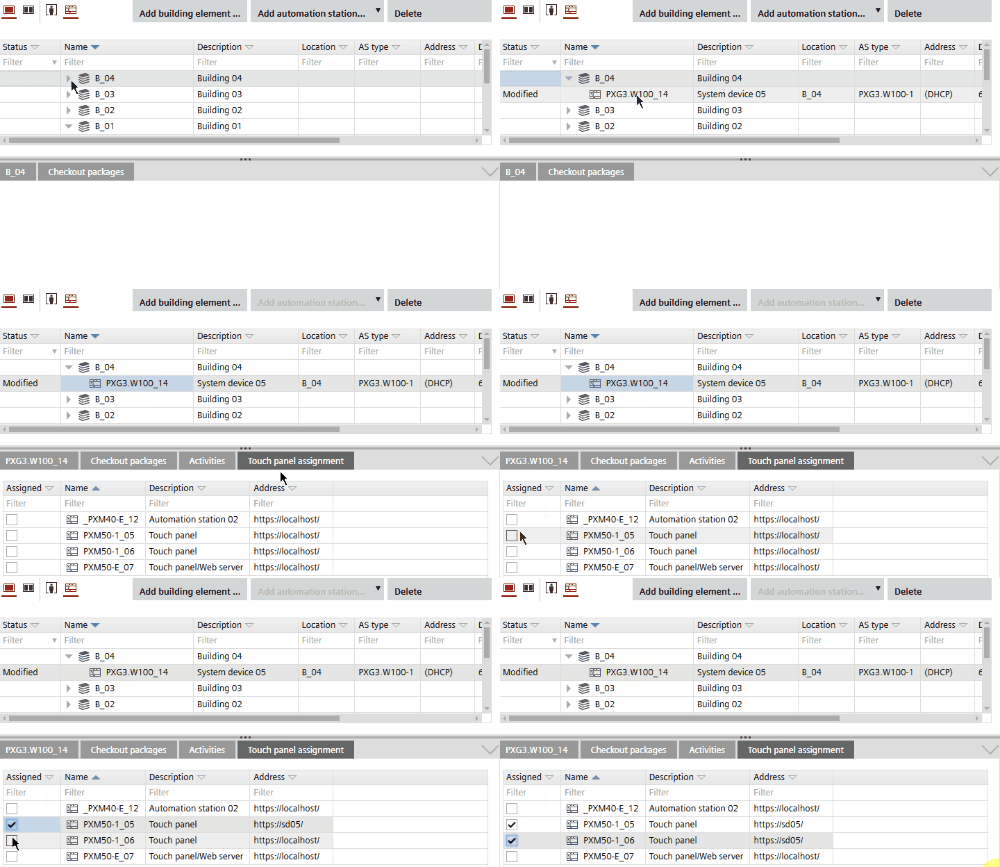
Assign touch panel
- Open Building > Building structure.
- Select an operating and monitoring e.g. PXG3.W100-2.
- In the Details pane, open the Touch panel assignment tab.
- In the Assigned column, select the touch panels that you want to assign to the operating and monitoring device.