Assigning devices
For each target family with assigned devices, a tab is displayed with a list of the assigned devices. Not all devices support assigning devices with ABT Site.

Assigning of XWP/Apogee and 3rd party devices to devices with web interface is not possible.
- ABT devices
for assigned room automation devices - XWP devices
for assigned Desigo primary devices (PXC) - Apogee devices
for devices assigned over Apogee PX - 3rd party devices
for assigned 3rd party devices
If central functions are used in the project, a corresponding hierarchy must exist. Without a hierarchy, the devices are not visible in the Integrate devices dialog.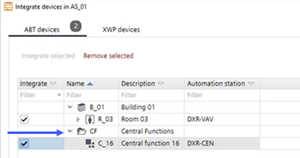
Engineering > Device assignment allows you to open a maximum of 5 tabs (instances) at a time.
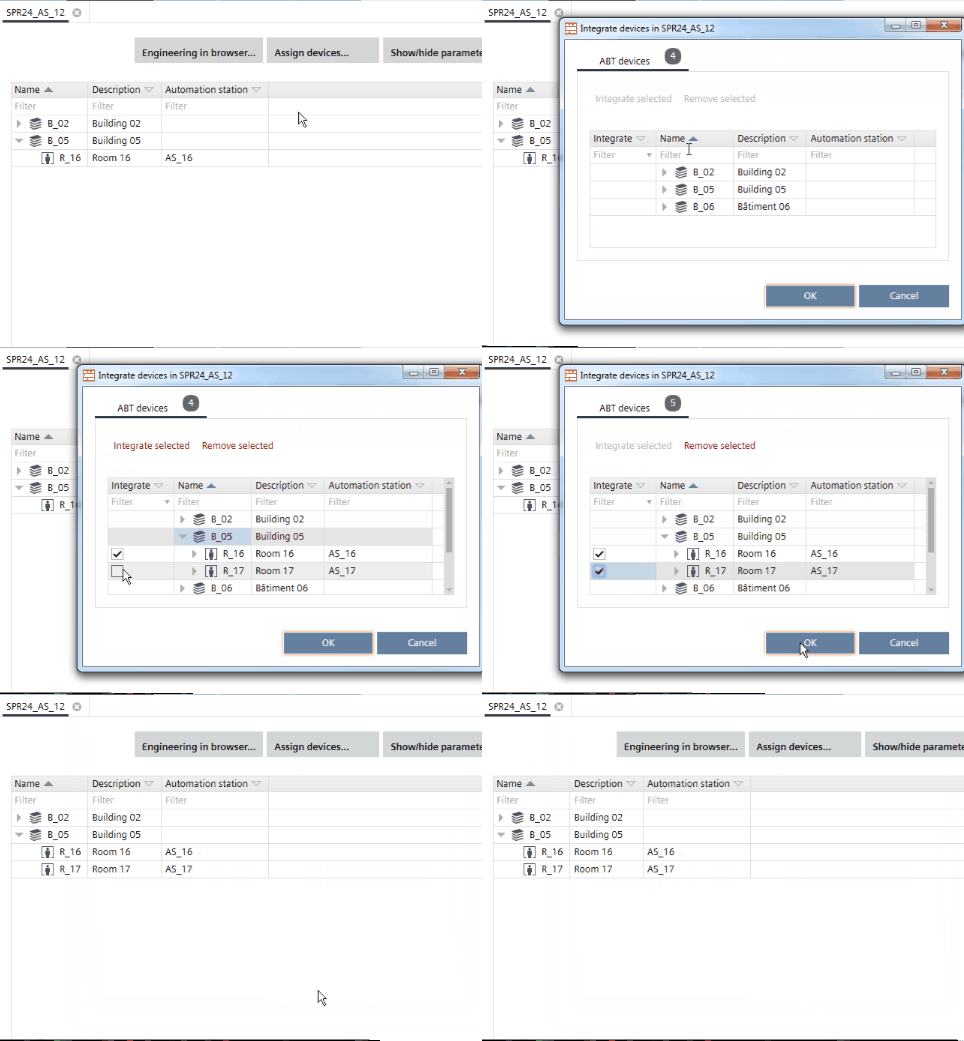
Assign devices
- You have added an operating and monitoring device, for example PXG3.W100, or a device with web interface to the building structure.
- You have added at least one automation station to the building structure.
- A central function hierarchy is created in the Central functions task.
Defining a central functions hierarchy
- Go to Building > Building structure.
- Right-click an operating and monitoring device, or a device with web interface, and select Go to engineering.
- Click Assign devices.
- Select the rooms you want to assign.
- Click Integrate selected.
- Click OK.
- The selected automation stations are assigned.
All devices engineered with and in the XWP / customer project are listed in the integration dialog.
Already assigned XWP devices are listed as well, even if the original assignment data (BBI) is not available in the project context.
BBI is the Siemens internal BACnet description interface (BACnet Beschreibungs Interface) of the primary controllers in the Desigo XWP environment. Only primary devices of version 4.0 and above are supported, older devices are not listed.
Engineering > Device assignment allows you to open a maximum of 5 tabs (instances) at a time.