Operational certificates
In the Desigo system, operational certificates are digital certificates that either enable secure HTTP (HTTPS) communication to the web servers embedded in the Desigo devices or secure BACnet (BACnet/SC, WSS://) communication between devices.
The operational certificates for web servers and BACnet/SC in a project are different but the basic workflows for generating and handling the certificates are the same.
See https://en.wikipedia.org/wiki/Public_key_certificate.
The following device types support the operational certificates in their built-in web servers:
- PXC3.Exxx-1
- DXR2.Exxx-1
- PXG3.Wxxx-1
- PXG3.Wxxx-2
- PXMxx-1
- PXMxx.E
- PXC4..
- PXC5.E003
- PXC5.E24
- PXC7.E400x
Benefits of certificates
Using TLS (as in HTTPS or WWS), all communication with web servers or WebSockets is encrypted to prevent wiretapping or altering communications. Moreover, web client users have complete confidence that they are connected to the genuine web server and not a counterfeit one. Users are notified if they are unable to connect via HTTPS, typically with "Not Secure" in the address bar. The web browser displays an error message in the event of certificate problems. This usually indicates that the server cannot be verified. The user can decide to continue but is not recommended.
A wrong or expired certificate also generates an error message in BACnet/SC. However, as BACnet/SC is machine-to-machine (M2M) communication, the respective WebSocket error does not involve a direct GUI to the user but triggers an error on the BACnet system that is then processed as any other regular BACnet error.
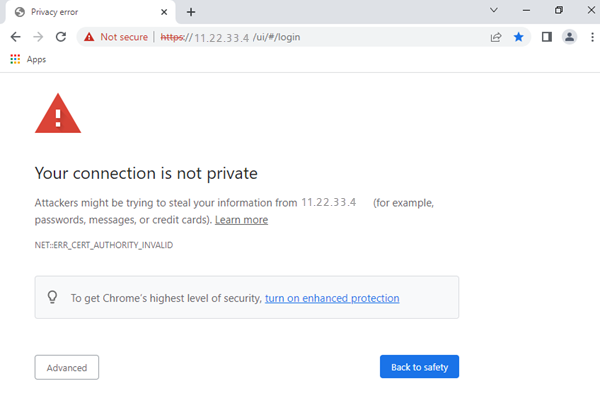
What are certificates?
A Certification Authority (CA) issues every certificate and is an entity jointly trusted common by the users.
In Desigo, an individual certificate is provided to every web server. CAs have their own certificates, called root certificates.
A certificate contains several fields. The most relevant are:
- Identity, such as the IP address of a web server
- Cryptographic key for the secure communication
- Validity period
- Information about the CA that created the certificate
- Signature, which is a proof of authenticity
The signature is a security code created by the CA and cannot be counterfeited which is why the process of creating a certificate is often called signing.
The client must already posses the certificate created by the CA to validate the certificate signature. This is why web browsers and operating systems trust several CAs by default. Users and administrators can add additional CAs, such as corporate CAs.
CAs are often organized in multiple levels, with a Root CA with one or more intermediate CAs.
In Windows, certificates are located under Internet Options > Content > Certificates.
You can also find certificates by typing cert into the Windows Search Bar.
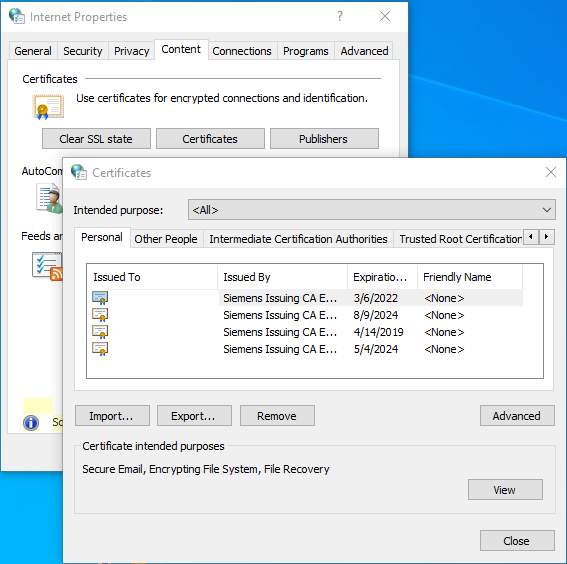
Certificate types
ABT Site manages certificates in Desigo. You can choose among the following options for each device:
- Internal CA (default): ABT as the CA.
- Certificates are automatically handled by ABT.
- Each project has its own root certificate.
- External CA: CA provided by an external organization. For example, a CA could be provided by the customer’s IT department or by the system operator.
- May be requested by high security projects.
- Requires additional workflows.
- No certificate.

For an internal CA: Everyone with a copy of an ABT project can create new certificates for that project. For this reason, be careful when distributing and storing ABT project files, including the exports generated via Pack & Go.
For details, see ABT Site Online Help.
Importing certificates from an external CA
The following figure illustrates how to import operational certificates from an external CA. Multiple devices can be handled together.
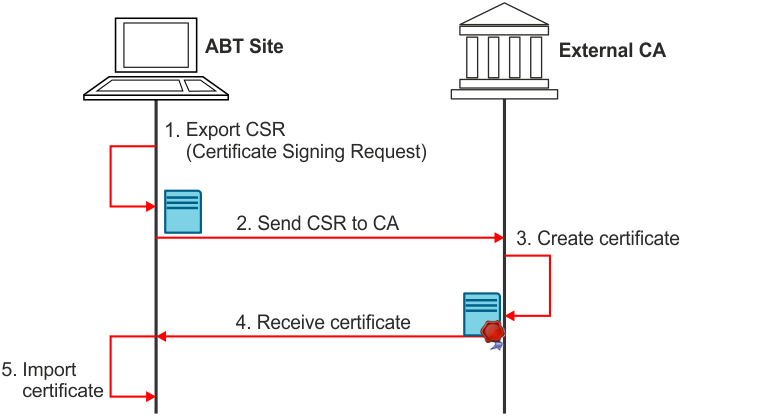
Exporting root certificates
Web clients require CA root certificates to validate the operational certificates. The method for specifying root certificates depends on the client type:
- Desigo touch panels: ABT Site automatically downloads root certificates.
- Desigo CC and web browsers:
- External CA: Provided by the administrator of the external CA, for example, the customer’s IT department.
- Internal CA: The root certificate must be exported from ABT Site and imported on the client.
– Desigo CC: An administrator with access to the OpenSSL-tool creates an operational certificate for Desigo CC, plus a CSR. This is handed over as files to ABT Site (or another CA), signed by it and returned to Desigo CC on file level.
The following figure illustrates how to export root certificates are exported from ABT Site and import on the client.
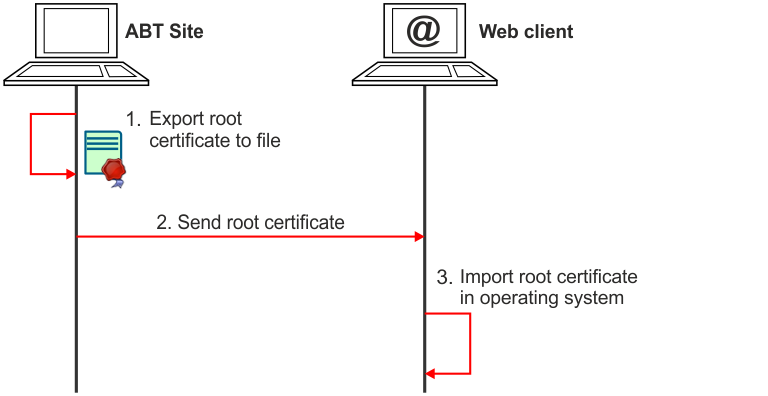
Most web browsers use the operating system’s certificate store, for example the MS Windows certificate store, but this not always the case.
For example, Mozilla Firefox has its own certificate store and require that you import the root certificate in Firefox. You change this by setting about:config > security.enterprise_roots.enabled to true (it is set to false by default).
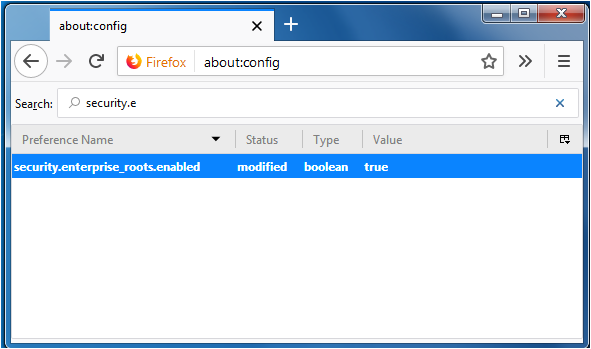
Consult the customer’s IT department before installing root certificates or changing security settings on customer’s computers.
Certificate deployment
The situation is as follows once all the operational certificates and root certificates are installed:
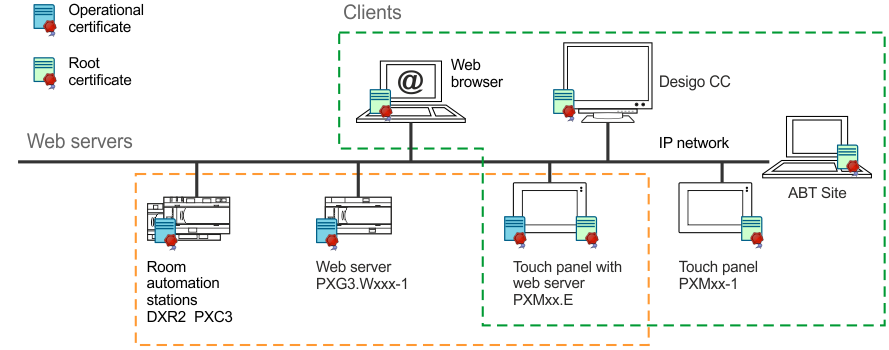
Devices with embedded web servers have their own operational certificates with IP address or Fully Qualified Domain Name (FQDN). Each client has one or more root certificates and some devices can be both, clients and servers (i.e. touch panels and embedded servers).
Each certificate has a validity period expressed as two dates with a defined lifetime and must be periodically replaced.
The CA determines the lifetime and has a default of five years for internal CA. The device triggers BACnet alarms as the expiration date approaches. Once expired, the client displays a warning each time the device is connected and may be configured to be more restrictive (to include ceasing communications).
Standard format and content
Files created by an external CA must meet the following requirements (contact customer support if this is not the case).
- The files must include the device certificate in PEM format, followed by the certificates from the certificate authorities using the syntax below. The intermediate certificate can be missing or repeated for every intermediate certificate authority used in the chain of trust.
-----BEGIN CERTIFICATE-----
(Device certificate)
-----END CERTIFICATE-----
-----BEGIN CERTIFICATE-----
(Intermediate certificate)
-----END CERTIFICATE-----
-----BEGIN CERTIFICATE-----
(Root certificate)
-----END CERTIFICATE-----
- The device certificates includes an X.509v3 extension with Subject Alternative Name that includes the device IP address or DNS name (must match the certificate signing request).
- ABT Site supports two files *.csr and *.txt.

- Note: The file *.csr contains a file header. The *.txt does not have a header.
