Optimizing the network traffic
You can optimize the network traffic of your Modbus network by creating bulk reader objects for your Modbus devices. The bulk reader object is an Octet string calculated value object which reads the consecutively addressed registers in one go. Bulk reader objects reduce the number of requests on the network and thus reduce the network load.
Create bulk reader objects automatically
- Go to Building > Building structure.
- Right-click a device and select Go to engineering.
- Open the Modbus task.
- Right-click a device in your Modbus network and select Optimize network traffic.
- The bulk reader objects are created automatically.
Create bulk reader objects manually
- Go to Settings.
- Open the Device defaults task.
- Select the Modbus tab.
Device defaults - Enable Show all object types check box.
- Go to Building > Building structure.
- Right-click a device and select Go to engineering.
- Open the Modbus task.
- Right-click a device in your Modbus network and select Add data point.
- In the Object type field, select Octet string calculated value.
- In the Function code field, select Read holding register.
- In the Address field, enter the start address from which you want to read the network requests.
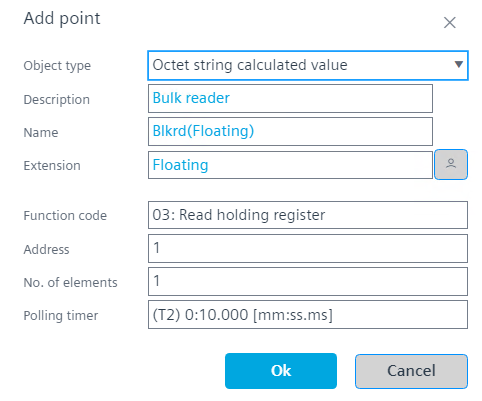
Function code and data type definition - Click OK.
- The bulk reader object is created.
Check bulk reader assignment

A bulk reader object is not considered in limit counting for Modbus data points. It is counted towards the total limit of BACnet objects.
- You have created at least one bulk reader object.
- Right-click a bulk reader object and select Show objects from bulk read.
- Applies the Assign bulk filter for the selected bulk reader object.
- Shows all objects for which the bulk reader was created.