Universal control function (UCtlFnct11 / UCtlFnct12)
Overview
The application function "Universal control function, PID controller, binary output (BO), analog output (AO)" (UCtlFnct11/12) is a generic function designed for flexible customization. It can be configured to handle miscellaneous automation tasks.
UCtlFnct11 and UCtlFnct12 are identical in function. Each can be configured / customized to handle a unique automation task.
Main features:
- Loop object with multiple control input
- Configurable evaluation parameters for the control input
- Automatic enable/disable function with priority 15
- Protection enable/disable function with priority 5
- Triac control for auxiliary output functions
- AO and/or BO command output(s)
- Configurable switch-on, switch-off points for converting loop output to binary signal
- Configurable delay options
Function
Inputs and outputs derive from the optional assignment of BACnet objects to collection objects. Each I/O arrangement depends on a customized configuration of the universal control function.
Inputs:
- Control input: XctrCol (Collection of input to the PID controller).
- Binary input: AutoDetCol (Collection of automatic detector). Automatic control priority 15.
- Binary input: PrtDetCol (Collection of equipment protection detector). Priority 5.
- Binary input: LgtBtnCol (Activate a triac for auxiliary output functions, not for lighting control). Priority 13.
Outputs:
- Control Output: YctrCol (Collection of controller output).
- Binary Output: SwiCmdCol (Collection of switch command).
Process value objects:
- EnFnct (BPrcVal)
- Sp (APrcVal)
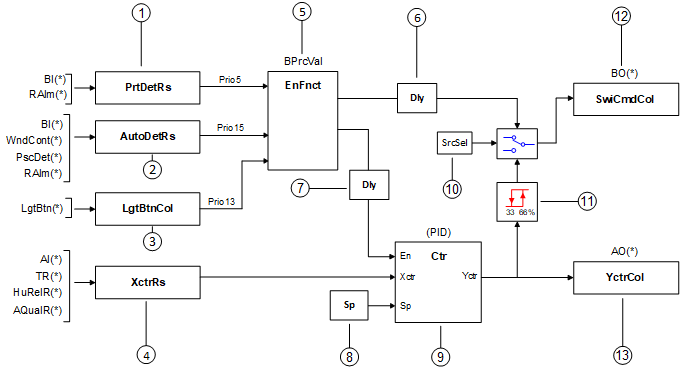
The value of Enable function (EnFnct) enables/disables the binary output. The various inputs enable/disable EnFnct at priority 15 (auto detect), priority 13 (LgtBtnCol), or priority 5 (protection detect) respectively. See figure.
EnFnct is also used to enable/disable the control loop. When enabled, the control loop modulates controller output (YctrCol) to maintain controller input (XctrCol) at setpoint. The setpoint for the control loop is a process value object that can be set by commands from another device.
Legend
The legend describes general functionality. See Configuration for additional details.
1 | PrtDetRs | BACnet object that represents the calculated result of binary input(s) used for equipment protection (Prio 5). Spare binary inputs BI(*) can be assigned to the collection object (PrtDetCol). In CET applications, the Room alarm object (RAlm, Alarm from room) can also be assigned. |
2 | AutoDetRs | BACnet object that represents the calculated result of binary input(s) used for auto detect (Prio 15). Window contacts (WndCont), presence detectors (PscDet) and spare binary inputs BI(*) can be assigned to the collection object (AutoDetCol). In CET applications, the Room alarm object (RAlm, Alarm from room) can also be assigned. |
3 | LgtBtnCol | Allows a PL-Link wall switch to be used to control a triac for auxiliary output functions. Since universal control function runs at lower priority within the DXR, do not use this triac output feature for functions requiring guaranteed response time below 300ms (e.g. Room lighting and shading control; response time can be approximately one second depending on internal processes at runtime.) |
4 | XctrRs | BACnet object that represents the calculated result of analog input(s) used in the universal control function. Supported inputs (includes KNX PL-Link): |
5 | EnFnct | BACnet object that uses the evaluated result of binary input(s) to enable/disable a control function. |
6 | DlySwiCmd | Configurable delay parameter, default 60 seconds. |
7 | DlyEnCtr | Configurable delay parameter, default 60 seconds. |
8 | Sp | Configurable setpoint for the loop object. |
9 | Ctr | The loop object. |
10 | SrcSelSwiCmd | The source selection parameter that selects either EnFnct signal or PID controller signal to send to the SwiCmdCol (switch command collection) object. |
11 | SwiOnPt | The PID controller signal is converted from analog to binary value using configurable switch-on, switch-off points. (default 66% switch-on, 33% switch-off) |
12 | SwiCmdCol | The binary output value. Only spare binary output(s) BO(*) can be assigned to the collection object. |
13 | YctrCol | The analog output value. Only spare analog output(s) AO(*) can be assigned to the collection object. |

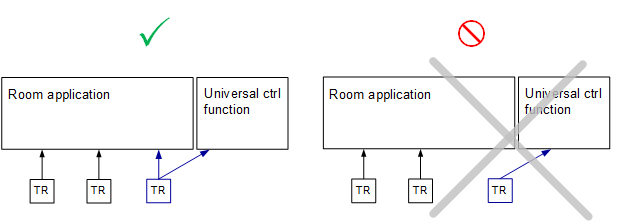
TR, HuRelR, and AQualR Inputs Are Always Part of Room Calculation
These inputs, when used in the universal control function, are always linked with the room calculation. See graphic.
(TR inputs shown but also applies to HuRelR and AQualR)
Example use cases
Example 1: Damper end switch triggers the EnFnct to No/Yes. EnFnct activates the BO that enables the fan. After a 30 second time delay, PID loop will be enabled and will start controlling fan speed to maintain a pressure setpoint. (Delay time is configurable, default is 60 seconds.)
Example 2: Turning on/off the PID loop based on time schedule to control the bathroom temperature with a radiator.
Configuration
 Parameters
Description | Parameter | Default value |
|---|---|---|
Delay for switching command | DlySwiCmd | 60 [s] |
Delay for enable controller | DlyEnCtr | 60 [s] |
Source selection for switching command 0:Enable function | SrcSelSwiCmd | 1:Controller |
Controller action 0:Direct | CtrActg | 0:Direct |
Controller input evaluation 1:Sum | XctrEvl | 2:Average |
Automatic detector evaluation 1:AND | AutoDetEvl | 2:OR |
Protection detector evaluation Enumeration see Automatic detector evaluation | PrtDetEvl | 2:OR |
Protection mode configuration 0:Off | PrtModCnf | 0:Off |
Switch-on point | SwiOnPt | 66 [%] |
Switch-off point | SwiOffPt | 33 [%] |
Interface
Interface | Description | Type | Ref. | Owned by | |
|---|---|---|---|---|---|
YctrCol | Collection of controller output | ColView | ● | - | |
| YctrRs | Result of controller output | ACalcVal | ● | - |
XctrCol | Collection of controller input | ColView | ● | - | |
| XctrRs | Result of controller input | ACalcVal | ● | - |
Sp | Setpoint | APrcVal | ● | - | |
EnFnct | Enable function 0:No | BPrcVal | ● | - | |
Ctr | Controller | Controller | ● | - | |
SwiCmdCol | Collection of switching command | ColView | ● | - | |
| SwiCmdRs | Result of switching command
| BCalcVal | ● | - |
AutoDetCol | Collection of automatic detector | ColView | ● | - | |
| AutoDetRs | Result of automatic detector 0:Off | BCalcVal | ● | - |
PrtDetCol | Collection of protection detector | ColView | ● | - | |
| PrtDetRs | Result of protection detector 0:Off | BCalcVal | ● | - |
LgtBtnCol | Collection of lighting pushbutton | ColView | ● | - | |
| LgtBtn | Lighting pushbutton 0:Off | LgtIn | ● | - |
Engineering and commissioning
Expert use (CFC programming):
- UCtlFnct11/12 used as basic structure for custom programming.
- Connect BACnet objects to the universal control function AF inputs to "add features" to the application (not just unrelated automation functions). The user re-addresses the input XFB(s) in the universal control function so they read temperatures, flows or other values from the application.
- Drive BACnet objects in the existing application. To do this successfully, the user must pay attention to the priority of the pre-programmed commands and those added to the same objects.