Humidifier (Hum11)
Overview
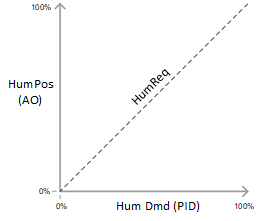
The application function "Humidifier 11" (Hum11) modulates a humidifier that adds moisture to a supply air stream to maintain the humidity level in the room at setpoint. The analog output (HumPos) commands a valve or is sent to a packaged humidifier.
Main features:
- Analog output control of valve or packaged humidifier
- Binary output enable/disable (optional)
- Equipment status input
- Equipment safety input
- Shut-off for high duct humidity
- Humidifier operation status
- Humidifier interlocks
Humidification – Issues of concern
Condensation from humidified air can manifest in unexpected places. Moisture migrates through the building and can find its way into external walls and between layers of construction materials. Condensation hidden inside walls can be a disaster.
Issues of concern include:
- Water spray where it is not needed (for example, water collection inside duct)
- Water spray when it is not needed (for example, seasonal high humidity)
- Ineffective high limit control, duct air
- Bends and changes in the duct; obstructions in the duct
- Ineffective temperature control (too cold air causes condensation)
 CAUTION

Humidification Hazards
Humidification in building control introduces risk of material property damage and unsafe conditions. Personnel without the background or responsibility for managing humidification must adhere to the following:
- DO NOT select room humidity setpoints.
- DO NOT select which modes enable and disable humidification.
- DO NOT pick the method for high limit control in the duct.
- DO NOT choose not to apply high limit control – send RFI if it is not in the spec.
- DO NOT alter dispersion tube Location or Pitch. If instructions are unclear contact the Humidifier Representative.
- DO NOT jumper anything in the package unit without written authorization from Humidifier Representative.
- DO NOT leave the Humidity system energized and untested.
- DO NOT energize Humidifier before the device has been commissioned.
- On all of these points, follow the spec. If the spec does not specify, then you must send an RFI.
Function
Basic function: Pass the request signal (typically from a room humidity controller) through a device mode switch and on to the output object.
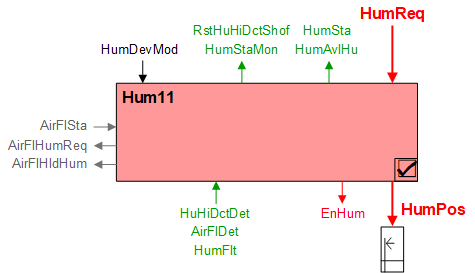
| Command or request (or related) |
| Notification of condition or status, or availability |
| Device mode |
| Interlock (internal signal, not a BACnet object; see Interlocks section for additional information) |


Device mode: The input signal for device mode is a multistate value.
HumDevMod supports the following states:
- Off
- Control mode
The DXR automatically selects "Control mode" unless Plant mode = Off, in which case HumDevMode is also Off. Humidifier function is specified in more detail in the room level humidification control AF where humidification can be configured separately for each room operating mode (see HumCtlxx).
HumDevMode may be overridden via central command to enable/disable humidification (for example, seasonal adjustment).
NOTICE

Do not override Device mode to Fully open
Device mode multistate object HumDevMod includes enumeration for "Fully open".
Humidification function is disabled / set to Off if HumDevMod is set to Fully open.
- The Device mode selection for "Fully open" should not be used.
- Do not override Device mode object to Fully open.
Interlocks
Room automation interlocks are internal signals that coordinate interaction between HVAC devices. They are not visible in ABT Site or web interface, but parameters associated with them are. See comment column for hints on parameters that affect interlock functionality.
Signal | Type | Dir. | Description | Comment |
|---|---|---|---|---|
AirFlSta | Boolean | In | Air flow status | The default setting for the enable parameter for air flow monitoring (EnMonAirFlSta) is Yes. |
AirFlHumReq | Boolean | Out | Air flow request for humidifier | Configurable for DlyOn time and for Switch-on, Switch-off levels. |
AirFlHldHum | Boolean | Out | Air flow hold for humidifier | Configurable for DlyOff time and for Switch-on, Switch-off levels. |
Available signal
The "Available" signal binary object (HumAvlHu) indicates whether or not humidifying equipment is available to be used. It is set false when HumDevMod is Off or when the humidifier is shut down by a high humidity input or by an equipment fault input (otherwise HumAvlHu is true). When HumAvlHu is false, the room humidification PID controller is disabled to prevent integral accumulation.
Safety inputs
- HuHiDctDet – High duct humidity detector (BI)
- AirFlDet – Air flow detector (BI)
- HumFlt – Humidifier fault (BI)
The interlock chart pin for air flow status (AirFlSta) can be used by setting EnMonAirFlSta = Yes (default), but it is allowed to be ignored (EnMonAirFlSta = No) because the hardwire input (AirFlDet) can be used and is considered more definitive. If both are used, then both must report airflow proof for the humidifier to function.
If a hardwire high humidity input signal is active (HuHiDctDet = Alarm), then humidifier operation is stopped. The signal can be configured to be either latching or non-latching.
If the signal is configured for latching, the humidifier state (HuSta) will remain in high humidity even after the signal is no longer active. In this case, the reset object "Reset high duct humidity shutoff" must be manually reset to "Ready" before humidifier operation can resume. If the signal is configured for non-latching, then humidifier operation resumes immediately after the hardwire signal is no longer active.
To configure the signal for latching, set Boolean parameter RstHuHiDctShof to Manual. For non-latching, set it to Auto.
NOTICE
High duct humidity shutoff
Confirm desired operation for latched or non-latching operation in spec or RFI.
- Latched operation (Manual reset)
- Non-latching operation (Auto reset)
Humidifier operating status (HuSta)
A multi-state calculated value object that informs users (building operators, BAS technicians, commissioning agents) of the humidifier’s operating state, and what is causing it.
HuSta (Humidifier state) | Description | |
|---|---|---|
1 | Normal | Default state when no other state is enabled. |
2 | Off | Occurs when device mode is Off. |
3 | High duct humidity | Occurs when high duct humidity switch is detected via hardwire input. Optional if duct humidity sensor exists. State should latch until manual reset (configurable). Occurs when duct humidity sensor exceeds configurable high duct humidity value. State should latch until manual reset (configurable). |
4 | No air volume flow | Occurs when no airflow is detected via hardwire input (Recommended). Occurs when internal signal AirFlSta reports no airflow proof (Secondary, can be disabled via configuration). |
5 | General fault | Occurs when a general fault is detected via hardwire input. |
Configuration
 Parameters
Description | Parameter | Default value |
|---|---|---|
Switch-on point for air volume flow hold humidification | SwiOnAflHldHum | 4 [%] |
Hysteresis for air volume flow hold humidification | HysAirFlHldHum | 2 [%] |
Switch-off delay for hold for air flow humidification | DlyOfAflHldHum | 30 [s] |
Switch-on point for air volume flow humidification request | SwiOnAflHumReq | 4 [%] |
Hysteresis for air volume flow humidification request | HysAirFlHumReq | 2 [%] |
Switch-on delay for air volume flow humidification request | DlyOnAflHumReq | 30 [s] |
Enable monitoring for air volume flow state 0:No | EnMonAirFlSta | 1:Yes |
Reset high duct humidity shutoff 0:Auto (non-latching configuration, auto reset) | RstHuHiDctShof | 1:Manual |
Interface
Interface | Description | Type | Ref. | Owned by |
|---|---|---|---|---|
HumPos | Humidifier position | AO | ◉ | Room segment / Device |
EnHum | Enable humidifier 0:Off | BO | ◉ | Room segment / Device |
HumSta | Humidifier state 1:Normal | ACalcVal | ● | - |
HumStaMon | Humidifier monitoring state | EvtEnr | ● | - |
RstHuHiDctShof | Reset high duct humidity shutoff 1:Ready | MTrgVal | ● | - |
HumDevMod | Humidifier device mode 1:Off | MPrcVal | ● | - |
HumReq | Humidification request | ACalcVal | ● | - |
HumAvlHu | Humidifier available for humidification 0:No | BCalcVal | ● | - |
HuHiDctDet | High duct humidity detector 0:Normal | BI | ◉ | Room segment / Device |
AirFlDet | Air flow detector 0:Inactive | BI | ◉ | Room segment / Device |
HumFlt | Humidifier fault 0:Normal | BI | ◉ | Room segment / Device |
Engineering and commissioning
See Caution notes above.
Hardwired airflow proof is recommended.
Hardwired high duct humidity switch is recommended.
The event enrollment object monitoring the humidifier state uses notification class 8 as default. It is recommended that the notification class be configured for specific alarming requirements.
The humidifier state object is meant for troubleshooting and diagnostics of the humidifier operation. It is recommended to be placed on the graphics.
Troubleshooting tip: If you do not know why the humidifier is off when it should be on, check the value of device mode (HumDevMod) and see Device mode section above.