Unlocking from Pack & Go
After creating a Pack & Go file the building hierarchy, the device and the corresponding appplication template are locked in the original project. The original project is the project from where the Pack & Go file was created.
Restriction on locked devices and templates (inside original project)
- The template configuration cannot be changed
- Instance parameters cannot be changed
- Instance properties (naming, BACnet IP / BACnet MS/TP etc.) cannot be changed
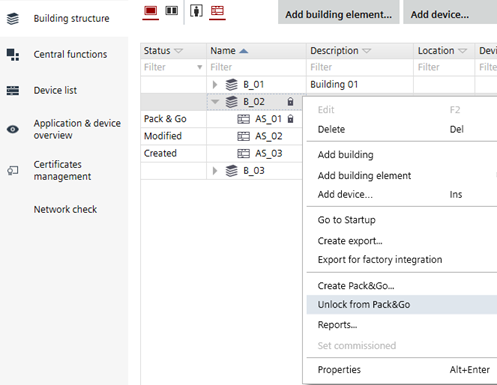
Unlock from Pack & Go
- At least one device is part of a Pack and Go package. The status field of the device is Pack & Go.
- Select a locked device or a locked building hierarchy or a locked template.
- Right-click and select Unlock from Pack & Go.
- Click OK.
- The device is unlocked.
- The status field of the device is set from Pack & Go to Modified.
- All other not selected devices that are part of the locked template are also unlocked.
- The building hierarchy is unlocked if no other devices in that building hierarchy are locked, otherwise the building hierarchy remains locked.