Trend logging
Trend data provides important information about the processes in a building automation and control system. Example:
- Monitoring control for optimization
- Recording the room temperature relating to the entered setpoint
- Recording the temperature and humidity for the demanding requirements of the Pharma business
The present values of different BACnet object types can be trended.
Trending is set on the applicable BACnet object. The function is enabled with 'Enable trend' = 'Yes'. An additional object is instantiated that controls actual trending and the required BACnet properties for this object are displayed.
The BACnet objects and their properties can be edited in ABT Site.
This type of trending is offline. The values are written to the buffer and periodically retrieved, for example, by Desigo CC.
Functioning and the most important trend settings
The BACnet properties available to the applicable TRENDLOG object are listed on the object types (e.g. AI, AO, BI, BO, MI, MO, value objects).
Enable Trend
'Enable trend' ('Yes'/'No') enables or disables the trend function and shows the required BACnet properties.
Enable trending
'Enable trending' allows a trend to start.
Start and stop trending
Enabled trending starts at the set 'Start time' and ends at the set 'Stop time'. These times are inactive by default (i.e. wildcards).
Logging type
The 'Logging type' determines whether the values are saved cyclically or for a change of value (COV).
The setting 'Logging type' = 'Polling' logs the value of the object continuously at the interval set in 'Logging interval'.
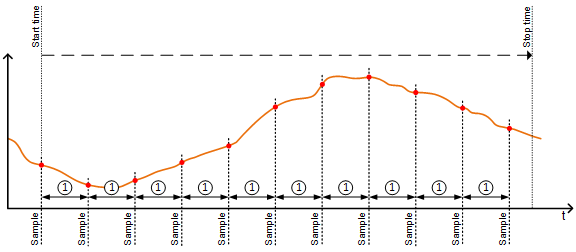
① 'Logging interval'
The setting 'Logging type' = 'COV' (change of value) logs the new value for each change to the present value. The logging occurs as soon as the last logged value is greater than the 'Change of value, COV'.
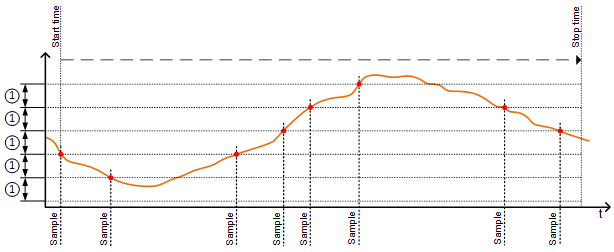
① 'Change of value, COV' (required deviation for logging)
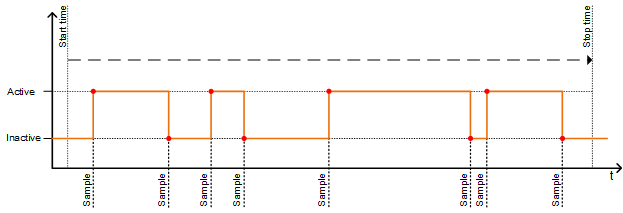
The setting 'Logging type' = 'COV' is often used to log the change of state of binary signals or multistate signals.
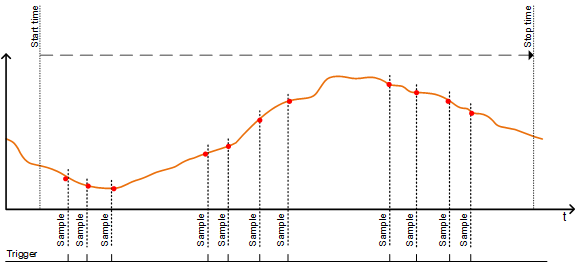
If you set 'Logging type' = 'Triggered', the TrendLog object logs a trended property when a trigger occurs. After logging is completed it automatically resets the value of the trigger property to FALSE, and waits for another event to begin the trend log data logging process. With this setting you can ensure accurate and controlled data collection based on the defined triggers.
Buffer memory
The values are written to the buffer memory. The 'Buffer size' determines how many values can be saved to buffer memory. The setting 'Stop if full' determines how to proceed if the buffer is full.
The setting 'Stop if full' = 'Yes':
Trending stops as soon as the buffer memory is full.
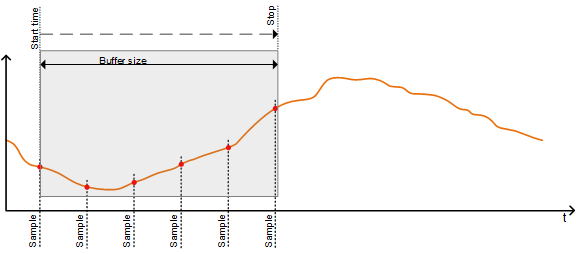
The setting 'Stop if full' = 'No':
Continues with a full buffer. The oldest values are overwritten by the newest values (FIFO).
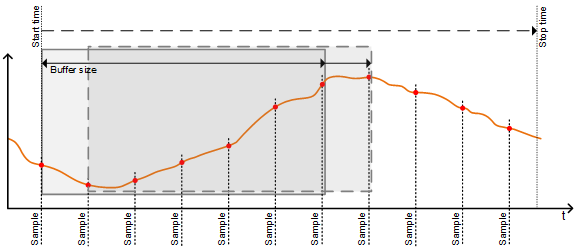
The setting 'Notification threshold' can be used, for example, by Desigo CC to notify that the buffer is nearly full and data points need to be retrieved.
Example for determining the buffer size:
The 'Buffer size' must be set to ensure that there is sufficient memory to temporarily store the trend data, for example, over the weekend that is caused by a fault to automatic polling of data by Desigo CC. In other words, for a trend duration of e.g. 72 [h].
At cyclically polling of a value every 5 [min], 864 values must be saved.
Determine intervals
The setting 'Align interval' determines whether the periodic polling interval is aligned at the start of a specific second, minute, hour, or day. The setting has no effect for 'Logging Type' = 'COV'.
This ensures that values from multiple, simultaneous trend logs can be saved at the same time and compared.
Alignment is only possible for whole number multiples (1…x) of a second, minute, hour, or day.
Interval offset
The setting 'Interval offset', measured in hundredths of a second, permits cyclical trend logs to be spread out.
With lots of active trend logs, this prevents a situation where all values are polled at the same time. The polling can be subdivided by staging in groups.
'Interval offset' is only active if the setting 'Align interval' = 'Yes'.
Notification threshold
The notification threshold determines when the buffer sends a request to retrieve data.
As soon as the set number of data entries is reached, an event notification is sent for the management station to retrieve the data. Data points are deleted from the buffer after retrieval.
Trend limitations
The maximum number of values saved temporarily per device and the sum total of the entered variables of all buffer memory is limited.