Modifying
You can modify ABT Site and ABT Pro libraries or features that are installed on your machine. Use the modify option when you already have ABT or some of its libraries installed on your machine and you want to modify them or install new ones according to your requirements. Complete the following steps to modify the tools:
- Extract the ABT setup package by using ABT_Installer.exe.
- In the ABT Installer’s Welcome dialog box, select the ABT Installer setup language and click Next.
Note: The language you select here is for ABT Installer only and not the ABT Pro or Site product language. - Select Modify to modify the installed features and click Next.
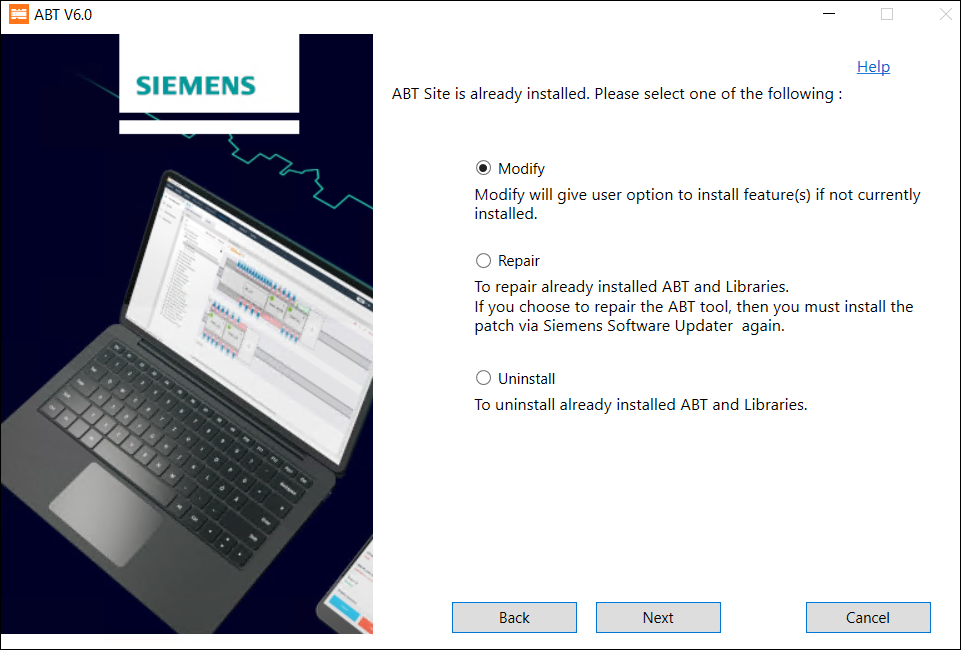
- Select the libraries you want to modify and click Next.
Note: If you have installed only ABT Site then you can see only ABT Site libraries to modify If the setup does not contain any libraries that must be modified, the selection check box and Next button is disabled. - Verify that your machine has enough space in its hard drive to modify the existing libraries or install new libraries and click Next.
- Verify the libraries that you selected for modification before clicking Modify.
- Select Restart Now and click Restart to restart your machine. You must restart your machine after you modify the tool.
- You have successfully modified the installed features.