Changing the device type (network or size)
You can change the network communication type from IP to MS/TP and vice versa by changing the device type without reengineering (PXC4..). You can also upscale devices to variants with more features (PXC4..,PXG3.., and PXC7).

The PXC4 supports the old and the new device types from SVS400.10 onwards:
- PXC4.E16 > PXC4.E16-2
- PXC4.E16S > PXC4.E16S-2
- PXC4.M16 > PXC4.M16-2
- PXC4.M16S > PXC4.M16S-2
It is recommended to use the types PXC4.E16-2 or PXC4.E16S-2 for the BACnet/SC network.
The following conversions are supported:
Upscale device size from PXC4..16S
- PXC4.E16S -> PXC4.E16 / PXC4.M16S / PXC7.400S / PXC7.400M /PXC7.400L
- PXC4.M16S -> PXC4.M16 / PXC4.E16S / PXC7.400S / PXC7.400M /PXC7.400L
- PXC7.400S -> PXC7.400M /PXC7.400L
Upscale device variant of PXG3.W..
- PXG3.W100-1 -> PXG3.W100-2 or PXG3.W200-2
- PXG3.W200-1 -> PXG3.W200-2
- PXG3.W100-2 -> PXG3.W200-2
Upscale device variant of PXM30/40/50.E / -1
- PXM30.E -> PXM40.E or PXM50.E
- PXM40.E -> PXM50.E
- PXM30-1-> PXM40-1 or PXM50-1
- PXM40-1 -> PXM50-1
Downscale device
You can also downscale devices to variants with less features. The following conversions are supported:
- PXC7.E400L -> PXC7.E400M / PXC7.E400S / PXC5.E24 / PXC5.E003 / PXC4.x16 / PXC4.x16S
- PXC7.E400M -> PXC7.E400S / PXC5.E24 / PXC5.E003 / PXC4.x16 / PXC4.x16S
- PXC7.E400S -> PXC5.E24 / PXC5.E003 / PXC4.x16 / PXC4.x16S
- PXC5.E24 -> PXC5.E003 / PXC4.x16 / PXC4.x16S
- PXC5.E003 -> PXC7xx / PXC5.E24 / PXC4.x16 / PXC4.x16S
- PXC4.x16 -> PXC5.E003 / PXC4.x16S
- PXC4.x16S -> PXC5.E003
To see all supported upscale/downscale conversion, upgrade the device to the latest available version.
PXG.3.W.. and PXM… device type version must be 2.0 or higher. Devices with version 1.x have to be upgraded to a higher version first.
Check for updates before changing the controller type.
Updating application templates and graphics libraries
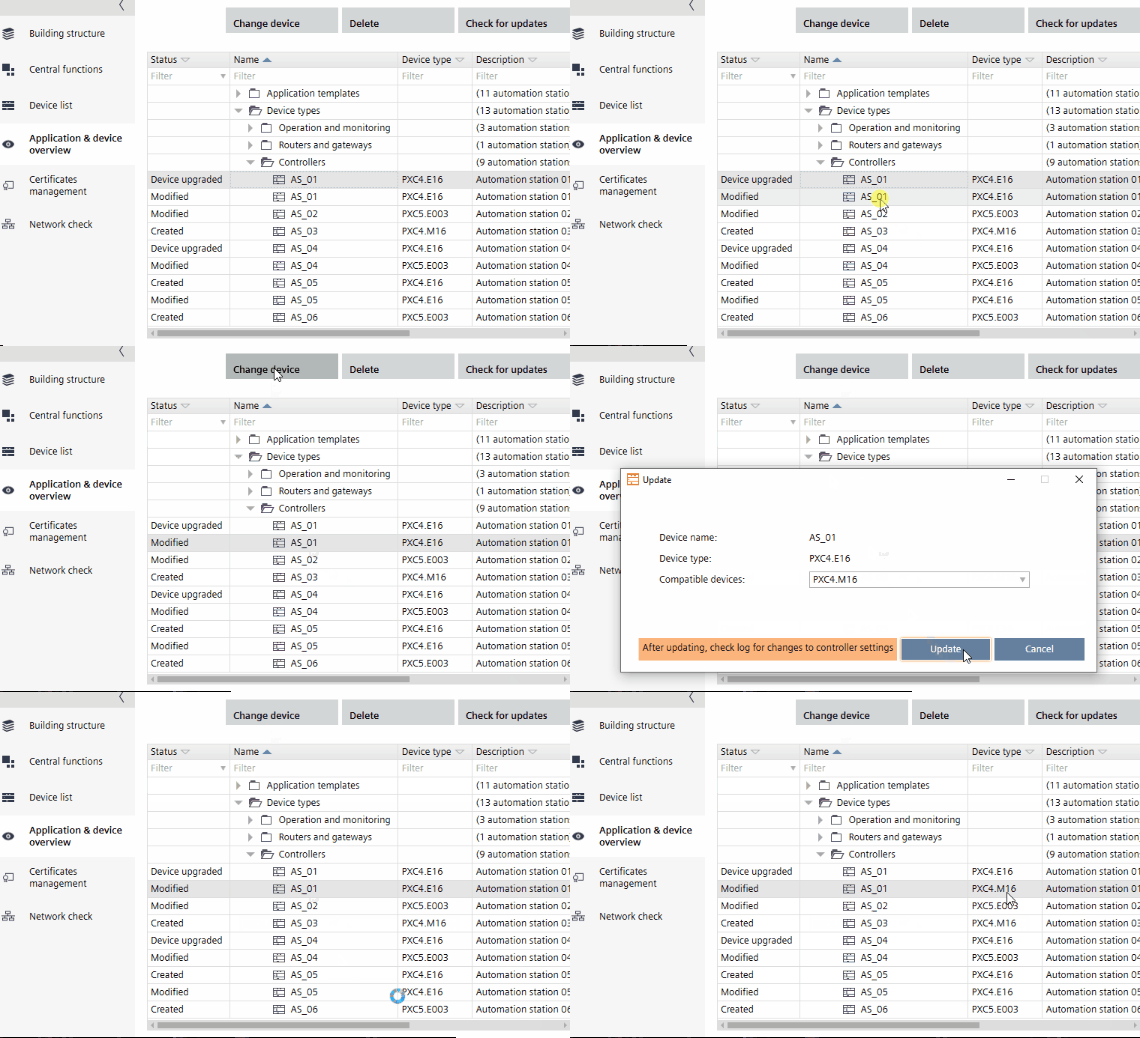
There are three main use cases for this feature:
- The planned communication type turns out to be too slow (change to IP) or too costly (change to MS/TP).
- The program simulation feature is only available for IP device types. By switching the network communication types, you are able to use the program simulation also for MS/TP devices.
- It turns out that more I/Os are required and you need to upscale to a bigger device type, which supports more I/Os (upscale to PXC4..16).
- PXC4.M.. does not support Modbus TCP. If you use Modbus TCP on a PXC4.E.. device, you cannot change the network communication type from IP to MS/TP.
- This is also valid for all other cases where features are no longer available on the new hardware variant.
- There is at least one engineered device.
- Device type version must be 1.1 or higher.
- Go to Building.
- Open the Application & device overview task.
- Select a device.
- Click Change device.
- The Change device dialog box opens.
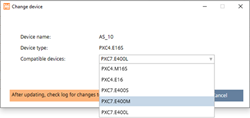
- From the Compatible devices drop-down list, select the new device type.
- Click Change.
- The device type is changed.