Engineering of room segment lighting AF Lgt11
Design overview
Standard delivery
For Human-Centric Lighting (HCL), a specific room feature (LgtHcLgt11) is available in the ABT Pro library, serving as infrastructure to optimize the implementation workflow.
LgtHcLgt11 is a basic application function that serves the HCL grouping communication from the central application type CenFnct11 and preprocesses the information for the HCL functionality in the room.
LgtHcLgt11
Principle
By using LgtHcLgt11 and extending the existing lighting basic application functions, the application engineers can more easily program his project specific HCL functionality for the room. The setup is modular, so the different features can be combined according to project needs and use cases:
- LgtHcLgt11: Main function for HCL. (Always needed)
- LocManOp11: Activating HCL via push button. (Works in combination with the control application functions. If LocManOp11 only is used with HCL, with no control application functions, set parameter EnExtSwiOnVal to Yes.)
- LgtPscMod11: Activating HCL via presence detector. (Works in combination with the control application functions.)
- LgtBrgtSwi11: Activating HCL via brightness.
- LgtConstCtl11: Constant lighting control with HCL.

Lighting device must in addition to the maintenance factor, also support and consider the brightness adjustment controlled by HCL.
Example: Target brightness 500lx
Maintenance factor 0.5, brightness adjustment 200% – The lighting device must support 2000lx if 500lx target brightness + 500lx for HCL are guaranteed for the whole life cycle.
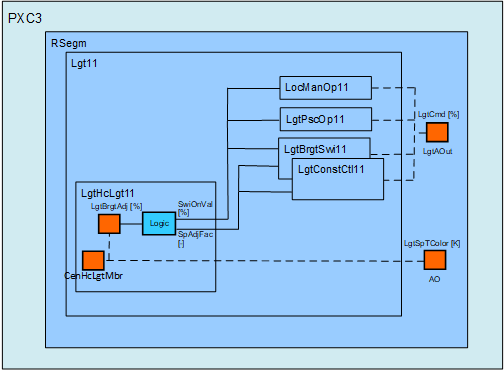
The HCL color temperature is calculated by the superior automation station and directly commanded to the output object LgtSpTColor.
Implementation workflow
Boundary condition
For HCL, an automation station PXC3.E..A-2 is required. The standard application types are designed for an automation station DXR2. These standard application types serve as a basis to adapt and implement HCL functionality on PXC3.E..A-2.
Recommended implementation workflow
If HCL is combined with HVAC functionality, then we recommend starting out with the application type that best fits the HVAC functionality (FCU, VAV, FPB or HP).
Apptype > Configure the HVAC and lighting functionality > Shrink
This is the base for the implementation of the HCL functionality.
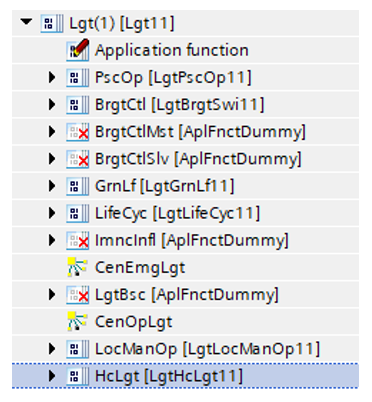
Next, the BAF LgtHcLgt11 must be added to the "Lighting 11" (Lgt11) AF. This is the base for the use case specific implementations described below.
Use case: HCL with local manual operation (LgtLocManOp11)
Principle
Combine HCL with the local manual operation only. HCL is activated by the lighting push button.
- Switch-on: The brightness and the color temperature are updated continuously according to HCL.
- Switch-off: The lighting is switched off.
- Any other command:1) Only the color temperature is updated. The update is done according to HCL.
1) Lighting commands: Stop, Dimming up, Dimming down, Step up, Step down, Go to level, No action, User defined 1...3.
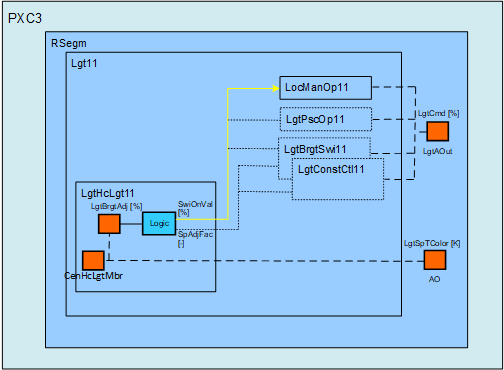
The HCL color temperature is calculated by the superior automation station and directly commanded to the output object LgtSpTColor.
Main updates
The following programming updates must be implemented.
AF LgtLocManOp11:
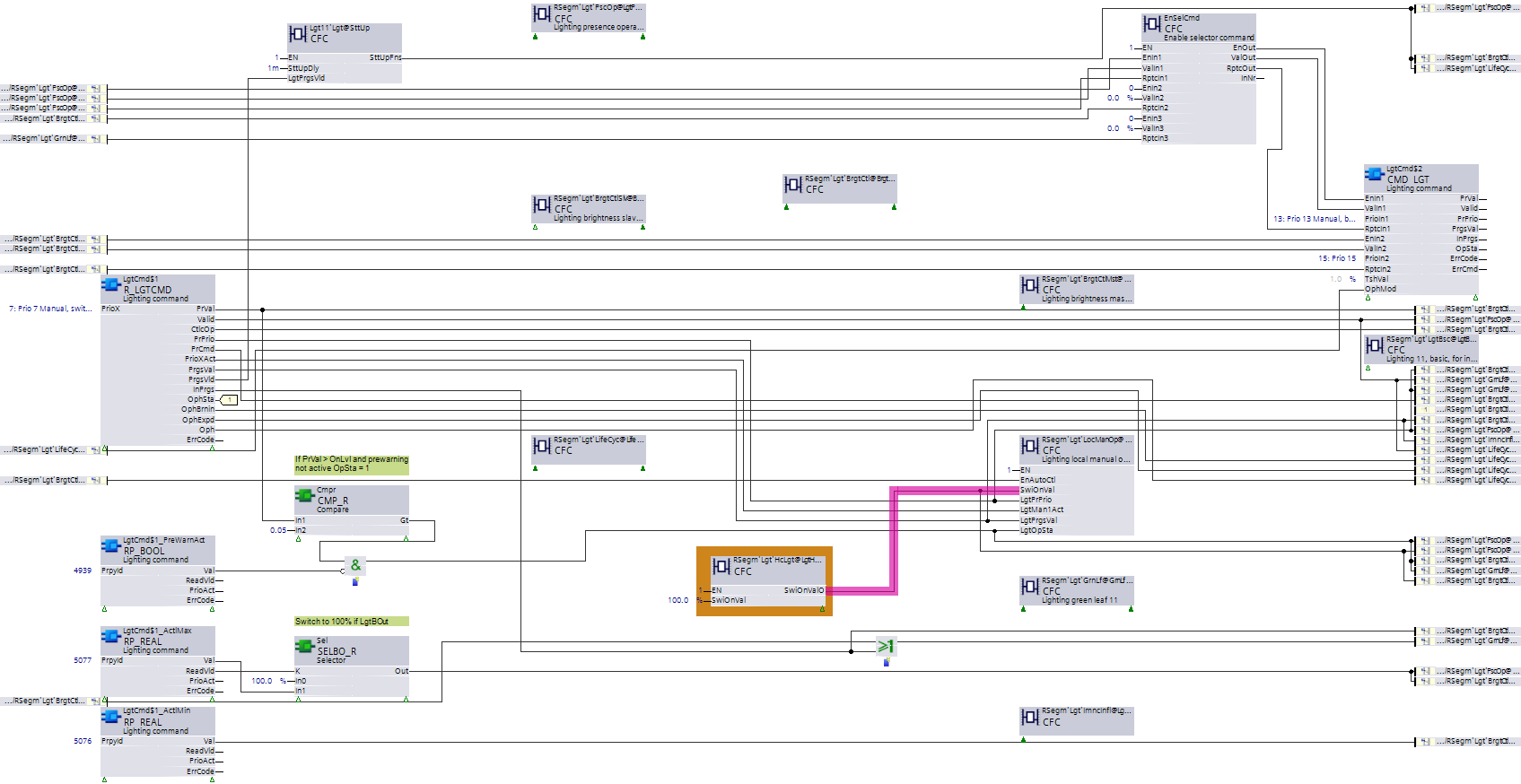
- Set parameter EnExtSwiOnVal to Yes.
Chart Lgt11:
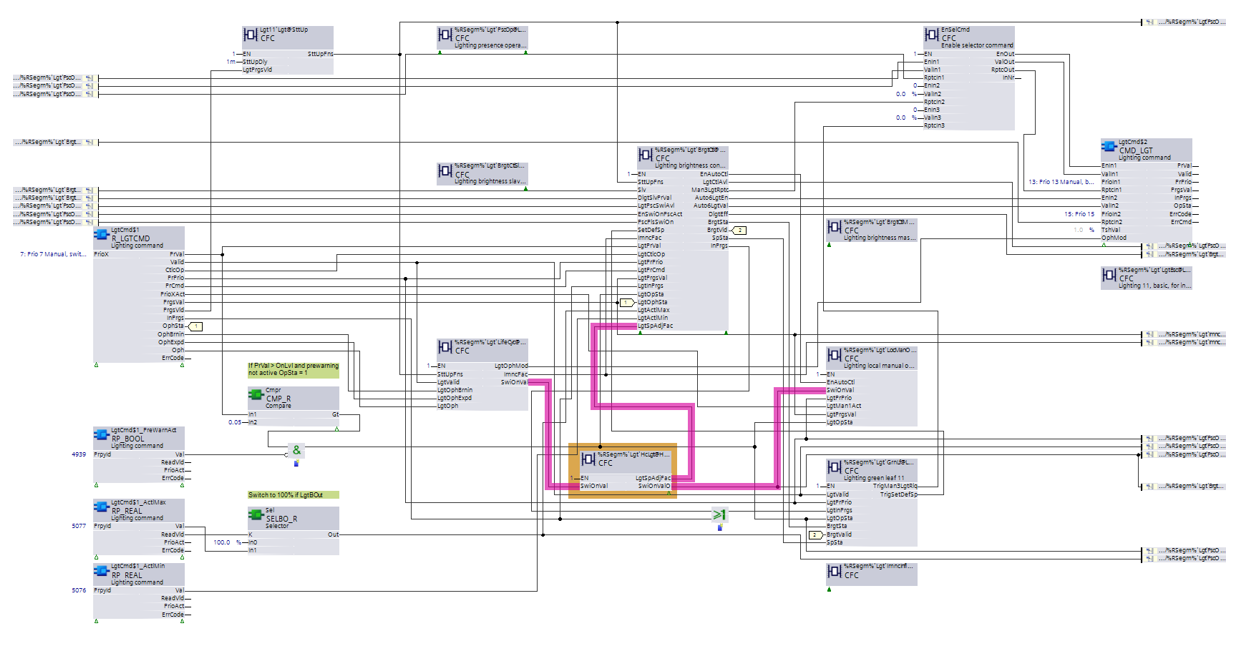
- Adapt the wiring for the switch-on value as highlighted in the figure below.
See the wiring examples below if the lighting life cycle functionality is also needed.
Use case: HCL with lighting presence operation (LgtPscOp11)
Principle
Combine HCL with the presence operation only. HCL is activated by the presence detector.
- Present: The brightness and the color temperature are updated continuously according to HCL.
- Absent: The lighting is switched off.
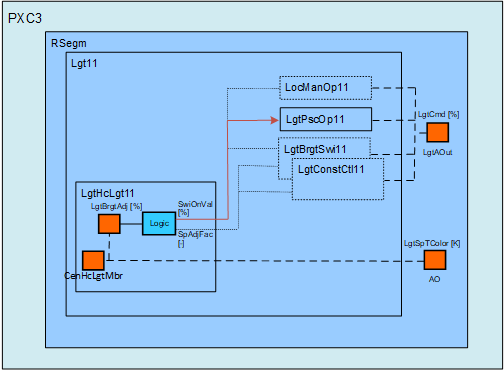
The HCL color temperature is calculated by the superior automation station and directly commanded to the output object LgtSpTColor.
Main updates
The following programming updates must be implemented.
Chart LgtPscOp11:
- No adaptions.
Chart Lgt11:
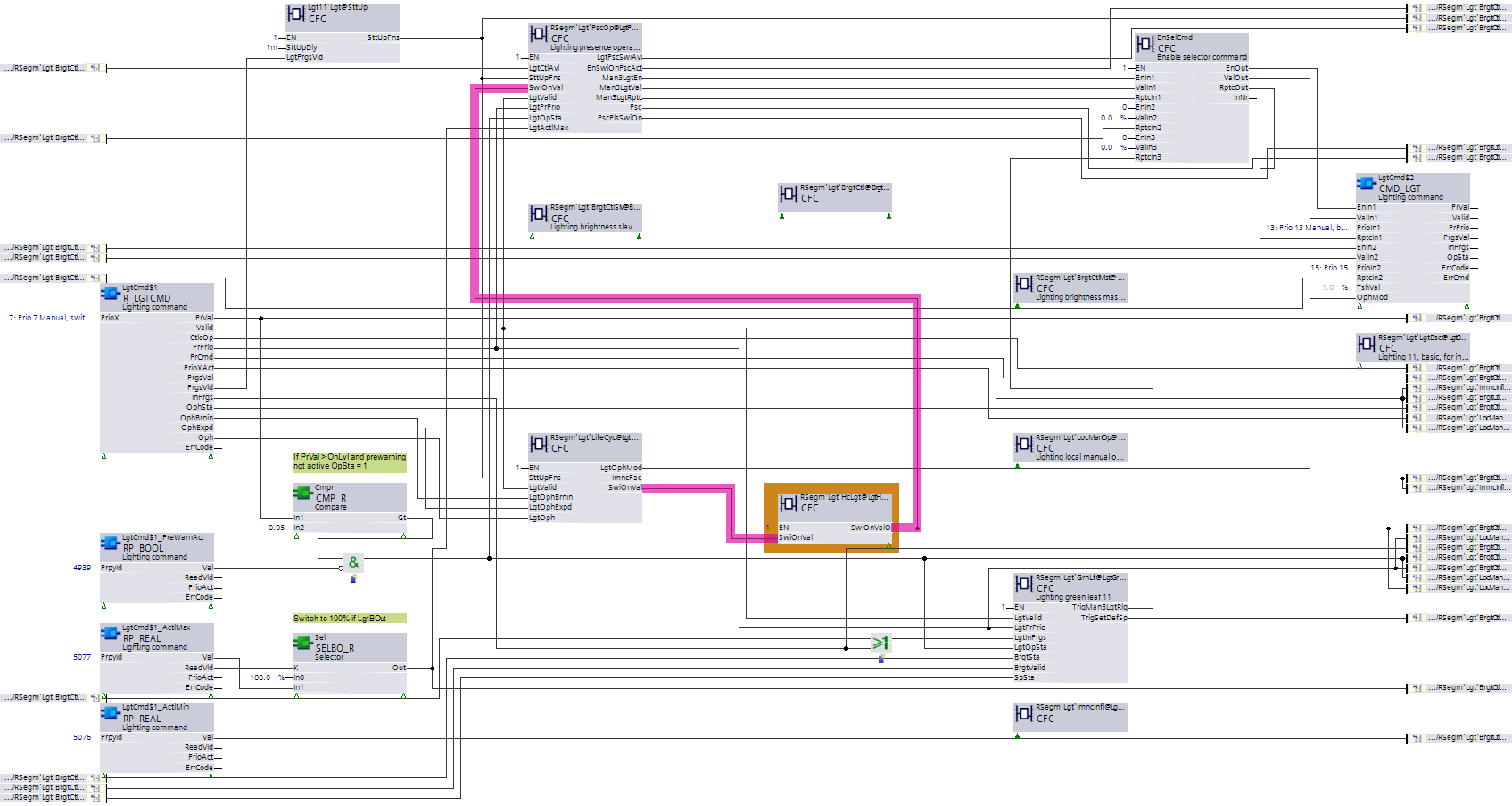
- Adapt the wiring for the switch-on value as highlighted in the figure below.
- Additional chart functionality: The switch-on value is shifted according to HCL.
Lighting brightness adjustment [%] | Switch-on value output [%] |
|---|---|
100 | 50 1) |
10-200 | 5-100 1) |
1) The lighting output can only be commanded at 100%. Note that a brightness adjustment of 100% is scaled to a switch-on value output of 50%. This ratio, in conjunction with the HCL range of 10 to 200%, provides a common configuration pattern on the PX schedulers for all HCL use cases.
Use case: HCL with brightness switch (BrgtSwi11)
Principle
Combine HCL with a brightness switch function. HCL is activated by the brightness sensor. The lighting switch-on point is shifted according to HCL.
- Dark: The brightness and the color temperature are updated continuously according to HCL.
- Bright: The lighting is switched off.
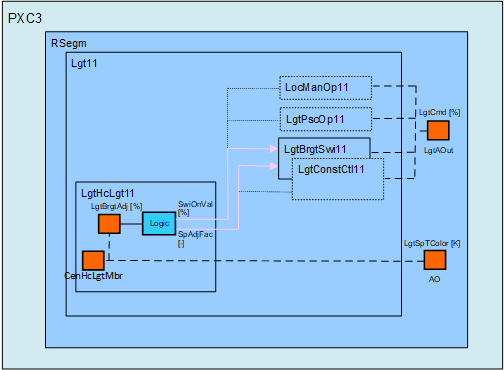
The HCL color temperature is calculated by the superior automation station and directly commanded to the output object LgtSpTColor.
Chart LgtBrgtSwi11:
- Additional chart interface: Pin [LgtSpAdjFac]
- Additional chart functionality: The lighting switch-on point and the switch-on value are shifted according to HCL.
Lighting brightness adjustment [%] | Lighting setpoint adjustment factor | Switch-on value output [%] |
|---|---|---|
100 | 1 | 50 1) |
10-200 | 0.1-2 | 5-100 1) |
1) The lighting output can only be commanded at 100%. Note that a brightness adjustment of 100% is scaled to a switch-on value output of 50%. This ratio, in conjunction with the HCL range of 10 to 200%, provides a common configuration pattern on the PX schedulers for all HCL use cases.
Examples: Lighting switch-on point 500lx
Lighting brightness adjustment [%] | Lighting present switch-on point [lx] | Switch-on value [%] |
|---|---|---|
50 | 250 | 25 |
100 | 500 | 50 |
150 | 750 | 75 |
In chart LgtBrgtSwi11:
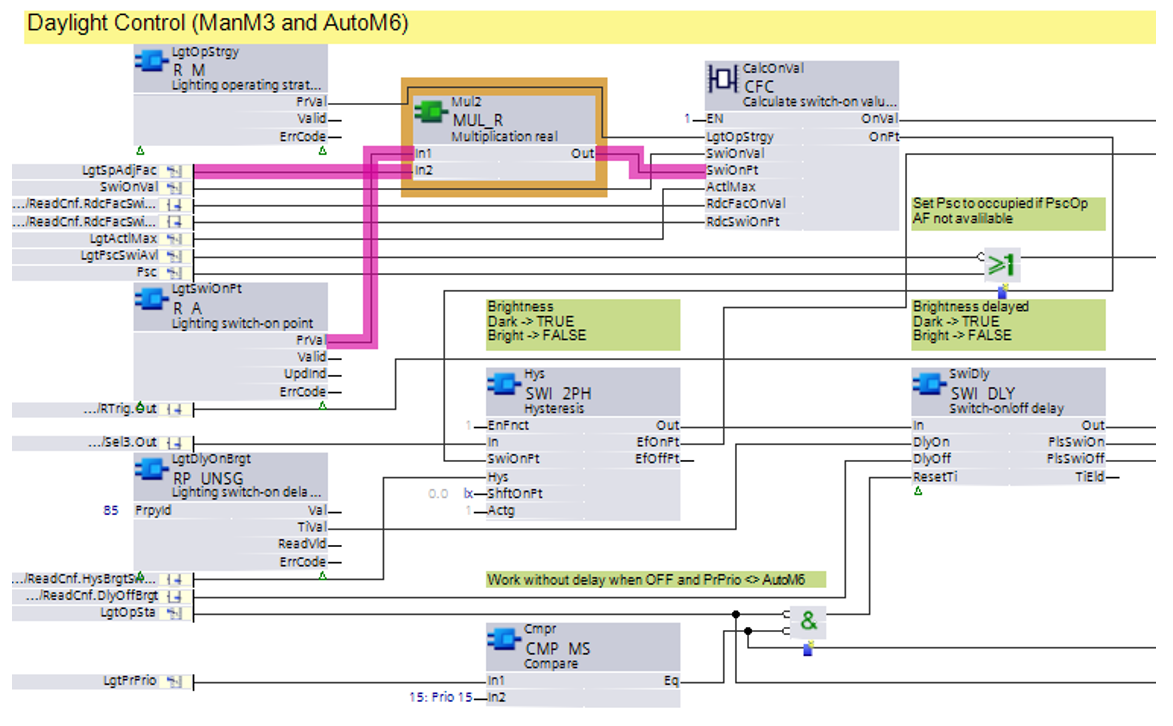
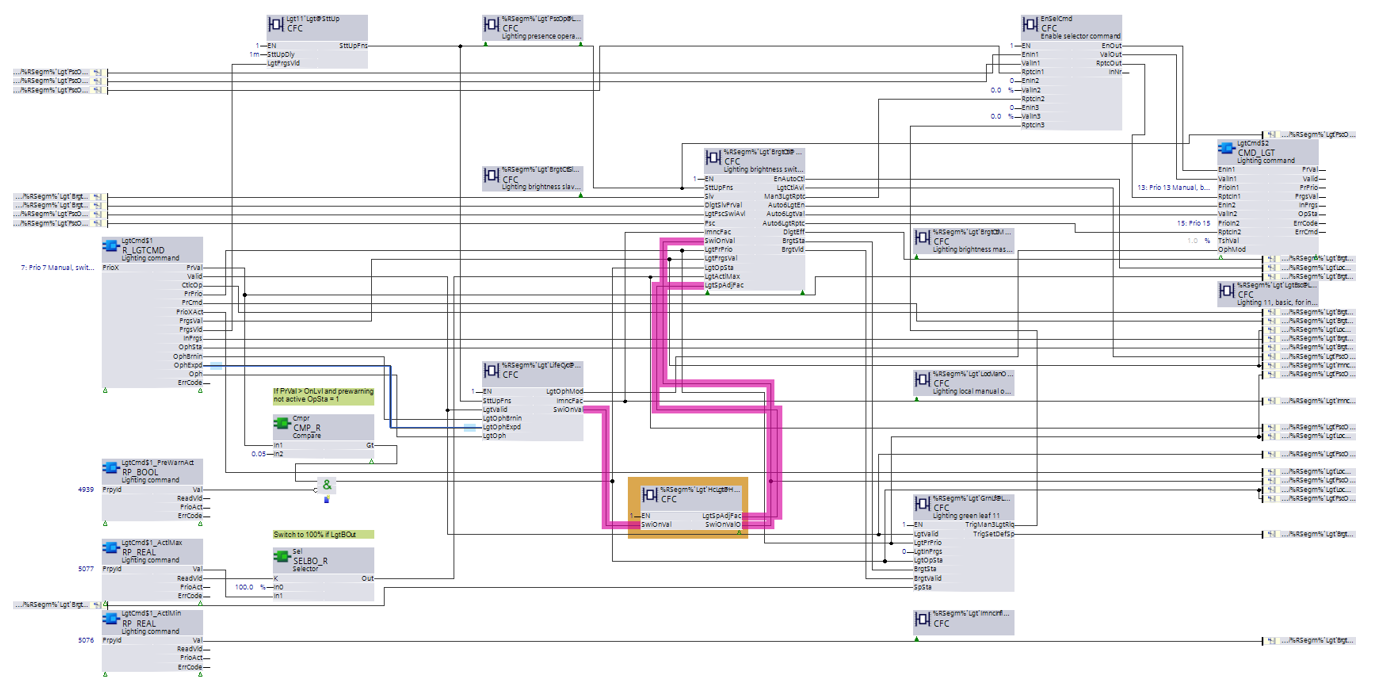
Chart Lgt11:
- Adapt the wiring for the switch-on value and connect the new pin [LgtSpAdjFac] as highlighted in the figure below.
Use case: HCL with brightness constant control (LgtConstCtl11)
Principle
Combine HCL with a brightness constant control and a push button. HCL is activated by the push button. The lighting setpoint for brightness is shifted according to HCL.
- Brightness control activated:
- Dark: The brightness and the color temperature are updated continuously according to HCL.
- Bright: The lighting is switched off. - Manual operation active: Brightness according to manual operation. The color temperature is updated.
LgtLocManOp11
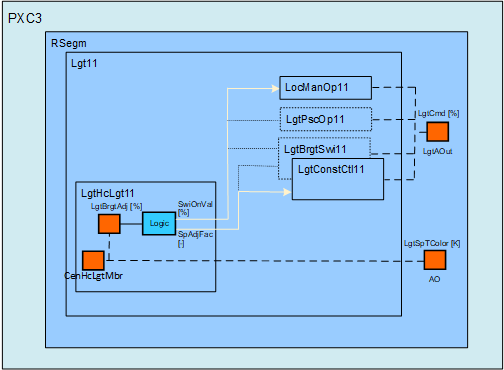
The HCL color temperature is calculated by the superior automation station and directly commanded to the output object LgtSpTColor.
Lighting device must in addition to the maintenance factor, also support and consider the brightness adjustment controlled by HCL.
Example: Target brightness 500lx
Maintenance factor 0.5, brightness adjustment 200% – The lighting device must support 2000lx if 500lx target brightness + 500lx for HCL are guaranteed for the whole life cycle.
Chart LgtConstCtl11:
- Additional chart interface: Pin [LgtSpAdjFac]
- Additional chart functionality: The lighting setpoint for brightness is shifted according to HCL.
Lighting brightness adjustment [%] | Lighting setpoint adjustment factor |
|---|---|
100 | 1 |
10-200 | 0.1-2 |
Examples: Lighting setpoint for brightness 500lx
Lighting brightness adjustment [%] | Lighting present setpoint brightness [lx] |
|---|---|
50 | 250 |
100 | 500 |
150 | 750 |
In chart LgtConstCtl11:
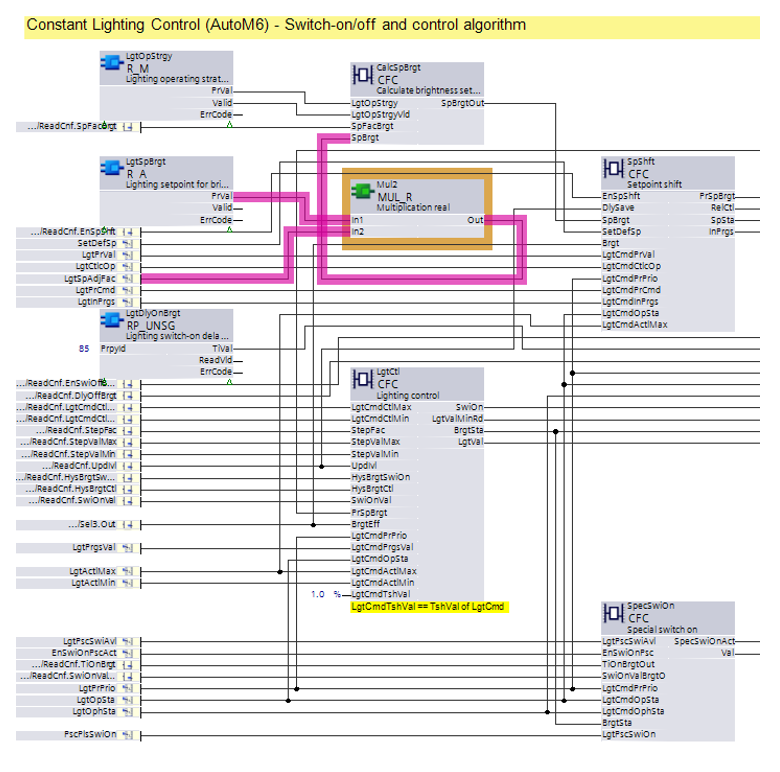
Chart Lgt11:
- Adapt the wiring for the switch-on value and connect the new pin [LgtSpAdjFac] as highlighted in the figure below.