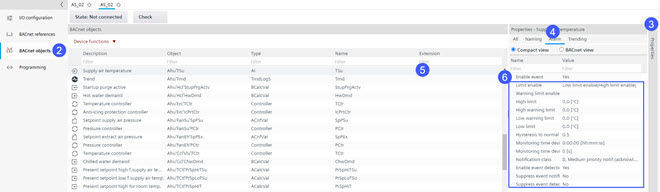
Enabling an alarm on a BACnet property
For hardware data points, Modbus or KNX PL-Link objects alarms can also be created directly in their related editors. Alternatively, it is also possible to use the programming editor for this task.
- Go to Building > Building structure.
- Right-click the automation station and select Go to engineering.
- Open the BACnet objects task.
- Select the Properties view tab.
- Select the Alarm tab.
- Select the object you want to set in alarm.
- From the Enable event drop-down list, select Yes.
- The alarm properties are listed and can be configured.