Opening the Web interface
To check the device assignment, open the Web interface.
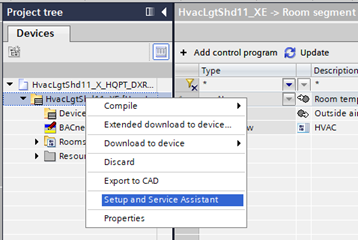
Open the Web interface
- The configuration is downloaded to the device.
Configuring and downloading to a device
- Open the Room programming editor.
Duplicating and programming - In the Project navigation view, right-click the device and select Web interface.
- The Web interface of the device opens in the same window.
- Click Installation.
- The Device overview of the Web interface opens.
For more information on the Web interface see the User guide.
http://www.siemens.com/download?A6V11938631