Shift data point addresses
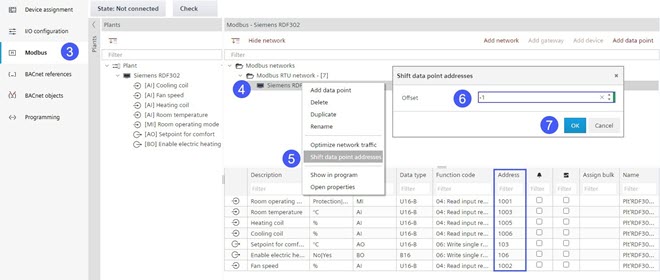
If an incorrect address range was selected during engineering, the address range can be changed in the entire automation station by means of an offset. Typically, choose an offset of 1 or -1 because at the time of engineering the initial range was not known.
- There is at least one configured device.
- Go to Building > Building structure.
- Right-click a device and select Go to engineering.
- Open the Modbus task.
- Right-click the Modbus device.
- Select Shift data point addresses.
- The Shift data point addresses dialog box displays.
- Enter an offset number in the Offset field.
- Click OK.
- The address range is changed by the appropriate value.