Disabling BACnet/IP communication
You can deactivate BACnet/IP communications for devices which have BACnet/SC enabled (if the BACnet/IP communication is truly no longer needed). When deactivating BACnet/IP the devices will communicate BACnet/SC only. Other communication channels like BACnet/IP over ethernet and DICP over IP-multicast will be deactivated.
There are two exceptions.
- Port 443 for HTTPS communication will remain open.
- The port for cloud communication will remain open.
You can close and deactivate the BACnet/IP communication for one device, or for all devices connected to a router (as a mass operation).
Disable BACnet/IP communication for one device (in the BACnet/SC topology)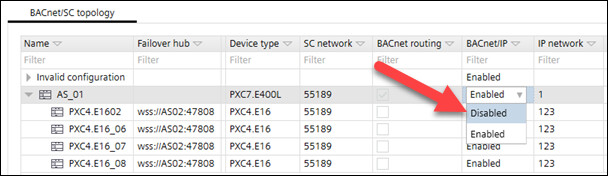
- Go to Building.
- Open the BACnet/SC task.
- In the BACnet/SC topology table, select a device.
- In the column BACnet/IP, select Disabled.
- The BACnet/IP communication is disabled and the IP functions in the Device details are grayed out.
Disable BACnet/IP communication for one device (in the Device details)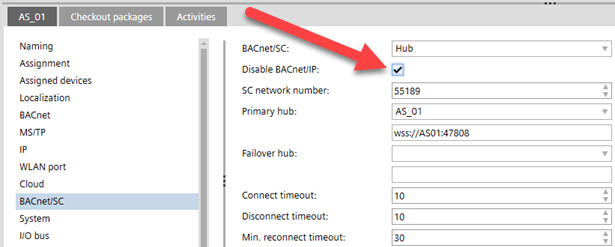
- Go to Building.
- Open the BACnet/SC task.
- In the BACnet/SC topology table select a device.
- In Device details > BACnet/SC, select Disable BACnet/IP.
- The BACnet/IP communication is disabled and the IP functions in the Device details are grayed out.
Details pane of the device version ≤ 1.5
Disable BACnet/IP communication for all devices connected to a hub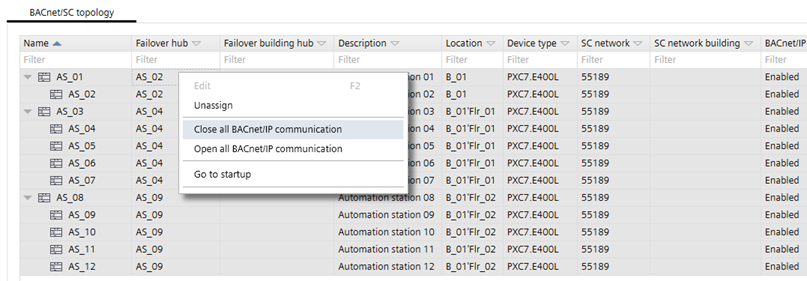
- Go to Building.
- Open the BACnet/SC task.
- In the BACnet/SC topology table, select a device which is used for BACnet routing.
- Right-click and select Close all BACnet/IP communication.
- The BACnet/IP communication is disabled for all devices connected to the hub.