Handling shared objects
Shared objects in KNX PL-Link transmit data to multiple devices at the same time.
- Shared objects do not belong to any device, they are owned by the KNX PL-Link bus (KNX PL-Link network object).
- The creation of shared objects is driven by the configuration of devices. If a device is configured to use shared objects, the shared objects are automatically created. If the shared objects are not needed by any device anymore, they are deleted.
- Shared objects are not saved in the library with the device or the device chart.
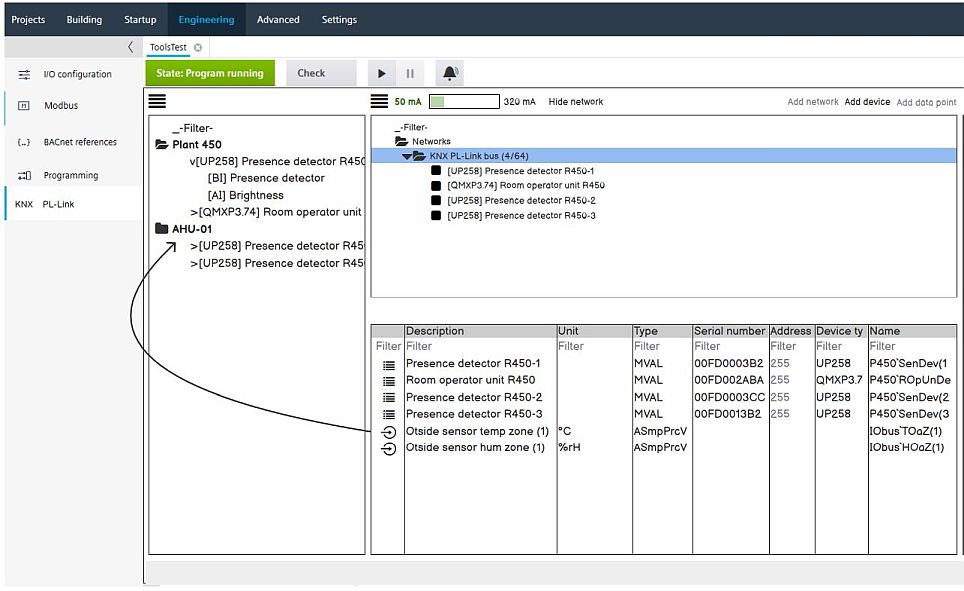
Once created the shared objects are visible in the table when the network is selected. Unsupported properties in the table are empty and cannot be edited (same behavior in online mode). Shared objects are always located at the bottom of the table below the last device.
Naming is initially created with the I/O bus as naming parent. If you want to change the name, drag and drop the name to a plant. The naming is then calculated depending on the plant and folder structure.
- Shared objects can be removed from a plant via context menu Remove from plant. Then the naming parent is again moved to the I/O bus.
- If a plant containing shared objects is deleted, the naming parent is reset to the I/O bus.