Data tampering detection
 WARNING

Cyberattack
Risk of manipulated project data and re-engineering of the entire project data and IT infrastructure
- Only use official Siemens ABT Site installations.
- Open used ports only.
- Create regular project backups.
- Please refer to the Desigo cybersecurity guidelines (A6V13813955) for further information about hardening.
- To become more familiar with the Desigo cybersecurity, watch the cybersecurity video for PXC4/5/7 (on YouTube).
A cyberattack on ABT Site can cause serious damage to Siemens devices or the customer IT infrastructure. Therefore, ABT Site continuously checks whether the installed files have been manipulated. As soon as a potential manipulation of a file is detected, the user is informed with a dialog box.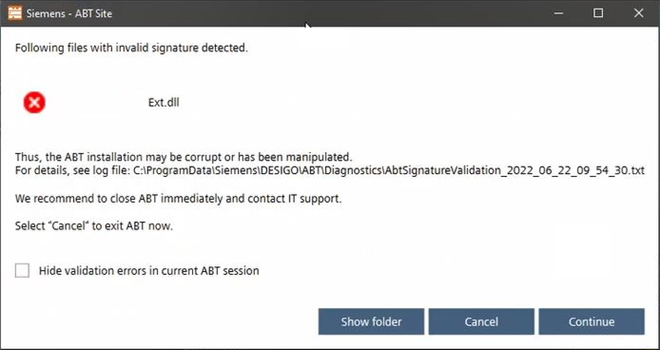
Function | Description |
|---|---|
Show folder | Opens the diagnostic program folder of the log file location [Installed drive]:\ProgramData\Siemens\Desigo\ABT\Diagnostic\AbtSignatureValidation_[Date and Time]. Example of an error message:
|
Cancel | ABT Site will close immediately. The project data will remain in its last persisted state. If you have unsaved changes, depending on your workflow, those changes may be lost. We recommend closing ABT Site and informing Siemens support or/and your IT department. |
Continue | The user is aware of the scope of the information. This can be used if, for example, a new test file is required to run a function. |
| If the program is continued with Continue:
|
 Hide validation...
 the message can be suppressed for the duration of the session.