Replacing I/O data point of the same object type
If another sensor type is available (installed) on the system, the properties can be adjusted by simply replacing it with the new sensor type.
- Support object types are AI, AO, BI, BO, MO, MI, CI.
- Not supported are Modbus and KNX PL-Link hardware data points.
- Go to Building > Building structure.
- Right-click a device and select Go to engineering.
- Open the I/O configuration task.
- In the I/O configuration area, select a data point in the Tabular view or Graphical view.
- Select the Library tab.
- Select Field devices > TX & on-board I/Os > [sensor type].
- Drag the selected sensor over the existing sensor in the I/O configuration area.
Info: The tool checks the compatibility of the used sensor.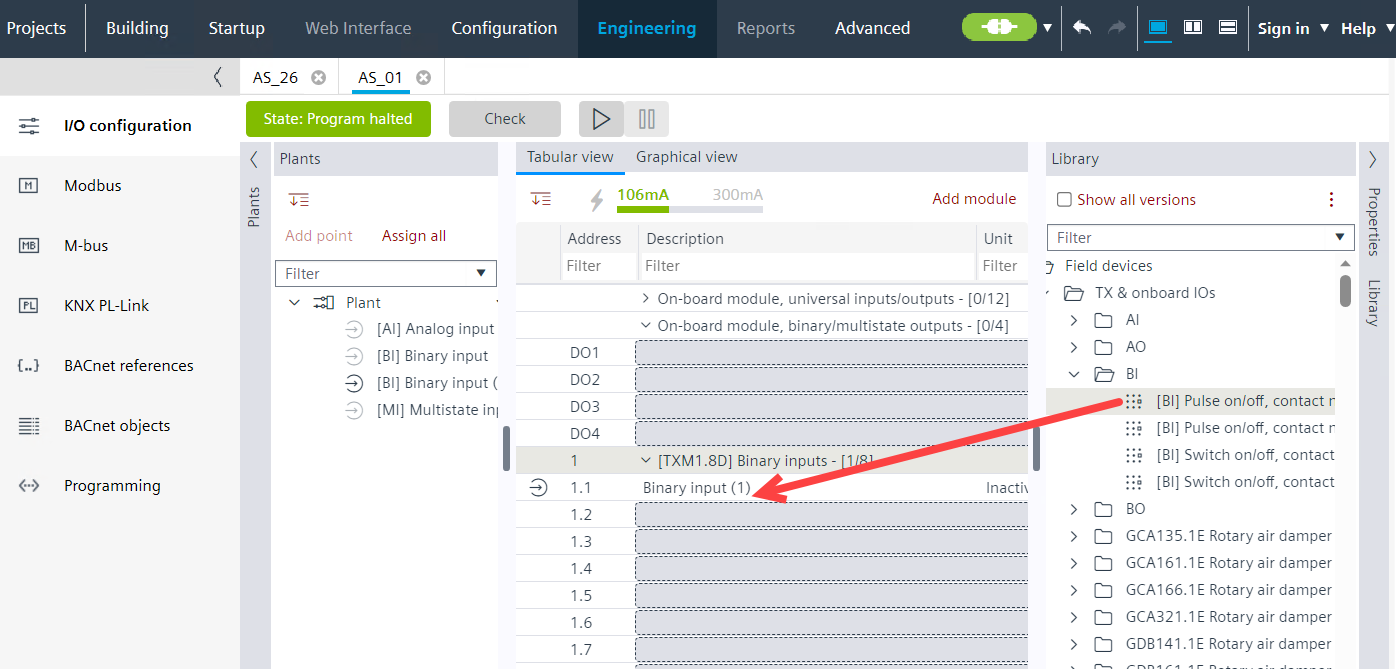
- The sensor is replaced with the new unit range.
- Not affected of the replacement are existing settings of the data like:
- Name, descriptions, alarms, limits, trending.
- Object ID, and therefore no change to the engineering in the Programming editor is required.
These properties will be update by the replacement | |||
AI and AO | BI and BO | MI and MO | CI (Accu) |
Field device type | Field device type | Field device type | Field device type |
COV |
|
| COV |
|
| Number of states |
|
| State text | State text |
|
Present maximum value |
|
|
|
Present minimum value |
|
|
|
Resolution |
|
|
|
Unit |
|
| Unit |
Signal type | Signal type | Signal type | Signal type |
Process value 1 |
|
|
|
Signal value 1 |
|
|
|
Process value 2 |
|
|
|
Signal value 2 |
|
|
|
|
|
| Prescale |
|
|
| Scale |