ABT Site as CA with Desigo CC connection
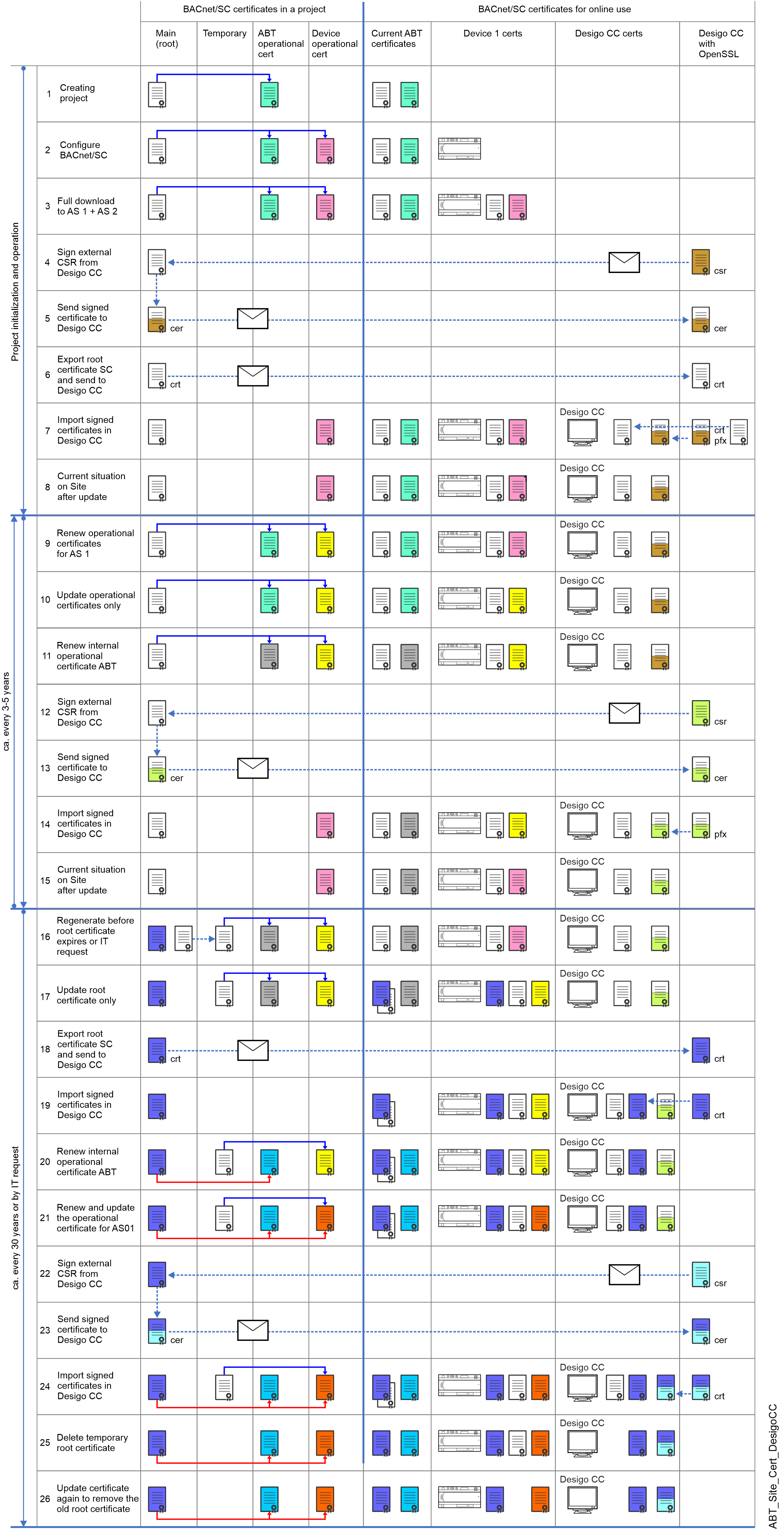
This example shows ABT Site as CA (certification authority) for the BACnet/SC network. Internal certificates are applied to Desigo devices. Certificates for Desigo CC have to be signed by the same CA (for example, the same ABT Site project), based on certificate signing requests provided by the Desigo CC management station. The certificate color shows when a change is made in the workflow.
NOTICE

Devices do not work correctly if parameters or program structure are not correct
This can lead to high cost for reengineering and commissioning of plants or items
- Obtain the latest control program from the ABT Site project
- Commissioning with the IP configuration is completed.
- Always first upload parameter data or control program on customer site.
- Always perform the first time a full download of the control program with BACnet/SC certificate. Afterwards, use Only updated certificates to update BACnet/SC operational and root certificates.
| Description |
1 | A root certificate (white) and an ABT Site operational certificate (green) are created at the time the ABT Site project is created. This root certificate can be valid until the expiry date is reached or if the customer requests a renewal of the root certificate (see step 16). Notes:
|
2 | The device operational certificate (pink) can be created after assigning the device to ABT Site. At this point, no certificate has be loaded into the device. Configuring BACnet/SC with hubs, failover hubs and nodes. Note: Each device has its own operational certificate based on the serial number. Multiple use of a certificate is not possible. |
A full download is required for downloading the operational certificate. After the download, the device can be operational with BACnet/SC. Note: In an existing project, a read-back of the current parameter and engineering data from the device is required. | |
The “certificate signing request” (csr) that is received from the Desigo CC is signed by ABT Site as CA, to create the BACnet operational certificate for Desigo CC. | |
5 | The signed operational certificate is sent back to the Desigo CC management station as a cer file. |
The root certificate must be sent to the Desigo CC management station. | |
7 | The ABT Site signed certificate and the root certificate are imported into the Desigo CC management station. This process is outside of the scope of ABT Site. |
8 | Shows the state in which the entire project is operational with BACnet/SC. Step 9 or 16 may become necessary as time progresses. |
The periodic renewal of the device operational certificates (yellow) must be planned in good time in advance. A reminder alarm from the device is sent 90 days before the certificate expires. It is recommended to budget this one year in advance. As soon as the date of the update of the certificates is determined, the update can be made in ABT Site. | |
Use Only updated certificates for updating the device operational certificate. | |
The renewal of the ABT Site operational certificate (gray) is possible at any time, independent of other devices in the BACnet/SC network because the root certificate is still the same and all devices trust certificates signed by that root. | |
The “certificate signing request” (csr) that is received from the Desigo CC is signed by ABT Site as CA, to create the BACnet operational certificate for Desigo CC. | |
13 | The signed operational certificate is sent back to the Desigo CC management station as a cer file. |
14 | The ABT Site signed certificate is imported into the Desigo CC management station. This process is outside of the scope of ABT Site. |
15 | Shows the state in which the entire project is operational with valid BACnet/SC certificates. |
If the IT department believes the existing root certificate to be compromised, or the formal lifetime of the root certificate comes to an end, a regeneration of the root certificate (white) is required. When regenerating the root certificate (dark-blue), all certificates on all devices in the project have to be renewed (note that this applies system-wide, that is: also on any potential 3rd party BACnet/SC devices of a project, too). This renewal process requires several steps in order to prevent any BACnet/SC communication interruptions during this process. For this reason, the existing root certificate becomes a temporary certificate and is valid until all devices are updated based on the new root certificate. | |
Use Only updated certificates for updating the device root certificate. After the update, the device remains operational with trust for both root certificates. | |
The root certificate must be sent to the Desigo CC management station. Note: Before the operational certificates of the devices are renewed with the new root certificate, it must be ensured that the old and new root certificate are available in Desigo CC. | |
19 | The ABT Site root certificate is imported into the Desigo CC management station. This process is outside of the scope of ABT Site. |
The renewal of the ABT Site operational certificate (blue) is possible at any time between step 16 and 23. If this step is not carried out, ABT Site will try to create a new operational certificate automatically in step 23. | |
Renewal of the device operational certificate (orange) based on the new root certificate (red) is required. Use Only updated certificates for updating the device root certificate (red). After the update, AS1 will have a certificate based on the new root. Because of steps 16 and 17, all devices trust certificates that are signed either by the old or the new root. Therefore, the operation of the system is uninterrupted.” | |
The “certificate signing request” (csr) that is received from the Desigo CC is signed by ABT Site as CA, to create the BACnet operational certificate for Desigo CC. | |
23 | The signed operational certificate is sent back to the Desigo CC management station as a cer file. |
24 | The ABT Site signed certificate is imported into the Desigo CC management station. This process is outside of the scope of ABT Site. |
When all devices are updated with the new root certificate, the temporary root certificate in ABT Site must be deleted. Note: if a new ABT Site operational certificate has not yet been created, we will try to create it automatically. The old root certificate in the Desigo CC management station can be deleted as well. | |
Use Only updated certificates for updating the device root certificate (white) in the device. The old root certificate is deleted. This means that certificates signed by the old root will no longer be trusted by the BACnet/SC network. The renewal process has been completed. When certificates have expired or when there is a new request from IT, these steps must be performed again from step 9 or 16. |