External KNX PL-Link power supply support
Up to 10 KNX PL-Link devices can be powered by a PXC4/5/7 device. If there is insufficient power, an additional power supply can be added.
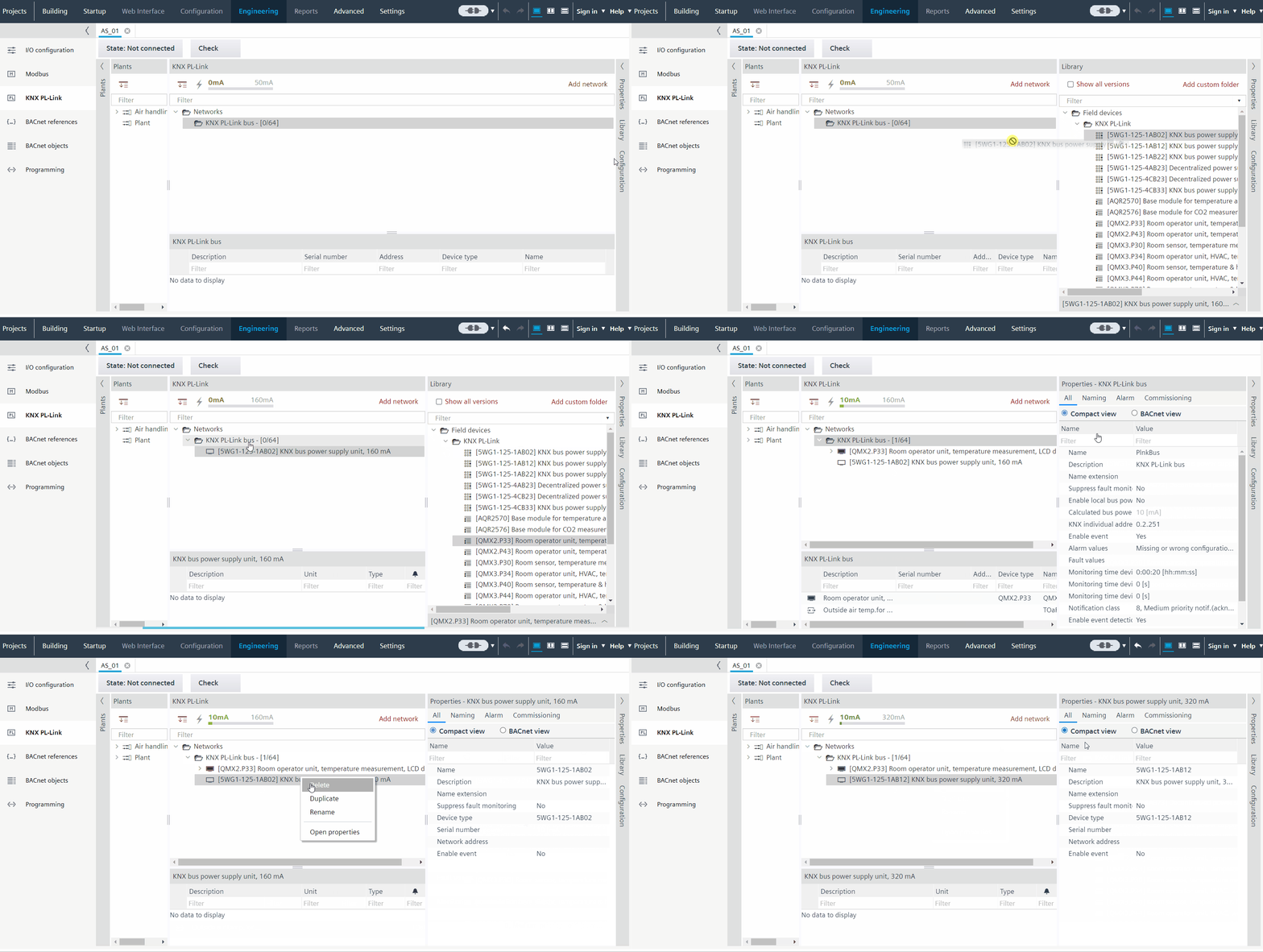
- The KNX PL-Link network is added to the plant.
- Go to Building > Building structure.
- Right-click a configured PXC4/5/7 and select Go to engineering.
- Open the KNX PL-Link task.
- Open the Library tab and expand Field devices > KNX PL-Link folder.
- Drag the required power supply and drop it to the network.
- A new power supply device is added to the network.

- A maximum of two power supply devices can be added to a network. The power calculation maximum is adjusted depending on the used external power supplies.
- For 3rd party power supplies, the required power consumption is not calculated. The user is responsible for ensuring the correct power supply.
Internal and external power supply should not be enabled together. When an external power supply is added to the network, the Enable local bus power supply in the Properties > All tab is disabled. By default, the Enable local bus power supply is always enabled. When the last external power supply is deleted, the internal one will be enabled again automatically.