Creating test point history during commissioning
Create a point test history for each data point during point testing done by the ABT Site editors (during 'Play' mode).
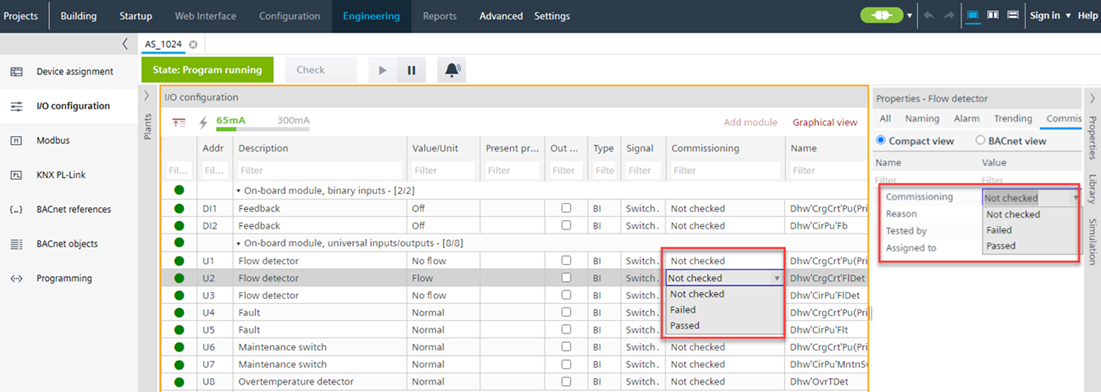
Enter the Engineering name for data point testing
The entered name is stored at the data point properties and printed out in a report at later time. Must be defined once in ABT Site.
- The project is closed.
- Go to Settings.
- Open the User interface tab.
- In the Engineer name field, enter your name.
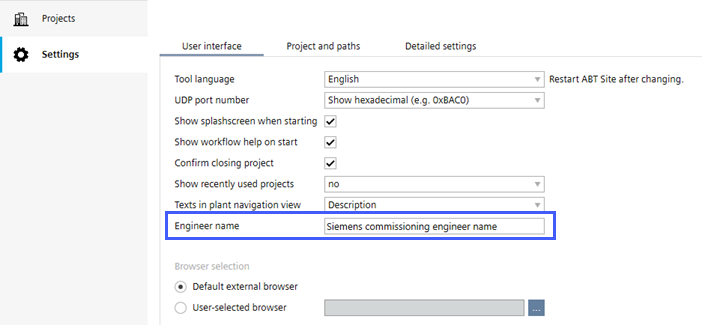
Test a data point
- The device is online.
- Go to Engineering.
- Open the I/O configuration task.
- In the Plants navigation view, select a data point.
- Open the Properties tab.
- Go to the Commissioning tab or go to the column Commissioning in the tabular view.
- In the Commissioning field, select Not checked/Passed/Failed option from the drop-down list.
- If you select the Failed option, a Commissioning dialog box displays.
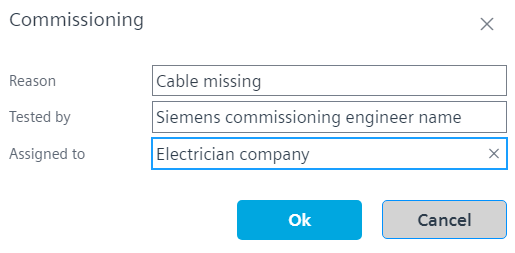
- In the Reason field, select the appropriate reason from the drop-down list. If you select the Other option from the drop-down list, the Comment field is displayed in the Commissioning dialog box. Enter the comments if necessary.
- The Tested by field displays your engineering name.
- Enter the name of the person or company in the Assigned to field to whom this failure has to be assigned.
- Click OK.
- You have added the details for the commissioning failure of the respective data point.
- If you select the Not checked or Passed option, you can see the information in the Properties tab.
- Click the BACnet view in the Properties tab to see the latest Commissioning state and Commissioning information.

- The latest Commissioning state and Commissioning information is also available in the data point commissioning report.
Creating reports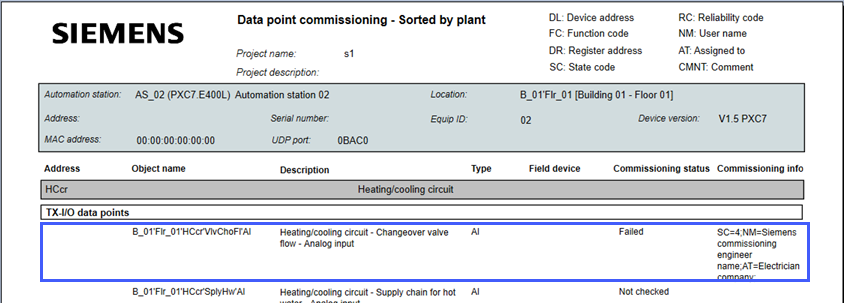
- Use ABT Go to see the complete test point history of an object.