Importing Ioopt files in M-bus
Ioopt (I/O Open Point Template) is a data exchange file for a configuration that describes a specific M-bus device. The file comes from Desigo TX Open and can be imported into ABT Site. Here, the data points of the device are mapped to the new integration model. The result is a configurable M-bus device in ABT Site. In some rare cases, not all data points can be mapped in ABT Site. The import operation does not stop when certain data points are not mapped. Check the log for the existing problems and adapt the corresponding data points manually.
Log viewer and status bar (Log and Jobs)
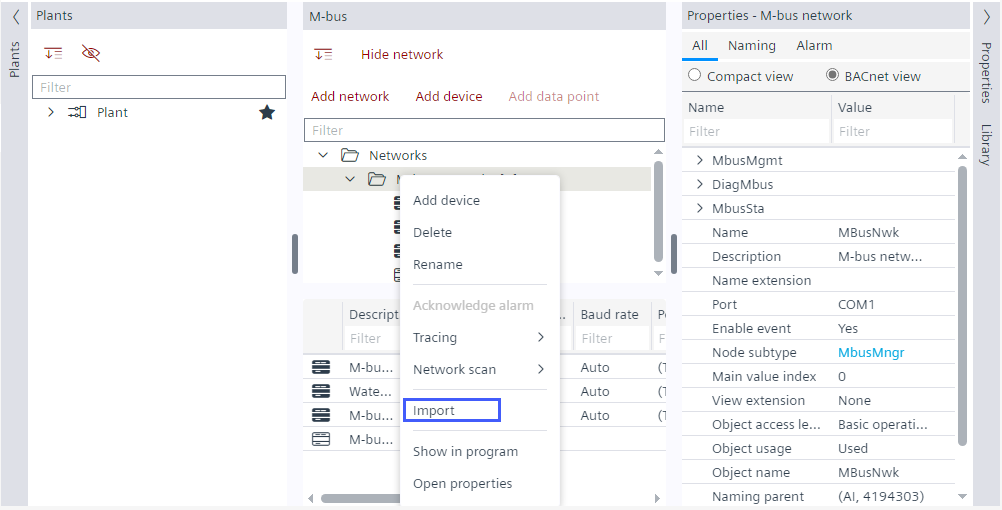
Import an ioopt file
- You have an ioopt file available.
- Go to Building > Building structure.
- Open the M-bus task.
- In the M-bus area, right-click a M-bus network and select Import.
- Select the ioopt file to import and click Open.
- Click OK.
- The M-bus device and data points specified in the ioopt file are created.
- The bulk reader objects are automatically created for optimizing the network load.