Engineering data status information
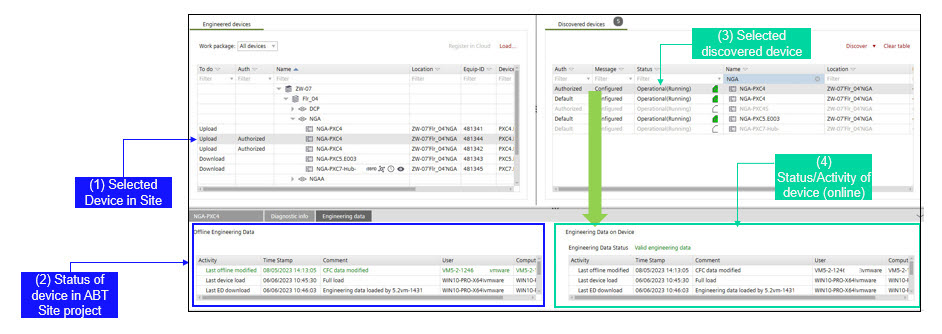
Shows engineering data status for selected device (the Enable engineering data on device check box is activated).
| |
1) Site: Selected device in ABT Site (offline data) | 3) Device: Selected device (online data) |
2) Site: Activities of device, containing
| 4) Device: Activities of selected online device, containing
|
Status of engineering data | Status/event | Next action to perform |
|---|---|---|
No engineering data |
| Full load Load engineering data |
Outdated engineering data |
| Load engineering data is required! (No full load required anymore) Note: an upload of outdated engineering data is still possible. |
Valid engineering data |
“Green indicates most recent engineering data”
“Engineering data on device is more recent! Upload recommended”
“Orange indicated that ABT Site data is more recent”, download recommended.
| Upload of engineering data possible |




