ABT Site as CA with ABT Go
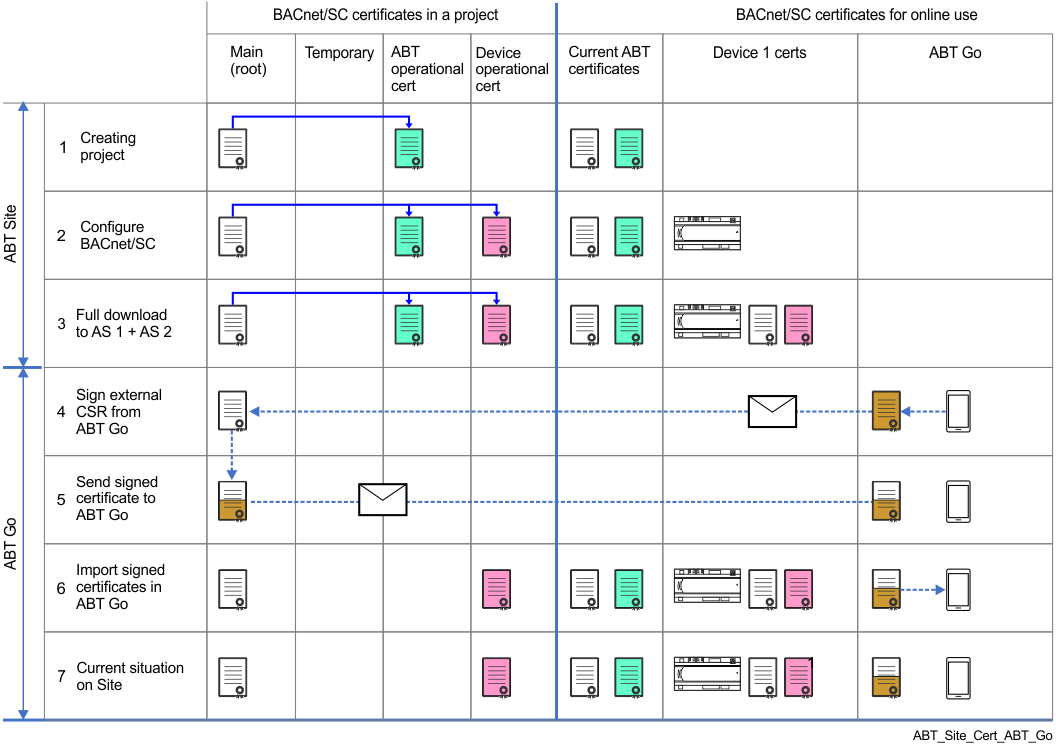
This example shows ABT Site as CA (certification authority) for the BACnet/SC network. Internal certificates are applied to Desigo devices. Certificates for ABT Go have to be signed by the same CA (for example, the same ABT Site project), based on certificate signing requests provided by ABT Go. The certificate color shows when a change is made in the workflow.
| Description |
1 | A root certificate (white) and an ABT Site operational certificate (green) are created at the time the ABT Site project is created. This root certificate can be valid until the expiry date is reached or if the customer requests a renewal of the root certificate. Notes:
|
2 | The device operational certificate (pink) can be created after assigning the device to ABT Site. At this point, no certificate has be loaded into the device. Configuring BACnet/SC with hubs, failover hubs and nodes. Note: Each device has its own operational certificate based on the serial number. Multiple use of a certificate is not possible. |
A full download is required for downloading the operational certificate. After the download, the device can be operational with BACnet/SC. Note: In an existing project, a read-back of the current parameter and engineering data from the device is required. | |
The “certificate signing request” (csr) that is received from ABT Go is signed by ABT Site as CA, to create the BACnet operational certificate for ABT Go. | |
5 | The signed operational certificate is sent back to ABT Go as a p12 formatted file. |
6 | The ABT Site signed operational certificate is imported into ABT Go. Internal conversion to a pfx format for ABT Go. |
7 | Shows the state in which the entire project is operational with BACnet/SC. |