Running sequence of function blocks
A control program contains several function blocks and connections. In order for the values to be calculated correctly, a run sequence for the function blocks must be defined. This can be done automatically or with additional programming for critical processes. Critical means, the order must not be changed by the Check  and Play
  functions.

The functions Control data and Data flow do not exists anymore.
NOTICE

Run sequence wrong calculated
Manually editing the block run sequence is not recommended, as it will be overwritten when recalculating.
- Use Check and Play function for calculating the run sequence.
- When a new function block is inserted, the next free number is assigned to it.
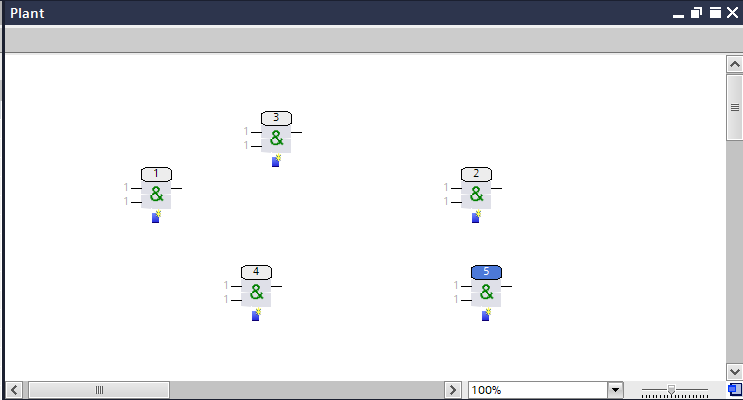
- Shows the function blocks as they were sequentially placed on the chart.
- Connect the function blocks in the graphic.
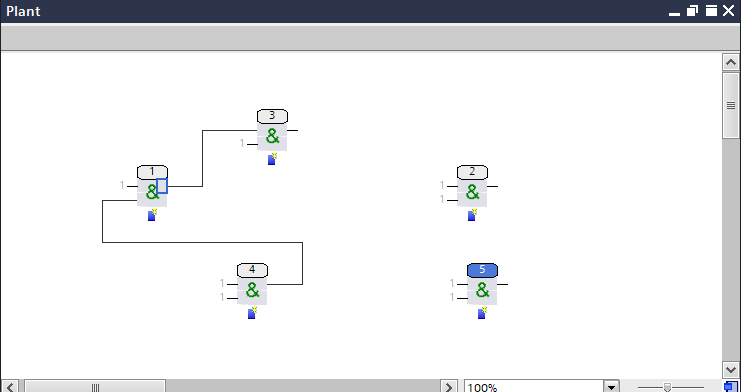
- Shows the blocks after connecting 4 to 1 and 1 to 3. An automatic calculation of the run sequence does not take place at this point in time.
- Blocks 2 and 5 have no connection.
- Click Check or Play to reorganize the run sequence of the function blocks.
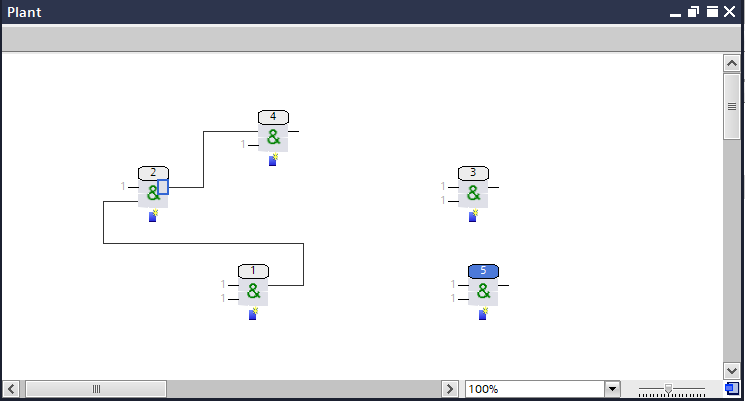
- The connected function blocks got a correct run sequence. This means that the input value always comes from an output of a previous block. This ensures that the values are calculated correctly.
- Function blocks that are not connected can get a new number (from 2 to 3) or keep the original number (5). However, this has no influence on the control program.