Configuring the recipient list
 WARNING

Alarms are no longer forwarded to a recipient
Changes after a project data import from the current project can lead to alarms no longer being forwarded on site afterwards.
- No offline changes should be made in ABT Site after the commissioning.
- If changes are made in ABT Site, the alarm forwarding on site must be checked and verified again.
- Go to Building > Building structure.
- Open the Application & device overview task.
- Select Device types > Controllers > [device].
- In the Details pane of the device, select Instance parameter.
- In the Property column, select the Recipient list cell.
- Right-click and select Configure recipient list.
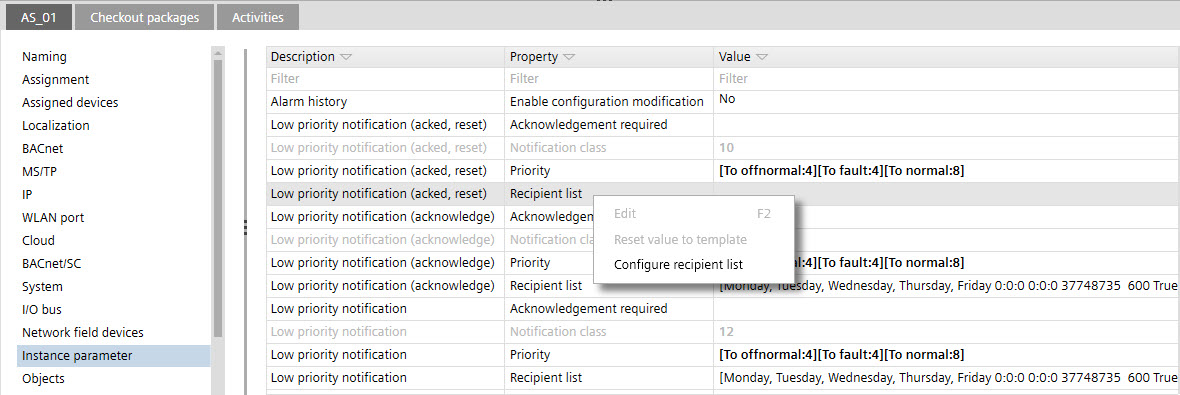
- The Configure recipient list dialog opens.
- Click Add.
- Configure the recipient list of the selected notification class:
- Valid days
The days of the week on which notifications may be sent to this destination during the value of From time and To time. - From time
The time during which the destination is used. To specify all times, use 00:00:00 for From time (start time ) and 23:59:59 for To time (stop time) - To time
- Recipient
The destination devices to receive event notification messages defined:
- as ID
or
- with network number and MAC address. - Process identifier
The process ID within the recipient device that receives the event notification messages. - Issue confirmed notifications
Indicates whether to send confirmed or unconfirmed event notifications. - Transitions
Indicate the types of transitions (To Offnormal, To Fault, or To Normal) sent to the destination.
Example with device ID: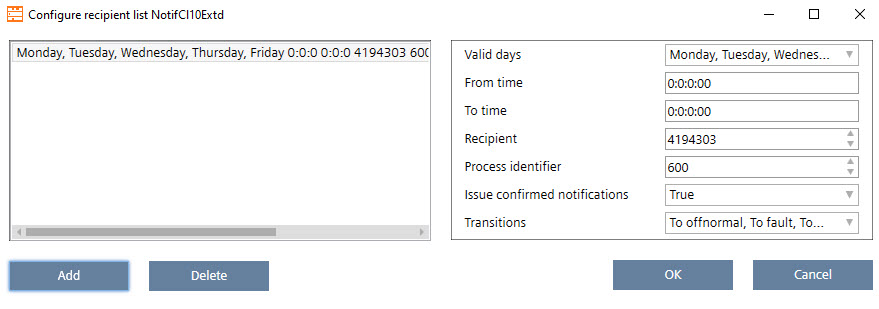
Example with network number and MAC address: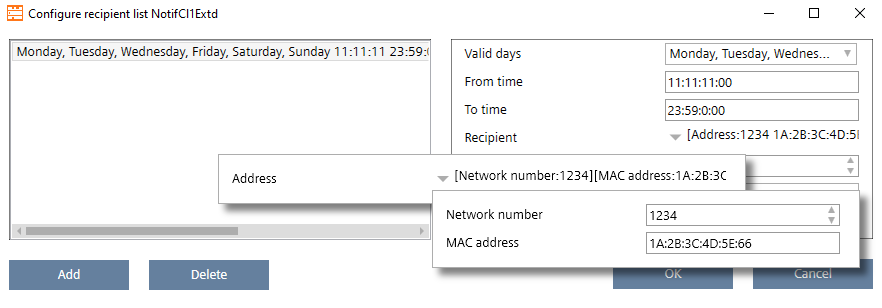
- Click OK.
- Repeat the steps for each Recipient list entry.