Deleting a recipient list entry
This function allows you to delete a recipient who no longer exists from the recipient list.
 WARNING

Alarms are no longer forwarded to a recipient
Changes after a project data import from the current project can lead to alarms no longer being forwarded on site afterwards.
- No offline changes should be made in ABT Site after the commissioning.
- If changes are made in ABT Site, the alarm forwarding on site must be checked and verified again.
- Go to Building > Building structure.
- Open the Application & device overview task.
- Select Device types > Controllers > [device].
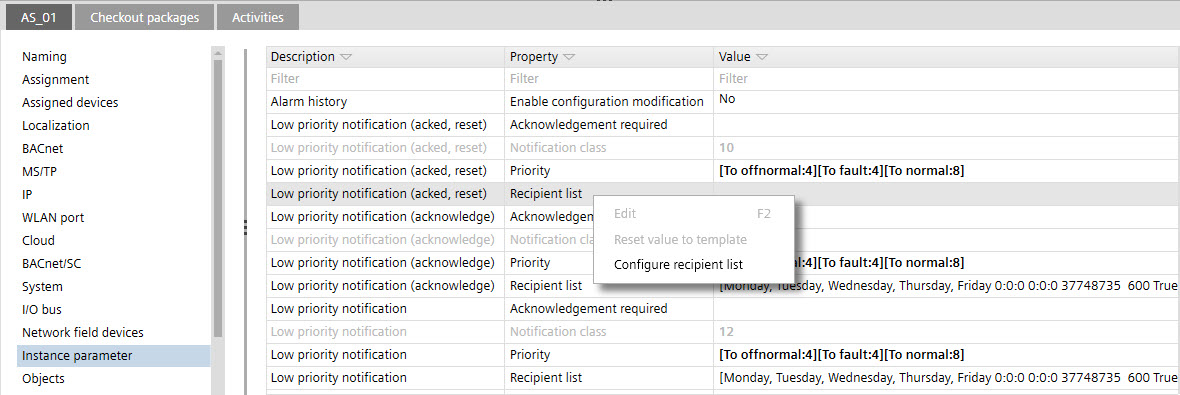
- In the Details pane of the device, select Instance parameter.
- In the Property column, select the Recipient list cell.
- Right-click and select Configure recipient list.
- The Configure recipient list dialog opens.
- Select a recipient list entry.
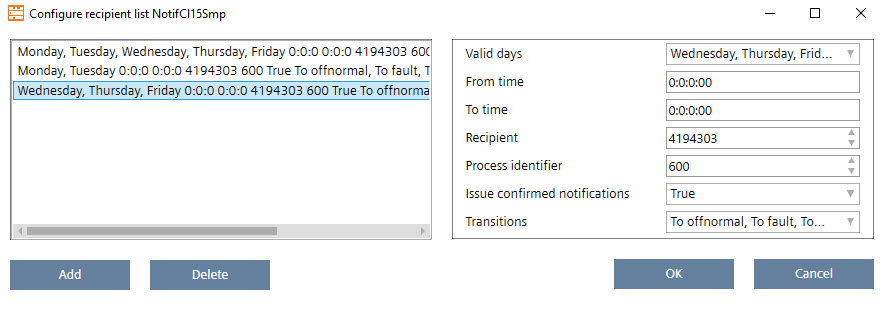
- Click Delete.
- Click OK.