Off site engineering of the device in the office
This engineering process can take place in parallel or sequentially. The only important thing is that the customer receives the project password at an early stage of the engineering.
Creating the project
- Create a project with a 4-rule password policy to access the device with the web interface.
- Send the project password to the customer.
- Do one of the following:
- Wait for the project information from the customer before you start with the project hierarchy.
- Create the project hierarchy. Rework the properties according to the information supplied by the customer in the Excel table.
- Start the engineering with the project hierarchy.
Creating the project hierarchy and configuring the device
- Create the project hierarchy according to the customer’s requirements.
- Create the device.
- Use the customers Excel table to add the following information:
- In the Dev.inst. # column, enter the device ID from customer’s Excel table.
- In Serial number column, enter the serial number from the customer’s Excel table.

- Do the following:
- for the device version ≤ 1.5: select the IPv4 tab.
- for the device version ≥ 1.6: select the Ports / network > LAN > IPv4.
- Clear the Use DHCP check box.
- In the IP address field, enter the IP address from customer’s Excel table.
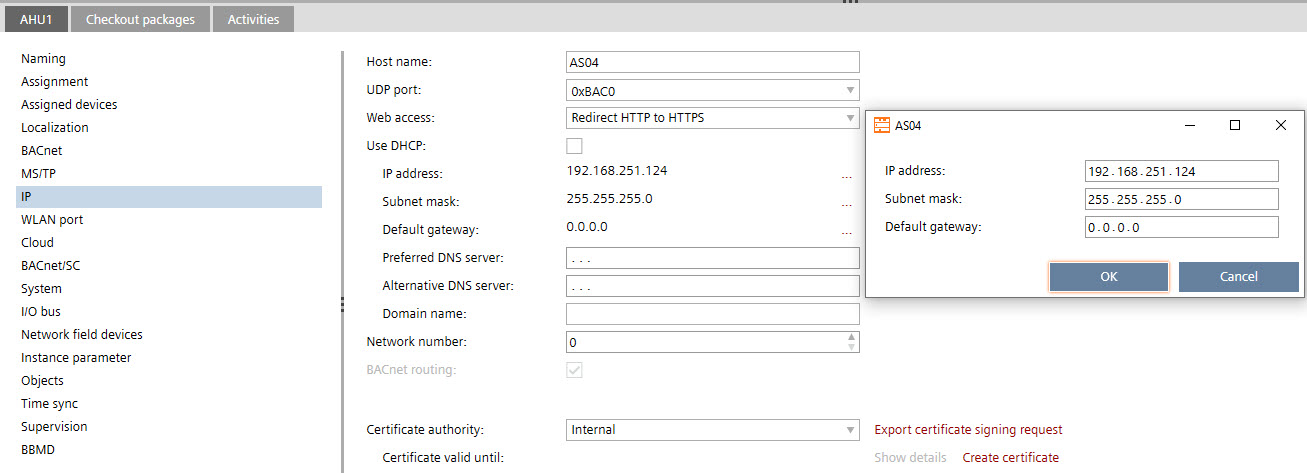
- Do the following:
- for the device version ≤ 1.5: select the Cloud tab.
- for the device version ≥ 1.6: select the LAN > IPv4 > Cloud port.
- Select the Enable Cloud check box to activate the Cloud service.
- Start the device programming.