Assign/re-assign a BA object to an xFB
A compatible BA object can be reassigned using drag-and-drop in the room control program. In case of existing connections, it will be overridden with the new BA object.
Assign a BA object to an xFB
- xFB is not connected to a BA object.
- In the Project tree, select the control program.
- The BA objects list and the control program are visible.
- In the Add control program list, select the BA object.
- Drag the BA object over the xFB.
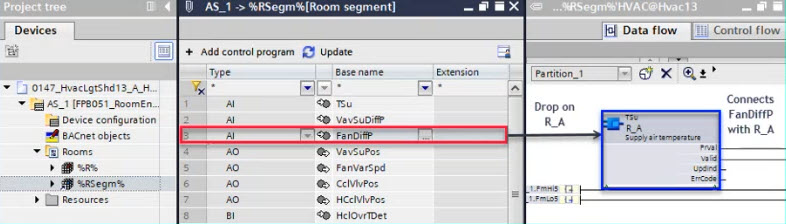
- The connection between BA object and xFB is established.
Re-assign a BA object
- A BA object is assigned to an xFB.
- In the Project tree, select the control program.
- The BA objects list and the control program are visible.
- In the Add control program list, select the BA object.
- Drag the BA object over the xFB.
- A Delete BA objects dialog box opens.
- Click Yes to replace the existing assignment.
- The connection between BA object and xFB is new established.