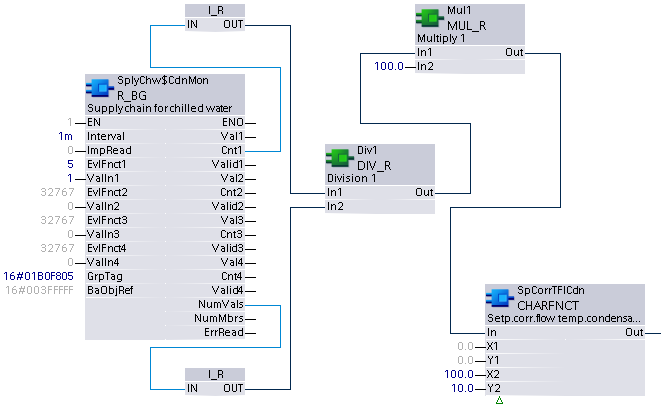
R_BG: Read binary group
R_BG binds to a Group manager object which controls the continuous collection of Group data (Present value / State flag pairs) from multiple data points for a specific Group data tag. In addition, the Group manager object triggers a configured evaluation function that calculates a resulting value. R_BG periodically reads the evaluated results at a preconfigured interval. A read can also be triggered from an external source.
R_BG can be configured to provide multiple (up to four) evaluated resulting values based on the selectable evaluation functions. At least one evaluation function must be configured.
Proprietary objects are needed for grouping infrastructure: one Group manager object and one or more Group member objects. Individual member data points are grouped and referenced via the Group member object(s), and the data is collected and passed from Group member object(s) to the Group manager object.
Compatible data points:
- Binary input [BI]
- Binary output [BO]
- Binary calculated value [BCalcVal]
- Binary configuration value [BCnfVal]
- Binary process value [BPrcVal]
Refer to data point objects for a detailed description of the BACnet data points.
Required properties of grouped data points:
- Present value
- State flag
Pin description (inputs)
BaObjRef | |
|---|---|
BA-Object reference Structure [BaObjRef] defines a bound connection between XFB and BACnet object. The binding occurs automatically. Manual configuration attempts are not necessary and can result in system errors. | |
DeviceId | Device identifier Double word (default value: 16#3FFFFF) [DeviceId] comprises object type and object instance in a single identifier. It is used to identify device object: local or remote. Local device object could also be identified by value 16#3FFFFF. |
ObjectId | Object identifier Double word (default value: 16#3FFFFF) [ObjectId] comprises object type and object instance in a single identifier. It is used to identify object within a device. |
ItemId | Item identifier Integer (default value: -1) [ItemId] represents an item index in the functional view node object, which references the BACnet object. [ObjectId] and [ItemId] together define an indirect access reference to the BACnet object. Value -1 indicates that direct binding is used. |
GrpTag |
|---|
Group data tag Double word (default value: 0) [GrpTag] defines the specific group data (present value, state flags) to be collected and evaluated by the XFB. The system provides predefined and also user definable tags. The [GrpTag] is typically set by the application developer in CFC and must not change during runtime. It must be set to a tag that matches the datatype of the XFB. |
Interval |
|---|
Read interval TIME (default value: T#0D_0H_0M_15S_0MS) The parameterizable polling time that specifies how often the calculated results are read. A value of 0 will disable the timer. In this case a read of the evaluated results can be triggered from an external source using [ImpRead]. In case the Interval pin has set the value -1s, the read of the evaluated result is triggered by the FW. The FW sets the read trigger when the evaluated result is newly updated. (If "LastUpdated" evaluation function is parameterized, Interval should be set to -1s.) |
ImpRead |
|---|
Impulse for read Boolean (default value: False) A linkable pin that allows an external source to provide a digital impulse to initiate a read operation. Since [ImpRead] can be wired, the read operations of multiple XFBs can be synchronized for collection in a single chart. Note |
EvlFnct1...4 | |
|---|---|
Evaluation function 1 Integer (default value: 32767) [EvlFnct1] determines the type of operation performed on valid present values from the collected group data that share a common [GrpTag]. [EvlFnct1] belongs to one of four input sets, each containing [EvlFnctX] and [ValInX]. It is typically set by the application engineer in CFC and must not be changed during runtime. If left unconfigured [EvlFnct1] is set per default to MaxInt (32767). In this case the evaluation function is disabled and [Valid1] is 0 (False). [EvlFnct2]...[EvlFnct4] functionality is identical to [EvlFnct1]. | |
5: CountOfVal | The number of valid present values for a given [GrpTag] in a specific group that satisfy the optional argument supplied by [ValIn1]. The result is set to output pin [Cnt]. |
6: AND | The logical AND operation for all valid present values for a given [GrpTag] in a specific group. |
7: OR | The logical OR operation for all valid present values for a given [GrpTag] in a specific group. |
10: LastUpdated | Searches the last updated value within all valid present values for a given group data tag of a specific group. |
ValIn1...4 |
|---|
Value input 1 Boolean (default value: False) A parameterizable argument for the evaluation function that sets a desired match value for the collected data of a given [GrpTag]. It is processed only if [EvlFnct1] is set to 5 (CountOfVal). [ValIn1] belongs to one of four input sets, each containing [EvlFnctX] and [ValInX]. It is typically set by the application engineer in CFC and must not be changed during runtime. [ValIn2]...[ValIn4] functionality is identical to [ValIn1]. |
Pin description (outputs)
Val1...4 |
|---|
Value 1 Boolean (default value: False) The evaluated resulting value based on the evaluation function selected in [EvlFnct1]. [Val1] belongs to one of four output sets, each containing [ValX], [ValidX] and [CntX].
[Val2]...[Val4] functionality is identical to [Val1]. |
Valid1...4 | |
|---|---|
Valid 1 Boolean (default value: False) Depending on the selection for [EvlFnct1], [Valid1] indicates whether [Val1] or [Cnt1] is reliable. [Valid1] belongs to one of four output sets, each containing [ValX], [ValidX] and [CntX]. [Valid2]...[Valid4] functionality is identical to [Valid1]. | |
1 (True) | [Val1] / [Cnt1] is reliable if at least one of the present values in the group data for the given [GrpTag] is valid. |
0 (False) | [Val1] / [Cnt1] is not reliable if none of the present values in the group data for the given [GrpTag] are valid. |
Cnt1...4 |
|---|
Count 1 Integer (default value: 0) The evaluated resulting value based on the CountOfVal evaluation function selected in [EvlFnct1]. [Cnt1] belongs to one of four output sets, each containing [ValX], [ValidX] and [CntX]. [Cnt1] will deliver:
[Cnt2]...[Cnt4] functionality is identical to [Cnt1]. |
UpdInd1...4 |
|---|
Update indication Boolean (default value: False) [UpdInd] indicates that at least one of the present values considered in the evaluation has been updated since the last execution of the XFB. [UpdInd] will only be set to true if Valid is true. [UpdInd] uses the update count property if present. This makes it possible to recognize a value as having been updated in cases where the new value is the same as the previous value. For objects without update count, [UpdInd] toggles on a change to Present value. Note |
NumVals |
|---|
Number of valid values Integer (default value: 0) The number of valid present value samples that have been collected for a specific [GrpTag]. |
NumMbrs |
|---|
Number of aggregated members Integer (default value: 0) The number of present value samples that have been collected for a specific [GrpTag], typically equal to the number of group member objects addressed by the group manager object for a particular group. |
ErrRead | |
|---|---|
Error while reading Integer (default value: 20) The status of the last XFB read attempt. In case no valid Val can be evaluated, [ErrRead] indicates the first detected error on the collected data for the given [GrpTag]. | |
= 0 | No error. |
> 0 | Error, see XFB error codes. |
Use case examples
NOTICE

Note
Graphics reflect examples of XFB implementations; See ABT for current examples of CFC.
R_BG: Example taken from the Central supply function AFN and CHT{SplyChw01}. Due to graphical size limitations, function blocks may be missing or shown more closely grouped than is typical.