R_BLSCMD: Read blinds command
R_BLSCMD reads the properties of a blind command output object.
R_BLSCMD reads the arbitrated Present value (structure: height, angle) and Present command properties, as well as Present priority, State flag and Reliability. R_BLSCMD also reads additional required properties which provide information about status and progress of the blinds actuator.
Compatible data points:
- Blind output [BlsOut]
Refer to data point objects for a detailed description of the BACnet data points.
Required properties:
- Present value (structure: height, angle)
- Progress value (structure: height, angle)
- Control command
- Present command
- Present priority
- State flag
- In process
- Last moving direction
Pin description (inputs)
BaObjRef | |
|---|---|
BA-Object reference Structure [BaObjRef] defines a bound connection between XFB and BACnet object. The binding occurs automatically. Manual configuration attempts are not necessary and can result in system errors. | |
DeviceId | Device identifier Double word (default value: 16#3FFFFF) [DeviceId] comprises object type and object instance in a single identifier. It is used to identify device object: local or remote. Local device object could also be identified by value 16#3FFFFF. |
ObjectId | Object identifier Double word (default value: 16#3FFFFF) [ObjectId] comprises object type and object instance in a single identifier. It is used to identify object within a device. |
ItemId | Item identifier Integer (default value: -1) [ItemId] represents an item index in the functional view node object, which references the BACnet object. [ObjectId] and [ItemId] together define an indirect access reference to the BACnet object. Value -1 indicates that direct binding is used. |
PrioX |
|---|
Priority X Integer (default value: 17) A parameterized input that can be used to query if a particular priority contains a valid commanded value or is released (NULL). [PrioX] cannot be changed during runtime. If [PrioX] is set to a value 1...16, the corresponding priority will be queried. The result is provided by the output pin [PrioXAct]. |
Pin description (outputs)
PrValHgt |
|---|
Present value height Real (default value: 0.0) The arbitrated present value structured element, height. If the arbitrated value is a target state command, [PrValHgt] represents the commanded target state value. If the arbitrated value is a control-command command, [PrValHgt] represents the progress value of the actuator. |
PrValAgl |
|---|
Present value angle Real (default value: 0.0) The arbitrated present value structured element, angle. If the arbitrated value is a target state command, [PrValAgl] represents the commanded target state value. If the arbitrated value is a control-command command, [PrValAgl] represents the progress value of the actuator. |
Valid | |
|---|---|
Valid Boolean (default value: False) An indication of whether output pin [PrVal] is reliable. | |
1 (True) | [PrVal] is reliable.
AND
|
0 (False) | [PrVal] is not reliable.
OR
|
CtlcOp |
|---|
Control command operation Integer (default value: 0) The value of the operation element from the structured Control command property, as read from the referenced BACnet object. If the BACnet object cannot be read successfully, the last valid value will be shown and Valid will be set to False. |
CtlcPsn |
|---|
Control command position number Integer (default value: 0) The value of the position number element from the structured Control command property, as read from of the referenced BACnet object. If the BACnet object cannot be read successfully, the last valid value will be shown and Valid will be set to False. |
CtlcHgt |
|---|
Control command height Real (default value: 0.0) The value of the height element from the structured Control command property, as read from of the referenced BACnet object. If the BACnet object cannot be read successfully, the last valid value will be shown and Valid will be set to False. |
CtlcAgl |
|---|
Control command angle Real (default value: 0.0) The value of the angle element from the structured Control command property, as read from of the referenced BACnet object. If the BACnet object cannot be read successfully, the last valid value will be shown and Valid will be set to False. |
PrPrio |
|---|
Present priority Integer (default value: 17) The active priority of the referenced BACnet object. [PrPrio] is set to:
|
PrCmd | |
|---|---|
Present command Boolean (default value: False) Indicates whether the current present value is from a target state command or a control-command command. | |
1 (True) | Control-command. |
0 (False) | Target state. |
PrioXAct | |
|---|---|
Priority X active Boolean (default value: False) [PrioXAct] indicates whether the priority being queried by input pin [PrioX] contains a valid commanded value or is released (NULL). Note | |
1 (True) | The queried priority is commanded. |
0 (False) | The queried priority is released (NULL), or the input pin [PrioX] is not being used. |
PrgsValh |
|---|
Progress value height Real (default value: 0.0) The actual height value as returned by the blind actuator, from the structured progress value property. |
PrgshVld |
|---|
Valid progress value height Boolean (default value: False) Indicates whether the progress value.height property is valid. |
PrgsVala |
|---|
Progress value angle Real (default value: 0.0) The actual angle value as returned by the blind actuator, from the structured progress value property. |
PrgsaVld |
|---|
Valid progress value angle Boolean (default value: False) Indicates whether the progress value.angle property is valid. |
InPrgs | |
|---|---|
In progress Boolean (default value: False) An indication of whether a blinds command is being processed and if the blinds are moving, based on the In process property. | |
1 (True) | A blinds command is being processed. |
0 (False) | No blinds command. |
LstDirc | |
|---|---|
Last moving direction Integer (default value: 0) The last moving direction of the blinds as indicated by last moving direction property. | |
1 (Down) | Last direction: Down |
0 (Up) | Last direction: Up |
ErrCode | |
|---|---|
Error code indication Integer (default value: 20) The status of the last performance of the XFB read operation. | |
= 0 | No error. |
> 0 | Error, see XFB error codes. |
Use case examples
NOTICE

Note
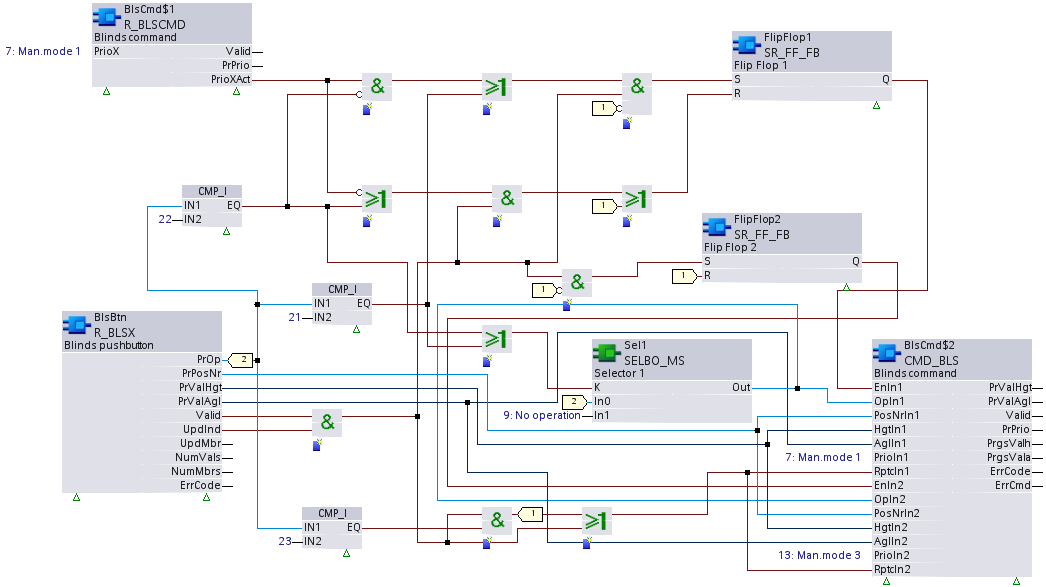
Graphics reflect examples of XFB implementations; See ABT for current examples of CFC.
R_BLSCMD: Blinds command.