Operating modes for room, plant, and devices
Overview (using a VAV application as an example)
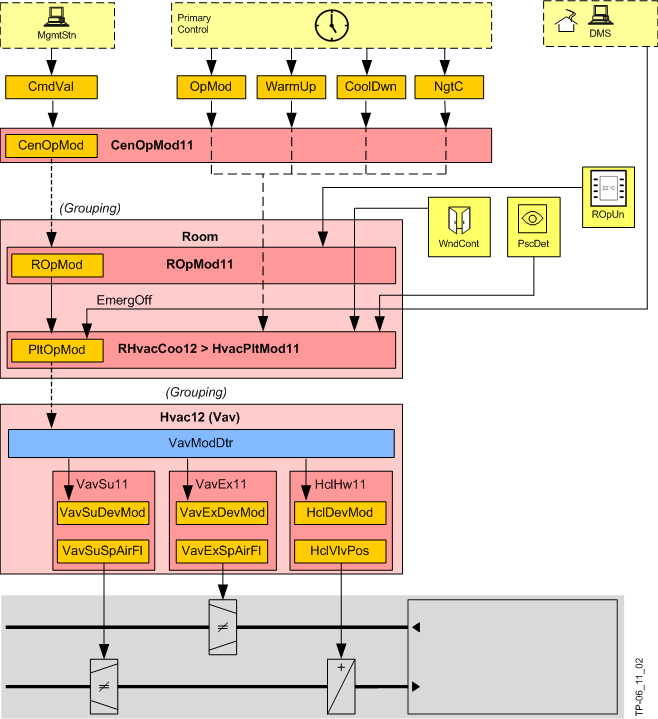
Central operating mode (CenOpMod)
Inputs are commands from a BACnet client or from the primary level (scheduler or a request for warm up (WarmUp), cool down (CoolDwn) or night cooling (NgtC)). CenOpMod11 determines, as the group manager, the central operating mode (CenOpMod) and includes in this manner the occupancy of buildings and room use.
Room operating mode (ROpMod)
The room operating mode (ROpMod) is determined in ROpMod11. The operating mode, defaulted by the central function, can be overridden in the room by a local presence button (PscBtn, optional) set to a defined state. The resulting room operating mode (ROpMod) applies to the room, including the devices.
Plant operating mode
The resulting room operating mode (ROpMod) can be overridden by a central request for warm up (WarmUp), cool down (CoolDwn), or night cooling (NgtC).
The resulting operating mode is referred to as the plant operating mode PltOpMod.
In addition, central protection, optimization, service, and emergency functions act on the room and override the plant operating mode.
IF | THEN* | |||||
|---|---|---|---|---|---|---|
Room operating mode | Presence detector | Window contact | Night cooling | Precooling | Preheating | Plant operating mode |
ROpMod | PscDet | WndCont | NgtC | CoolDwn | WarmUp | PltOpMod |
-- | -- | Open | -- | -- | -- | Protection |
Protection | -- | Closed | -- | -- | -- | Protection |
Economy | -- | False | False | False | Economy | |
| True | True | False | Night cooling | ||
-- | -- | -- | True | Warm-up | ||
-- | -- | True | False | Cool down | ||
Pre-Comfort | -- | -- | True | -- | Cool down | |
-- | -- | False | -- | Pre-Comfort | ||
Occupied | -- | -- | -- | Comfort | ||
Unoccupied | -- | False | -- | Pre-Comfort | ||
-- | True | -- | Cool down | |||
Comfort | -- | -- | -- | -- | Comfort | |
Occupied | -- | -- | -- | Comfort | ||
Unoccupied | -- | False | -- | Pre-Comfort | ||
-- | True | -- | Cool down | |||
* The resulting plant operating mode depends on the configuration.
Device operating mode
Depending on room operating mode (comfort, economy, etc.), each device is assigned a device operating mode (DevOpMod) (control, fully open, fully closed, off).
This occurs within the temperature control AF, in the Room programming editor chart "VavDevModDtr", i.e. the table below is fixed programmed.
Control mode means that temperature control in RHvacCooxx controls the devices (modulating or 2-point). The remaining states are provided by the segment AF Hvacxx.
The device operating mode (DevMod) for controlling aggregates and components can accept the following states (example: VAV):
IF | Then device operating mode... (DevMod) | |||||||
|---|---|---|---|---|---|---|---|---|
Air handling | Heat/cooling radiation | |||||||
Plant operating mode (PltOpMod) | Vav supply air | Vav extract air | Cooling coils | Heating / cooling coils | Heating coil | Ceiling heating / chilled ceiling | Radiator | |
1 | Off | Off | Off | Closed | Closed | Closed | Closed | Closed |
2 | Protection | Control | Control | Control | Control | Control | Control | Control |
3 | Economy | Control | Control | Control | Control | Control | Control | Control |
4 | Pre-Comfort | Control | Control | Control | Control | Control | Control | Control |
5 | Comfort | Control | Control | Control | Control | Control | Control | Control |
6 | Warm-up | Control | Control | Control | Control | Control | Control | Control |
7 | Cool down | Control | Control | Control | Control | Control | Control | Control |
8 | Room low temperature protection | Max flow | Control | Off | Fully open heat | Fully open | Fully open heat | Fully open |
9 | Not used | Off | Off | Closed | Closed | Closed | Closed | Closed |
10 | Free cooling | Control | Control | Control | Control | Control | Control | Control |
11 | Night cooling | Control | Control | Closed | Closed | Closed | Closed | Closed |
12 | Ventilation | Max flow | Control | Control | Control | Control | Control | Control |
13 | Not used | Off | Off | Closed | Closed | Closed | Closed | Closed |
14 | Air volume flow off | Off | Off | Closed | Closed | Closed | Control | Control |
15 | Smoke extraction positive pressure | Special flow | Off | Control | Control | Control | Control | Control |
16 | Smoke extraction negative pressure | Off | Special flow | Closed | Closed | Closed | Control | Control |
17 | Purge | Max flow | Control | Control | Control | Control | Control | Control |
Only the values in bold face are set by the Room programming editor chart "VavDevModDtr".
Free cooling
This device operating mode cools a room to the Comfort setpoint using chilled water even if the room operating mode is not Comfort. It permits "free" cooling (using cold outside air) if chilled water is available from the primary plant.
Conditions in the room are:
- Free cooling (FreeCAvl) is available in refrigeration generation.
- Chilled water temperature (FreeCTChw) is below 20 °C or 68 °F.
- The average room temperature (all rooms for this group) is above 23 °C or 73.4 °F.
For details see AF SplyChw11.
Night cooling
The device operating mode cools a room using cooling outside air. The primary plant sends a "Night cooling request" (NgtCRequ) to the group member rooms.
The decision as to whether night cooling makes sense and is energy efficient is made on the primary air handling unit. Various coordination signals between the primary plant and room automation:
- Switch on the fans.
- Set the mixed air dampers to 100% outside air.
- Lock all other equipment including heating coils, cooling coils, humidifier.
- Set the VAV boxes in the room to a defined value.
Night cooling only occurs under the following conditions:
- The room is vacant (Economy or Protection).
- The outside temperature is above an adjustable setpoint (9 °C or 48.2 °F).
- The temperature difference to cooling is sufficiently large, i.e. room temperature - outside temperature > 7 K / 12.6 °F.
- The temperature deviation from room temperature and temperature setpoint is sufficiently large, i.e. room temperature > room setpoint + 2 K / 3.6 °F.
Frost protection
"Low room temperature protection" is planned in the enumeration of the plant operating mode (8, VAV boxes in control mode and all heat sources at 100%) but is not used by any AFs. A room programming chart specific to the project must be created, if room frost protection is required, with a room temperature low and high limit to command and release this device operating mode.
Fire and smoke extraction
 DANGER

Desigo Room Automation is not a danger management system!
Injury possible for incorrectly engineered fire and smoke extraction functions.
- Use only properly trained personnel for engineering and commissioning!
In the event of a fire or smoke extraction, either the central emergency function HVAC (CenEmgHvac) or, locally, a fire detector or smoke extraction switch acts. Supply air and/or extract air and VAV boxes are deployed to a defined position.
- In case of fire: The entire room including the devices is switched to emergency mode EmgOff.
In this operating mode, manual interventions via BACnet clients as well as switch-on and off delays, are no longer permitted. - Smoke extraction: The emergency operating modes overpressure, under pressure, or purge act via a higher priority on the plant operating mode (PltOpMod) and thus on individual devices.
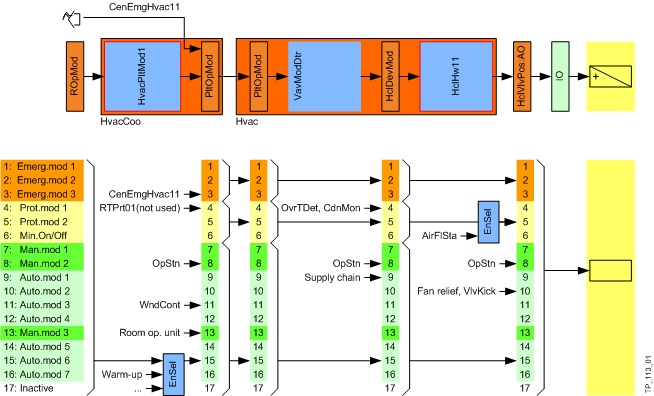
Operating modes and prioritization
The following overview displays the sources written (at which priority) to the various operating modes.