Shading energy efficiency (ShdEngyEffcy11)
Overview
The application function "Shading energy efficiency 11, thermal protection" (ShdEngyEffcy11) contains energy efficiency functionality.
Note: Per default, thermal protection is active when the room is unoccupied (Configuration in RShdCoo11
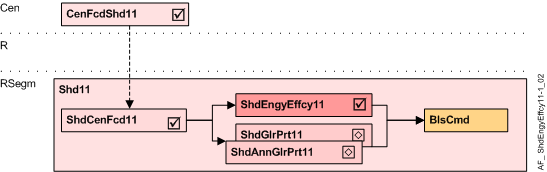
Cen | Central functions |
CenFcdShd11 | Central facade shading for automatic 11 |
R | Room |
RSegm | Room segment |
ShdCenFcd11 | Shading central facade function 11, for automatic |
ShdEngyEffcy11 | Shading energy efficiency 11, thermal protection |
ShdGlrPrt11 | Shading anti-glare protection 11 |
BlsCmd | Blinds command |
Function
The AF calculates the required energy efficiency position, and prepares the necessary blinds commands.
For correct operation, the AF requires AF ShdCenFcd11 with a solar radiation sensor.
The energy efficiency position is based on:
- The façade’s solar radiation, calculated in the central façade function (AF CenFcdShd11) as a multistate value SolRdnCnd (None, Low, Medium, High)
- The Room thermal load condition (RThLd) (Load / Heating, Unload / Cooling)
- The Energy mode for load (EngyModLd), configured to the needs of the room and the user
- The Energy mode for unload (EngyModUnLd), configured to the needs of the room and the user
The Energy mode for load defines the blinds position for room thermal load condition "Load" (heating), based on the solar radiation condition (None, Low, Medium, High)
Configured Energy mode for "Load" | Blinds position for solar radiation condition (from AF CenFcdShd11) | ||||
|---|---|---|---|---|---|
No | Name | None | Low | Medium | High |
1 | Up / Down (Default) | Move down | No movement | Move up | Move up |
2 | Up / No operation | No movement | No movement | Move up | Move up |
3 | No operation | No movement | No movement | No movement | No movement |
- Criteria for "High" (high solar radiation):
"Move up" is used to allow heat gain via solar radiation
"No operation" is used when heat gain is not possible due to the design of the façade product - Criteria for "Medium" (medium solar radiation):
Same as "High" - Criteria for "Low" (low solar radiation):
"Low" is used as a hysteresis to avoid frequent movements due to changes in the solar radiation - Criteria for "None" (no solar radiation):
"Move down" is used, when moving down the blinds or awnings prevents heat loss due to convection through the window
"No operation" is used to avoid any movement. The blinds or awnings must be opened manually or via time scheduler
The Energy mode for unload defines the blinds position for room thermal load condition "Unload" (cooling), based on the solar radiation condition (None, Low, Medium, High)
Configured Energy mode for "Unload" | Blinds position for solar radiation condition (from AF CenFcdShd11) | ||||
|---|---|---|---|---|---|
No | Name | None | Low | Medium | High |
1 | Down / Up | Move up | No movement | Move down | Move down |
2 | Sun tracking / Up (Default) | Move up | No movement | Move to sun tracking position | Move to sun tracking position |
3 | Down / No operation | No movement | No movement | Move down | Move down |
4 | Sun tracking / No operation | No movement | No movement | Move to sun tracking position | Move to sun tracking position |
- Criteria for "High" (high solar radiation):
"Sun tracking" is used to allow maximum daylight even when the solar radiation protection is active to prevent heat gain through the window
"Move down" is used instead of "sun tracking", when - no sun tracking is possible or does not work correctly due to the design of the façade product or
- the user does not want sun tracking (too much movement)
- "High" solar radiation can block manual operation, see below.
- Criteria for "Medium" (medium solar radiation):
Same as "High". Manual operation can not be blocked. - Criteria for "Low" (low solar radiation):
"Low" is used as a hysteresis to avoid frequent movements due to changes in solar radiation. - Criteria for "None" (no solar radiation):
"Move up" is used when the user wants to have as much daylight as possible.
"No operation" is used to avoid any movement. The blinds or awnings have to be opened manually or via time scheduler. - For "High" solar radiation, manual operation via pushbuttons can be blocked by setting CtlModUnldHi to 1.
0 = Normal (Default) enables manual operation regardless of the solar radiation.
Configuration
 Parameters
Description | Parameter | Default value |
|---|---|---|
Control mode by unload at high solar radiation 0:Normal | CtlModUnldHi | 0:Normal |
Energy mode for load 1:Up / Down | EngyModLd | 2:Up / No operation |
Energy mode for unload 1:Down / Up | EngyModUnld | 2:Sun tracking / Up |
Interface
Interface | Description | Type | Ref. | Owned by |
|---|---|---|---|---|
RThLdCnd | Room thermal load condition 1:Load(heating) | MCalcVal | ● | - |
Engineering and commissioning
- The sun tracking function and solar radiation thresholds are configured in the central façade AF CenFcdShd11.
- The AF is required for energy efficiency control.
- For correct operation, the AF requires AF ShdCenFcd11 with a solar radiation sensor.
Troubleshooting
Verify the function of the chart in CFC: All values evaluated can be seen on the chart outputs.