Multi-speed fan (FanMultiSpd11)
| This application function operates a multi-speed fan. The fan speed is calculated based on request signal for heating, cooling or ventilation. Manual input via room operating unit is also possible. This application function is typically configured for fan coil unit. Can also support a series or parallel fan-powered VAV box, or a heat pump. There is an optional binary input for the fan state. This application function is NOT available for: |
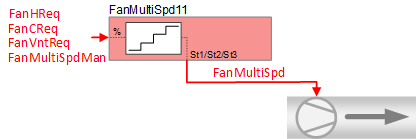
Required elements and how to configure them:
Element | I/O | Signal type |
|---|---|---|
FanMultiSpd "Multi-speed fan" | On-board output, Fan speed | 2-Stage Normally open or 3-Stage Normally open |
Function
The figure below shows BACnet objects associated with this application function. Primary signal flow is summarized as follows:
The fan request signal(s) are received (FanVntReq / FanCReq / FanHReq) and processed into the multistate fan speed output signal (FanMultiSpd). Manual input via room operating unit is also possible (FanMultiSpdMan).
Basic function: Accept request signal from associated room controller and pass it through a device mode logic switch; Output the result as a command to the BACnet object that controls the device.
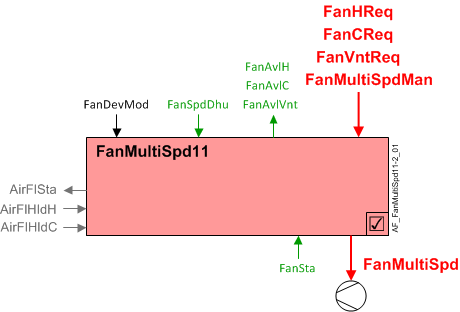
| Command or request (or related) |
| Notification of condition or status, or availability |
| Device mode |
| Interlock (internal signal, not a BACnet object; see Interlocks section for additional information) |


Interlocks
Room automation interlocks are internal signals that coordinate interaction between HVAC devices. They are not visible in ABT Site or web interface, but parameters associated with them are. See comment column for hints on parameters that affect interlock functionality.
Signal | Type | Direction | Description | Comment |
|---|---|---|---|---|
AirFlCReq | Boolean | In | Air flow cooling request |
|
AirFlHReq | Boolean | In | Air flow heating request |
|
AirFlDhuReq | Boolean | In | Air flow dehumidification request |
|
AirFlVntReq | Boolean | In | Air flow ventilation request |
|
AirFlHldC | Boolean | In | Air flow hold for cooling |
|
AirFlHldH | Boolean | In | Air flow hold for heating |
|
AirFlSta | Boolean | Out | Air flow status | See Configuration section for parameters named "...AirFlSta". |
AirFlVavReq | % | In | Air flow vav request | Fan-powered box application. |
FanManOff | Boolean | Out | Fan manual off |
|
FanMultiSpd - Multistate output "Fan multi-speed" supports up to four states: Off, Speed 1, Speed 2, Speed 3 (see Configuration).
Number of states is a property of FanMultiSpd:
- Number of states = Speed 1
SwiOnPt1 = 66.66%, Hys1 = 33.33% - Number of states = Speed 2
SwiOnPt1 = 33.33%, Hys1 = 16.66%
SwiOnPt2 = 83.33%, Hys2 = 16.66% - Number of states = Speed 3
SwiOnPt1 = 22.22%, Hys1 = 11.11%
SwiOnPt2 = 55.56%, Hys2 = 11.11%
SwiOnPt3 = 88.89%, Hys3 = 11.11%
Switch-on and hysteresis values for Number of states are hard coded and not configurable.
Ventilation request (simple non closed loop control) - When FanDevMod is "Control mode" the fan is available for ventilation request (FanAvlVnt = Yes). When a ventilation request (FanVntReq) is greater than 4%, FanMultiSpd = at least Speed 1. (switch-off hysteresis to turn fan off is 2%)
If device mode is not Control mode, FanVntReq has no effect.
Note
This feature ensures that the fan can provide a minimum ventilation air flow when there is little or no heating or cooling demand, such as in the "Neutral" zone during temperature sequencing.
Fan heating available status - FanAvlH will equal "Yes" if FanDevMod is "Control mode" and the internal signal for air flow heating request is active (True).
Fan cooling available status - FanAvlC will equal "Yes" if FanDevMod is "Control mode" and the internal signal for air flow cooling request is active (True).
Configuration
 Objects
Description | Object | Type | Default value |
|---|---|---|---|
Fan speed for dehumidification 1:Off | FanSpdDhu | MCnfVal | 2:Speed 1 |
Fan start speed by fan-powered box Enumeration see FanSpdDhu | FanSttSpdFpb | MCnfVal | 2:Speed 1 |
Fan end speed by fan-powered box Enumeration see FanSpdDhu | FanEndSpdFpb | MCnfVal | 4:Speed 3 |
VAV end air volume flow | VavAirFlEnd | ACnfVal | 100 [] 1), 2) |
1) Value is taken as [m3/h] for pressure independent VAV control
2) Value is taken as [%] for pressure dependent VAV control
 Parameters
Description | Parameter | Default value |
|---|---|---|
Enable state input | EnStaIn | 0:No |
Interlocks | ||
Switch-on delay for air volume flow state | DlyOnAirFlSta | 30 [s] |
Enable fan operation before heating coil 0: No | EnFanOpBfHcl | 0:No |
Interface
Interface | Description | Type | Ref. | Owned by |
|---|---|---|---|---|
FanMultiSpd | Multi-speed fan 1:Off | MO | ◉ | Room segment / Device |
FanSta | Fan state Note | BI | ◉ | Room segment / Device |
FanMultiSpdMan | Manual multi-speed fan 1:Off | MPrcVal | ● | - |
FanDevMod | Fan device mode 1:Off | MPrcVal | ● | - |
FanCReq | Fan cooling request | ACalcVal | ● | - |
FanHReq | Fan heating request | ACalcVal | ● | - |
FanVntReq | Fan ventilation request | ACalcVal | ● | - |
FanAvlC | Fan available for cooling 0:No | BCalcVal | ● | - |
FanAvlH | Fan available for heating 0:No | BCalcVal | ● | - |
FanAvlVnt | Fan available for ventilation 0:No | BCalcVal | ● | - |
FanSpdDhu | Fan speed for dehumidification 1:Off | MCnfVal | ● | - |
VavAirFlEnd | VAV end air volume flow | ACnfVal | ● | - |
FanSttSpdFpb | Fan start speed by fan-powered box Enumeration see FanSpdDhu | MCnfVal | ● | - |
FanEndSpdFpb | Fan end speed by fan-powered box Enumeration see FanSpdDhu | MCnfVal | ● | - |
Engineering and commissioning
Parameter EnStaIn must be set to 1:Yes if a binary fan status input is used.