Updating user profiles for engineered devices
Use this procedure to load the Access Control Profile (user profile) into the destination device. User profiles are subject to the Password policy for ABT Site.
Password policy
User profiles
Update a user profile
- All selected devices must be in a configured state.
- Open the Startup > Configure and download task.
- Select the Engineered devices tab.
- Right-click the selected devices and select Load > User profile only.
- The project user profiles are loaded to the selected device. ABT Site checks for user profiles that might have been added or changed online on the device. If there are such changes, a message displays.
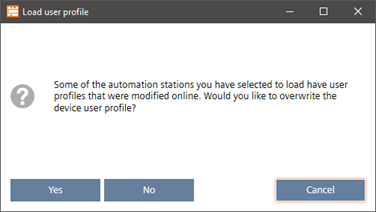
- Click Yes, if you want to overwrite the changed user profiles of the selected devices.
- Click No, if you want to keep the changed user profiles on the devices. Other selected devices, which do not have any user profiles online changed, will be loaded with the project user profiles.
- Click Cancel to cancel the operation. The device user profiles are not changed.
- The user profiles are updated.

This task supports mass loads. It does not allow firmware and application type loads over a room unit. Checks are performed to ensure that all selected devices are of the same type and to determine file compatibility. The device performs a backup of device instance data (as needed) and restores it after update except for application type (user must reload configuration).