Annual shading anti-glare protection 11 (ShdAnnGlrPrt11)
Overview
The application function "Annual shading anti-glare protection 11" (ShdAnnGlrPrt11) contains the glare protection functionality and communicates with the annual shading computer.
The shading computer overwrites the output of this AF if the conditions of the associated blind differ from the conditions of the rest of the facade sector.
Note: Per default, glare protection is active when the room is occupied (Configuration in RShdCoo11)
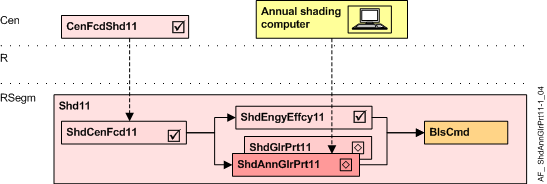
Cen | Central functions |
CenFcdShd11 | Central facade shading for automatic 11 |
R | Room |
RSegm | Room segment |
ShdCenFcd11 | Shading central facade function 11, for automatic |
ShdEngyEffcy11 | Shading energy efficiency 11, thermal protection |
ShdGlrPrt11 | Shading anti-glare protection 11 |
ShdAnnGlrPrt11 | Annual shading anti-glare protection 11 |
BlsCmd | Blinds command |
Function
The AF calculates the required glare protection position, and prepares the necessary blinds commands.
For correct operation, this AF requires the existence of AF ShdCenFcd11 with a brightness sensor.
The glare protection position is based on:
- the brightness on the façade, calculated in the central facade function (AF CenFcdShd11) as a multistate value GlrPrt (None, Hold direct, High direct, Hold indirect, High indirect, Dark)
- the glare protection mode (GlrPrtMod) configured to the needs of the room and the user.
- the information from the annual shading computer. The shading computer overwrites the output of this AF if the conditions of the associated blind differ from the conditions of the rest of the facade sector.
Evaluation of a resulting glare protection condition from CenFcdShd11 and Annual Shading Computer:
Resulting glare protection condition | From Annual Shading Computer | ||||
|---|---|---|---|---|---|
No | From CenFcdShd11 | None | Indirect | Direct | Direct and indirect |
1 | None | None | None | None | None |
2 | Hold direct | None | Hold | Hold | Hold |
3 | High direct | None | High indirect | High | High indirect |
4 | Hold indirect | None | Hold | None | Hold |
5 | High indirect | None | High | None | High |
The Anti-glare protection mode (GlrPrtMod) defines the blinds position based on the glare protection condition (None, Hold, High).
Configured Anti-glare protection mode | Blinds position for glare protection condition | |||
|---|---|---|---|---|
No | Name | None | Hold | High, High indirect |
1 | Down / Open / Up | Move up | Open slats | Move down |
2 | Sun tracking / Open / Up | Move up | Open slats | Sun tracking |
3 | Down / No operation / Up | Move up | No operation | Move down |
4 | Sun tracking / No operation / Up | Move up | No operation | Sun tracking |
5 | Down / No operation / No operation | No operation | No operation | Move down |
6 | Sun tracking / No operation / No operation | No operation | No operation | Sun tracking |
- For resulting glare protection = High indirect, the sun tracking position depends on the configured direction of the reflecting area
- Vertical: sun tracking position according to CenFcdShd11
- Horizontal: sun tracking position according to a configurable value
- Criteria for "High"(glare protection required):
"Sun tracking" is used to allow maximum daylight even during glare protection
"Move down" is used instead of "Sun tracking", when - no sun tracking is possible due to the design of the façade product
- sun tracking does not cover all places in the room correctly or
- the user does not want sun tracking (frequent movements)
- Criteria for "Hold" (Change from glare to no-glare for a short duration):
"Open slats" is used only for venetian blinds. Slats are opened for "Hold". This allows maximum daylight, but results in some short movements.
"No operation" is used for awnings or when the user prefers to avoid movements. - Criteria for "None" (Change from glare to no-glare for a long duration):
"Move up" is used to get maximum daylight, but results in some movements.
"No operation" is used to avoid any movement. The blinds or awnings have to be opened manually or via time scheduler.
- The Glare evaluation mode (GlrEvalMod) can be selected as follows:
- Sun position: The AF uses the sun position only; the information of the annual shading computer is ignored.
- Annual shading: The annual shading computer overwrites the glare protection condition with None if a window is shaded by an obstacle (e.g. a hill or a building).
- Anti-glare indirect: The annual shading computer influences the glare protection condition with High if a window is hit by reflected light (e.g. from a lake or from a building).
- Annual shading & Anti-glare indirect.
The behavior of the AF after / without annual shading information (AnnShdEndStrgy) can be configured: To none or To hold.
It applies when the annual shading computer no longer reports a special condition (reflected light or shading by obstacles) or when information is missing).
The direction oft he light reflecting area can be configured:
Vertical (other buildings with glass facade) or Horizontal (lakes or snow)
The blinds position in the event of communication failure (to the annual shading computer, ComFltStrgy) can be configured: Sun position, Down, Up, No operation, Open slats.
Interface (to the annual shading computer)
Interface | Description | Type | Ref. | Owned by |
|---|---|---|---|---|
AnnShd | Annual shading 1:Undefined | MTrgVal | ● | - |
The value is written to the BACnet object by the annual shading computer:
- In case of a change
- Cyclically every 5 minutes
Configuration
 Parameters
Description | Parameter | Default value |
|---|---|---|
Anti-glare protection mode 1:Down / Open / Up | GlrPrtMod | 2:Sun tracking / Open / Up |
Glare evaluation mode 1:Sun position | GlrEvalMod | 1:Sun position |
Annual shading end of active strategy 0:To none | AnnShdEndStrgy | 0:To none |
Reflection 0:Vertical | Refc | 0:Vertical |
Communication failure strategy 1:Sun position | ComFltStrgy | 1:Sun position |
Blinds command for horizontal reflection 1:Move up | CmdHrzRefc | 8:Go to position |
Blinds position number for horizontal reflection 1:P1: Visual protection | PosNrHrzRefc | 2:P2: Anti-glare, sun position low |
Blinds height for horizontal reflection | HgtHrzRefc | 0 [%] |
Slat angle for horizontal reflection | AglHrzRefc | 0 [%] |
Interface
None.
Engineering and commissioning
- The sun tracking function and brightness thresholds are configured in AF CenFcdShd11.
- For correct operation, the AF requires the existence of AF ShdCenFcd11 with a brightness sensor.
Troubleshooting
Verify the function of the chart in CFC: All evaluated values can be seen on the chart outputs.