Assigning I/O's (template)
I/O's can also be assigned individually for each room.
Assigning I/O's (areas)
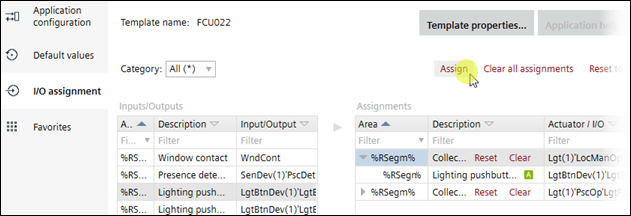
Assign I/O's for an application template
- Select an application template.
- Open Building > Application & device overview > Go to configuration.
- Configuration > Application configuration opens.
- Select Configuration > I/O assignment.
- The available sensors are displayed in the left table, and the actuators in the right table.
- Select the button in the left table.
- Select the corresponding button collection in the right table.
- Click Assign.
- The button is assigned to the button collection, and the I/O is assigned.
- Repeat steps 4 to 6, until all I/O's are assigned.
- The I/O's for the application template are assigned.

Rooms and segments without assigned I/O's inherit the I/O assignments of the parent template.
I/O's assigned individually for rooms and segments are not removed when changing the parent template.