Controller object (Controller)
✳ Indicates a Siemens proprietary property.
Controller output |
|
|
|---|---|---|
"Controller output" indicates the current output value of the loop algorithm in units of the Output-Units property. | ||
Controller type ✳ |
|
|
|---|---|---|
"Controller type" defines the current loop controller type. The controller acts either as a PID controller or a staged controller. The default is PID controller. | ||
Controller state ✳ |
|
| |
|---|---|---|---|
"Controller state" indicates the current controller state or the sequence controller element. | |||
Controller-off | Controller is switched off. | ||
Controller-cmd | Controller does not control. | ||
Controller-on | Controller is controlling actively. | ||
Controller-min | Controller is off (Present-Value = Minimum-Output). | ||
Controller-max | Controller is off (Present-Value = Maximum-Output ). | ||
Controller mode ✳ |
|
| |
|---|---|---|---|
"Controller mode" indicates the current loop control mode. | |||
Continuous | The controller acts as continuous PID-controller. | ||
2-position | The controller acts as 2-position controller (hysteresis). | ||
State flag ✳ |
|
|
|---|---|---|
"State flag" represents four boolean flags ("Out of service", "Overridden", "Fault", "In-Alarm") that indicate the general status of an object. | ||
Reliability |
|
|
|---|---|---|
'Reliability' indicates whether the property value 'Present value' is reliable. If the 'Present value' is not reliable, the property 'Reliability' indicates the cause of the fault and the bit "Fault" of the state indication is set to 'True'. In a normal case, the property 'Reliability' is set to "No fault". | ||
Property ID: 103 | ||
Out of service |
|
|
|---|---|---|
"Out of service" allows decoupling the object from being modified by a control program, system program or peripheral device.
| ||
Property ID: 81 | ||
Priority for writing |
|
|
|---|---|---|
"Priority for writing" indicates the priority used to command the output of the Controller object. The property is set up during engineering. The property is read-only. Range: 1...16 | ||
Controller output maximum |
|
|
|---|---|---|
"Controller output maximum" specifies the maximum value of the "Controller output" (Present value) property. The property is used by the loop control logic to prevent the logic from controlling beyond the range of the controlled device and to prevent integral windup. The property is set up during engineering. The property "Units for controller output" indicates the engineering units of "Controller output" (Present value). | ||
Controller output minimum |
|
|
|---|---|---|
"Controller output minimum" specifies the minimum value of the "Controller output" (Present value) property. The property is used by the loop control logic to prevent the logic from controlling beyond the range of the controlled device and to prevent integral windup. The property "Units for controller output" indicates the engineering units of "Controller output" (Present value). | ||
Controller output for offset |
|
|
|---|---|---|
"Controller output for offset" indicates the bias value used by the loop control logic expressed in units of the property "Units for controller output". The property is set up during runtime. The property is not used for staged controllers. | ||
Units for controller output |
|
|
|---|---|---|
"Units for controller output" indicates the engineering units of the property "Controller output" (Present value). The property is set up during engineering. | ||
Controller output var.reference |
|
|
|---|---|---|
"Controller output var.reference" represents the reference to the object and property to which output of the control loop is written to. | ||
Controller input |
|
|
|---|---|---|
"Controller input" represents the value used by the controller object as input value. "Controller input" typically represents the value referenced by "Controller input var.reference". | ||
Units for controller input |
|
|
|---|---|---|
"Units for controller input" indicates the engineering units of the property "Controller input". The property is set up during engineering. | ||
Controller input var.reference |
|
|
|---|---|---|
"Controller input var.reference" represents the reference to the object and property to set the "Controller input". | ||
Setpoint |
|
|
|---|---|---|
"Setpoint" represents the value used by the controller object as input value. It typically represents the value referenced by "Controller input var.reference". "Units for controller input" indicates the engineering units of "Setpoint". | ||
Setpoint reference |
|
|
|---|---|---|
"Setpoint reference" represents an optional reference to the object and property containing the setpoint value used for the Controller object.
| ||
Control action |
|
|
|---|---|---|
"Control action" indicates whether the loop object acts direct or reverse. | ||
Gain |
|
|
|---|---|---|
"Gain" defines the proportional gain parameter used by the loop. The property is set up during engineering. The property is not used for staged controllers. | ||
Units for gain |
|
|
|---|---|---|
"Units for gain" indicates the engineering units of the property "Gain". The property is set up during engineering. | ||
Rise time from 0 to 100% |
|
|
|---|---|---|
'Rise time from 0 to 100%' defines the time [1/10 s] that a signal requires to go from 0 [%] to 100 [%]. The time should match the runtime of the actuator. | ||
Property ID: 4996 | ||
Fall time from 100 to 0% |
|
|
|---|---|---|
'Fall time from 100 to 0%' defines the time [1/10 s] that a signal requires to go from 100 [%] to 0 [%]. The time should match the runtime of the actuator. | ||
Property ID: 4995 | ||
Number of stages ✳ |
|
|
|---|---|---|
"Number of stages" defines the number of stages of a staged controller. | ||
Switch delay ✳ |
|
|
|---|---|---|
"Switch delay" defines the switching delay of a staged controller in seconds. The property is set up during engineering. Default: 300 [sec] | ||
Hysteresis switch-off ✳ |
|
|
|---|---|---|
"Hysteresis switch-off" defines the switching difference of a staged controller or a 2-position controller. It is used to configure the switching difference necessary to switch to next lower stage. The property is set up during engineering. Default: 0.5 The engineering units of "Hysteresis switch-on" and "Hysteresis switch-off" are defined in the property "Units for differential value". | ||
Hysteresis switch-on ✳ |
|
|
|---|---|---|
"Hysteresis switch-on" defines the switching difference of a staged controller or a 2-position controller. It is used to configure the switching difference necessary to switch to next higher stage. The property is set up during engineering. Default: 0.5 The engineering units of "Hysteresis switch-on" and "Hysteresis switch-off" are defined in the property "Units for differential value". | ||
Neutral zone ✳ |
|
|
|---|---|---|
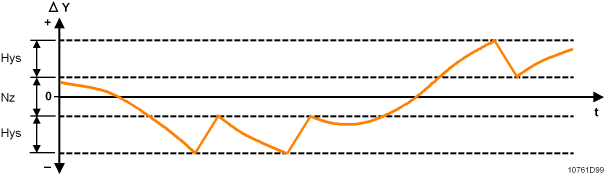
"Neutral zone" defines the insensitive area of the controller around the setpoint. If the absolute sum of the control difference is smaller than half the neutral zone ("Setpoint" – "Controller input" < "Neutral zone"/2), then the manipulated variable is tracked during 7 process cycles at "controller output" (Present-Value). Afterwards, the "controller output" is constant until the control difference is outside the "neutral zone". The "controller output" takes over again the manipulated variable calculated. "Neutral-Zone" will not be used if Controller-Type = staged "Units for differential value" indicates the engineering units of "Neutral-Zone". Range: 0...40 | ||
Units for differential value ✳ |
|
|
|---|---|---|
"Units for differential value" indicates the engineering units of the properties "Hysteresis switch-on" and "Hysteresis switch-off ". The property is set up during engineering. | ||
Integral action time Tn |
|
|
|---|---|---|
"Integral action time Tn" defines the integral gain parameter used by the loop. The property is set up during engineering. The property is not used for staged controllers. | ||
Units for integral action time |
|
|
|---|---|---|
"Units for integral action time" indicates the engineering units of "Integral action time Tn". Integral-Constant-Units are not used if Controller-Type = staged. | ||
Derivative action-time Tv |
|
|
|---|---|---|
"Derivative action-time Tv" defines the derivative gain parameter used by the loop. The property is set up during engineering. The property is not used for staged controllers. | ||
Units for derivative action-time ✳ |
|
|
|---|---|---|
"Units for derivative action-time" indicates the engineering units of the property "Derivative action-time Tv". Derivative-Constant-Units will not be used if Controller-Type = staged | ||
Change of value, COV ✳ |
|
|
|---|---|---|
'Change of value, COV' specifies the minimum change in 'Present value' property that will cause a COV notification to be issued to change-of-value subscribers of this object. | ||
Property ID: 22 | ||
Update count ✳ |
|
|
|---|---|---|
"Update count" represents the number of times that the "Present value" property has been updated.
| ||
Event state |
|
|
|---|---|---|
"Event state" provides a way to determine if this object has an active event state associated with it. The "Event state" property indicates the event state of the object. Changes in the "Event state" property to the value FAULT are considered to be fault events. If the object does not support intrinsic reporting, then the value of this property is NORMAL. | ||
Property-ID: 36 | ||
Object access level ✳ |
|
| ||
|---|---|---|---|---|
"Object access level" defines the instance-specific object access level. "Object access level" is used for generic filtering and processing an object by a client application.
| ||||
Access level | Name | Description | ||
7 | Basic operation | Access to BACnet objects and properties for a room user e.g. data points visible on a room unit. | ||
6 | Standard operation | Access to BACnet objects and properties for standard operation and monitoring (daily business), .e.g. room and plant information on a management station. | ||
5 | Extended operation | Access to BACnet objects and properties for extended operation and monitoring such as network and device objects. All I/Os are visible | ||
4 | Administrator | Not used by HQ solutions yet. | ||
3 | Basic service | Access to BACnet objects and properties used for commissioning, e.g. configuration value extensions, I/O extensions, etc. | ||
2 | Extended service | Not used by HQ solutions yet. | ||
1 | Internal | Access to all BACnet objects and properties for very specialized actions e.g. during development. | ||
Object usage ✳ |
|
|
|---|---|---|
"Object usage" indicates whether the object is used or unused. The "Object usage" property can hide or display respective objects and their functionality in a client. For example, room functionality can be marked for flexible room arrangements as used/unused. An object that is marked as unused behaves as if the object does not exist. | ||
Property ID: 4930 | ||
Description |
|
|
|---|---|---|
"Description" is a string of printable characters whose content is not restricted. | ||
Object name |
|
|
|---|---|---|
"Object name" represents a name for the object that is unique internetwork-wide. The minimum length of the string is one character. The set of characters used in the "Object name" are restricted to printable characters. | ||
Object identifier |
|
|
|---|---|---|
"Object identifier" is a numeric code that is used to identify the object. It must be unique internetwork-wide. | ||
Object type |
|
|
|---|---|---|
"Object type " indicates membership in a particular object type class. E.g. "Analog input", "Binary output", "Event enrollment", "Trend log", etc. | ||
Profile name |
|
|
|---|---|---|
"Profile name" indicates the name of an object profile to which this object conforms. To ensure uniqueness, a profile name must begin with a vendor identifier code followed by a dash. All subsequent characters are administered by the organization registered with that vendor identifier code. The vendor identifier code that prefixes the profile name indicates the organization that publishes and maintains the profile document named by the remainder of the profile name. | ||
Comment |
|---|
A string of printable characters whose content is not restricted. (property is only used in ABT Pro) |
Version |
|---|
Version of a copied object (copied from a library). (property is only used in ABT Pro) |
Library reference |
|---|
Source of a copied object (copied from a library). (property is only used in ABT Pro) |