Fume hood sash, double vertical and external (FhSash12)
Overview
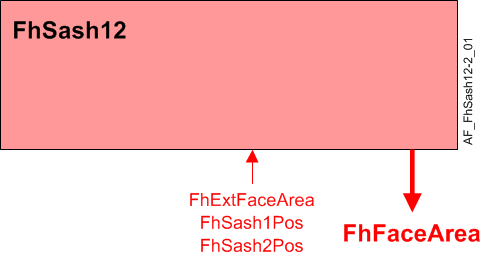
The application function "Fume hood sash 12, double vertical and external" (FhSash12) is used to calculate the face area of a fume hood with two side by side vertical sashes.
Main features:
- Face area calculation
- Face area valid signal
Function
| Command or request (or related) |
| Notification of condition or status, or availability |
| Device mode |
| Interlock (internal signal, not a BACnet object; see Interlocks section for additional information) |


Face area calculation:
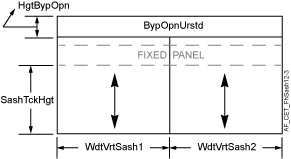
Face area is a calculated value that uses the following:
- FhSash1Pos – Sash position from the sash sensor, analog input value.
- FhSash2Pos – Sash position from sash sensor 2, analog input value.
- FhExtFaceArea – External face area, analog input value.
- SashTckHgt – The height of the sash track, analog configuration extension item.
- WdtVrtSash1 – The width of vertical sash 1, analog configuration extension item.
- WdtVrtSash2 – The width of vertical sash 2, analog configuration extension item.
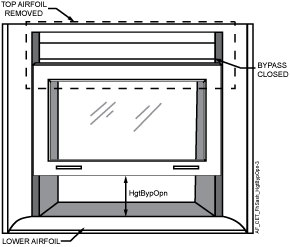
- HgtBypOpn – Height of bypass opening, analog configuration extension item.
- BypOpnUrstd – Unrestricted bypass opening, analog configuration extension item.
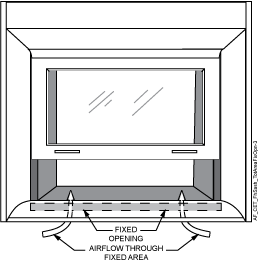
- TotAreaFixOpn – Total area of fixed openings, analog configuration extension item.
- ExtFaceArea – External face area is used, binary configuration extension item.
- AreaSenFail – Area on sensor failure, analog configuration extension item.
- FhFaceArea – Fume hood face area, analog calculated value, for monitoring only.
|
|
Note
FhExtFaceAreais only used in the FhFaceArea calculation when ExtFaceArea is set to yes.
Face area valid signal: The FaceAreaVld output is used by other modules to determine if the general fume hood failure alarm should be active and to set other objects to valid.
The FaceAreaVld signal is a combination of valid signals from the sash 1 position sensor and external face area. ExtFaceArea is used to determine if there is an active external face area device.
The output will only be ON and FhFaceArea will only be set valid when:
- sash 1 position sensor, sash 2 position sensor and external face area are valid, and external face area is active.
OR
- sash 1 position sensor and sash 2 position sensor are valid, and external face area is not active.
Note
Sash sensor(s) must be calibrated. See Sash calibration and verification in Technical principals for more information.
Feature configuration
Feature selections for "Room HVAC coordination" are accessed via the Application configuration task in the Configuration component.
Feature (AF) | Feature description | Ref. |
|---|---|---|
Trend for fume hood face area | None/Active | ☑ |
Configuration
 Parameters
Description | Parameter | Default value |
|---|---|---|
External face area ▶ Set to Yes if a Sash Open Area Module is connected on SCOM. 0:No | ExtFaceArea | 0:No |
Sash track height | SashTckHgt | 0 [cm] |
Width of vertical sash 1 | WdtVrtSash1 | 0 [cm] |
Width of vertical sash 2 | WdtVrtSash2 | 0 [cm] |
Height of bypass opening | HgtBypOpn | 0 [cm] |
Unrestricted bypass opening | BypOpnUrstd | 100 [%] |
Total area of fixed openings | TotAreaFixOpn | 0 [m2] |
Area on sensor failure | AreaSenFail | 0.5 [m2] |
Length unit | LngtUnit | [cm] |
Area unit | AreaUnit | [m2] |
Interface
Interface | Description | Type | Ref. | Owned by |
|---|---|---|---|---|
FhExtFaceArea | Fume hood external face area | AI | ◉ | Room segment / Field device |
FhSash1Pos | Fume hood sash 1 position | AI | ◉ | Room segment / Field device |
FhSash2Pos | Fume hood sash 2 position | AI | ◉ | Room segment / Field device |
FhFaceArea | Fume hood face area | ACalcVal | ● | - |
TrndFhFaceArea | Trend for fume hood face area | FtrSel | ● | - |
Engineering and commissioning
Optional.