[INTEGRAL] Integral function
Function block INTEGRAL calculates the area of the integrated input value over time.
INTEGRAL calculates the area for an integrated input value over time.

The units of the integrated sums can be modified using a conversion factor.
INTEGRAL cyclically acquires the input value [In] and integrates it by time. The present result is provided at output [Out].
Input enable function [EnFnct] can be used to start the integration. For [EnFnct] = 0, the value on output [Out] is set to 0.0 and the present integrated sum is retained internally.
Set start value
The output value [Out] for the integrated sum can be set to a predefined start value on input [SttVal], prior to or during the integration process. The start value must be less than the counter limit. The output value is set to the start value, if the value on input set start value [SetStt] is set to 1.
Set counter limit
The counter value limit [CntValLm] is the high limit for the integrated sum, at which the integration is restarted and [LmRd] is set to 1 for one cycle.
Set conversion factor
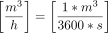
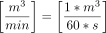
INTEGRAL uses the unit seconds for time in internal calculations. The conversion factor can be set if a value on input [In] is in minutes or hours.
Input value [Unit] | Conversion | Conversion factor | Modified input value [Unit] |
|---|---|---|---|
|
| 0.000278 |
|
|
| 0.016667 |
|




Enable negative value count
If the input [EnCntDn] is set to 1, the function block considers the negative input values. As a result, sums with negative values can be generated at the output.
If only positive input values are expected, [EnCntDn] can be set to 0 to avoid processing measurement errors.
Input | Description | Data type | Default value |
|---|---|---|---|
EnFnct | Enable function Enables the function. | Boolean | 1 |
0 - The function is disabled. | |||
In | Input | Real | 0.0 |
SetStt | Set start value | Boolean | 0 |
0 - Do not set start value. | |||
SttVal | Start value | Real | 0.0 |
CntValLm | Counter value limit The limit for the integrated sum. | Real | 0.0 |
CnvFac | Conversion factor Conversion factor to modify the unit for the output value. | Real | 1.0 |
EnCntDn | Enable count for negative values | Boolean | 1 |
0 - Ignore negative values. | |||
TshVal | Threshold value Configured value to control function block write attempts. An attempt is permissible only if the change of value is greater than or equal to [TshVal]. Note | Real | 0.1 |
Pers | Persistent | Boolean | 0 |
0 - No | |||
|
BaObjRef | BA-Object reference | Structure | --- |
BaObjRef | Device identifier | Double Word | 16#3FFFFF |
BaObjRef | Object identifier | Double Word | 16#3FFFFF |
BaObjRef | Item identifier | Integer | -1 |
Output | Description | Data type | Default value |
|---|---|---|---|
Out | Output | Real | 0.0 |
LmRd | Limit reached Triggers an impulse if [Out] is greater than or equal to [CntValLm]. | Boolean | 0 |
Dstb | Disturbed [Dstb] indicates whether the referenced BACnet object was accessed. | Boolean | 0 |
ErrCode | Error code indication | Integer | 0: No error |
= 0 - No error | |||
INTEGRAL is used wherever input values are summed up over time:
- Calculate volume [m3] from volume flow [m3/s]
- Calculate electrical energy [kWh] from electrical power [kW]
The function blocks reads the last saved integral value from the BACnet object at start up and uses the value as the first integral sum if [Pers] = 1. The integral sum begins at 0 in the event of an error, or if [Pers] = 0.
The properties 'top row value' and 'old start value' are must be available on the associated BACnet object as extension property ('Extension by persistence' = 'Integral').