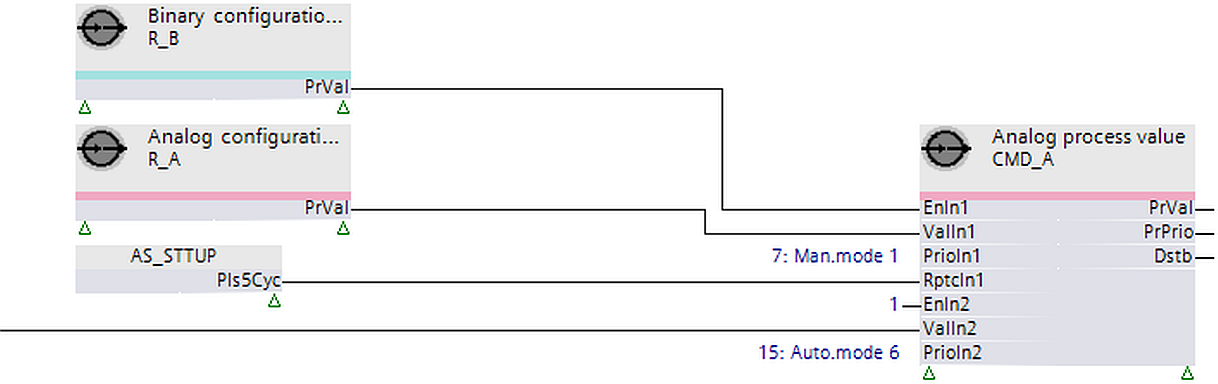
[CMD_A] Command Analog

Function block CMD_A commands property 'Present value' at a specific priority for a single, analog data point (or releases this priority).

CMD_A commands property 'Present value' at a specific priority for a single, analog data point (or releases this priority). CMD_A reads properties 'Present value' and 'Present priority' to check whether these values were changed and a new commanding is required.

Functioning

Compatible data points:

  • Analog output [AO]
  • Analog process value [APrcVal]
  • Third-party objects that include the required properties and support the priority mechanism.

Required properties:

  • Present value
  • Status flag
  • Priority array
  • Present priority

Optional properties:

  • Reliability
  • Extension by event configuration
  • Event state
  • Acknowledged transitions
  • Extension by data aggregation
  • Maintenance state
  • Operating hours
  • Suppress event notification
  • Suppress event detection
  • Enable aggregation

Operate with priorities

The function block uses 2 approaches to control if operating with priorities:

1. Exclusive control (planned for priorities 1..5, 9..12, 14..16)

  • Only one command source is permitted for a data point priority.
    • A function block on a project can command this priority.
    • An input set of a function block can command this priority.
  • The function block commands the priority anew or releases it if a priority is used from a function block and another commanding source changes this priority.

2. Last win control (planned for priorities 7, 8, 13)

  • Multiple, command sources can use the same priority.
    • The last commanded value (release) remains on the priority until a new command is performed by one of the commanding sources.


Exclusive control
Priorities: 1...5, 9...12, and 14...16

Last win control
Priorities: 7, 8, and 13

Behavior at plant startup

[EnIn1] = 0
Release priority.

[EnIn1] = 0
No release.

[EnIn1] = 1
Command priority.

[EnIn1] = 1
No command.

Command process

If [EnIn1] changes from 0 to 1.

If [EnIn1] changes from 0 to 1.

If [EnIn1] = 1 and [ValIn1] changes.

If [EnIn1] = 1 and [ValIn1] changes.

If [EnIn1] = 1 and [RptcIn1] = 1.

If [EnIn1] = 1 and [RptcIn1] = 1.

Release

If [EnIn1] changes from 1 to 0.

If [EnIn1] changes from 1 to 0.

If [EnIn1] = 0 and [RptcIn1] = 1.

If [EnIn1] = 0 and [RptcIn1] = 1.

Behavior in the event of commanding from another source

[EnIn1] = 0
Priority remains released.

[EnIn1] = 0
Priority is not released by the function block.

[EnIn1] = 1
Priority remains commanded with a value of [ValIn1].

[EnIn1] = 1
Priority is not commanded by the function block.

The data point periodically saves the value of priority 8 to controller memory. After a power outage, the value is restored in the property 'Priority array' and evaluated by the data point. All other priorities are not saved to controller memory.

Operation with other input sets of function block ([EnIn2]...[EnIn4], [ValIn2]...[ValIn4], [RptcIn2]...[RptcIn4]) is the same.

Pins

Input

Description

Data type

Default value
Value range

EnIn1EnIn4

Enable input 1Enable input 4

[EnIn1] determines whether [ValIn1] is commanded at the priority from [PrioIn1] or the priority is released.
[EnIn1] belongs to one of four input sets, each including [ValInX], [EnInX], [PrioInX] and [RptcInX]. These input sets are used to command the data point(s) at different priorities as needed.
[EnIn1] can be configured by the developer or linked to the chart and calculated by the control program during runtime.
The functionality of [EnIn2]…[EnIn4] is the same as [EnIn1].

Boolean

0

0 - Priority of [PrioIn1] is released if not active at the moment by setting another [EnInX] to 1.
1 - The priority for [PrioIn1] is commanded.

ValIn1ValIn4

Value input 1Value input 4

The value for commanding at [PrioIn1].
[ValIn1] can be configured by the developer or linked to the chart and calculated by the control program during runtime.
[ValIn1] is commanded at the priority from [PrioIn1] in the following cases:

  • If [EnIn1] is 1 is and [ValIn1] changes by a value, that is greater than or equal to [TshVal].
  • If [EnIn1] is 1 and [ValIn1] includes a limit value such as 0.0 or 100.0 ([TshVal] is ignored).

The functionality from [Valid2]...[Valid4] is the same as [VaIln1].

Real

0.0

PrioIn1PrioIn4

Priority input 1Priority input 4

Integer

17

[PrioIn1] belongs to one of 4 input sets and receives the priority that accompanies [ValIn1].
[PrioIn1] can be configured and cannot be changed during runtime. Value 17 means that the input is not used.
The functionality from [PrioIn2]...[PrioIn4] is the same as for [PrioIn1].
Priority range:
1...16 (see limitations to priorities 6 and 8 later).

Exclusive control:
Priorities 1...5, 9...12, and 14...16

During startup, the function block can use exclusive control to initialize the assigned priorities in ranges 1...5, 9...12 and 14...16.

During runtime, the function block retains exclusive control. If external overwriting is signaled, the function block can newly command or release at the priority of [PrioIn1].

Two or more input sets on the same function block cannot have a common, exclusive control priority, as this will result in conflicts.

Last wins:
Priorities 7, 8, and 13

No initialization of priorities during startup.

During runtime, the last valid command controls priority.

If 2 or more input sets have the same priority and are commanded concurrently, only the input set with the first numeric order is performed (In1...In4).
If 2 or more input sets have the same priority and the same conditions for commanding and releasing are issued concurrently, the command operation wins.

Prio 6:
Each BACnet object reserves command priority 6 for min. on/off time functionality. Commands at priority 6 are rejected by the BACnet object.
For min. on/off time functions, the control program must contain a logic and use another priority.

Prio 8:
Command priority 8 is planned for manual operation and is typically unassigned on the function block. Last wins functionality allows the control program to change an operator command.

RptcIn1RptcIn4

Repeat command input 1Repeat command input 4

[RptcIn1] repeats a command or releases a priority.
If [RptcIn1] = 1 and [EnIn1] = 1, the function block repeats a command from [ValIn1] in each programming cycle with the priority from [PrioIn1].
If [RptcIn1] = 1 and [EnIn1] = 0, the function block forces a release of the priority from [PrioIn1] on each programming cycle.
The functionality from [RptcIn2]...[RptcIn4] is the same as for [RptcIn1].
Note
[RptcIn1] may not be permanently forced to 1. This may impact performance or network traffic.
[RptcIn1] can be linked and typically is calculated and set by the control program.

Boolean

0

TshVal

Threshold value

Configured value to control function block write attempts. An attempt is only permitted if the change of value is greater than or equal to [TshVal].
Exception: [TshVal] is ignored if the new value is a limit value such as 0.0 or 100.0.

Note
Cannot be set to 0.0.

Real

0.1

SupEvtDet

Suppress event detection

Suppresses the detection of events.
Note
If the extension for 'Intrinsic reporting' is not enabled, the input value is not considered in the function of the function block.
If the same BACnet object is accessed by multiple functions in a control program, only one of these function blocks may interconnect to the pin.
The function is not available for BACnet third-party objects.

Boolean

0

SupEvtNtf

Suppress event notification

Suppresses notification of events.
Note
If the extension for 'Intrinsic reporting' is not enabled, the input value is not considered in the function of the function block.
If the same BACnet object is accessed by multiple function blocks in the control program, only one of these function blocks may interconnect to the pin.
The function is not available for BACnet third-party objects.

Boolean

0

EnDataAgn

Enable data aggregation

Permits activation or deactivation of data aggregation.
Note
If the extension for data aggregation is not enabled, the input value is not considered in the function of the function block.
If the same BACnet object is accessed by multiple blocks in the control program, only one of these function blocks may interconnect to the pin.
The function is not available for BACnet third-party objects.

Boolean

0

BaObjRef

BA-Object reference
Link between function block and BACnet object.

Structure

---

BaObjRef
> DeviceID

Device identifier
[DeviceID] includes object type and object instance in one ID.
Identifies the device object: local or remote. A local device object can also be identified by value 16#3FFFFF.

Double Word

16#3FFFFF

BaObjRef
> ObjectID

Object identifier
[ObjectID] includes object type and object instance in one ID.
Identifies the object on a device.

Double Word

16#3FFFFF

BaObjRef
> ItemID

Item identifier
[ItemID] represents an index in a view node object that references the BACnet object.
[ObjectID] and [ItemID] together define an indirect reference to the BACnet object.
Value -1 indicates a direct interface.

Integer

-1


Output

Description

Data type

Default value
Value range

PrVal

Present value

Value of property 'Present value' for the referenced BACnet object. [PrVal] supplies the last valid value in the event of a fault.
Note
[PrVal] supplies the overridden output value if the associated object is overridden. Display of the overridden value is not available for third-party objects.

Real

0.0

PrPrio

Present priority

Active priority of the referenced BACnet object.

[PrPrio] is set to:

  • Active priority if access to property 'Present priority' can be accessed.
  • 17, if all priorities are released or if no access to property 'Present priority' is possible.
  • 0, if the BACnet object is overridden.

Integer

Default

Overridden
Prio 1 Emergency, manual
Prio 2 Emergency
Prio 3 Emergency
Prio 4 Protection
Prio 5 Protection
Prio 6 Minimum On/Off time
Prio 7 Manual, switch
Prio 8 Manual, system operator
Prio 9
Prio 10
Prio 11
Prio 12
Prio 13 Manual, building user
Prio 14
Prio 15
Prio 16
Default

Dstb

Disturbed

[Dstb] indicates whether the referenced BACnet object is in fault or in state OffNormal. When the BACnet object returns to state Normal, [Dstb] retains its value until the transition to normal is acknowledged.
[Dstb] = 1, if:
BACnet object = Access error
OR
'Status flag' = Fault
OR
'Event state' <> Normal

[Dstb] = 0, if the above condition is not fulfilled AND 'Acknowledged transitions' = x, x, 1.

Note
Properties 'Event state' and 'Acknowledged transitions' are not considered if the BA-Object has an alarm extension set to disabled.
Output [Dstb] does not retain the value after a restart following a power outage if the state of the BACnet object is normal.
Properties 'Event state' and 'Acknowledged transitions' are not considered on BACnet third-party objects.

Boolean

0

Flty

Faulty

[Flty] indicates whether the last event on the referenced BACnet object was in fault. If the BACnet object returns to the normal state, [Flty] retains its value until the transition to normal is acknowledged.
[Flty] = 1, if:
BACnet object = Error during access
OR
'Status flag' = Fault

[Flty] = 0, if the above condition is not fulfilled AND one of the following possibilities is valid:

  • 'Event state' = Upper limit
  • OR
  • 'Event state' = Lower limit
  • OR
  • 'Event state' = Normal AND 'Acknowledged transitions' = x, x, 1

Note
Properties 'Event state' and 'Acknowledged transitions' are not considered if the BA-Object has an alarm extension set to disabled.
Output [Flty] does not retain the value upon restart after a power outage if the state of the BACnet object is normal.
Properties 'Event state' and 'Acknowledged transitions are not considered for BACnet third-party objects.

Boolean

0

HiLmRd

High limit reached

Indicates if the last event on the referenced BACnet object has state Offnormal based on reaching the upper limit. When the BACnet object returns to state Normal, [HiLmRd] retains its value until the transition to normal is acknowledged.
[HiLmRd] = 1, if:
BACnet object = Access successful
AND
'Status flag' = No fault
AND
'Event state' = Upper limit

[HiLmRd] = 0, if the above condition is not fulfilled OR one of the following possibilities is valid:

  • 'Event state' = Lower limit
  • 'Event state' = Normal AND 'Acknowledged transitions' = x, x, 1

Note
Properties 'Event state' and 'Acknowledged transitions' are not considered if the BA-Object has an alarm extension set to disabled.
Output [HiLmRd] does not retain the value upon restart after a power outage if the state of the BACnet object is normal.
The function is not available for BACnet third-party objects.

Boolean

0

LoLmRd

Low limit reached

Indicates if the last event on the referenced BACnet object has state Offnormal based on reaching the lower limit. If the BACnet object returns to state Normal, [LoLmRd] retains its value until the transition to normal is acknowledged.
[LoLmRd] = 1, if:
BACnet object = Access successful
AND
'Status flag' = No fault
AND
'Event state' = Lower limit

[LoLmRd] = 0, if the above condition is not fulfilled OR one of the following possibilities is valid:

  • 'Event state' = Upper limit
  • 'Event state' = Normal AND Acknowledged transitions = x, x, 1.

Note
Properties 'Event state' and 'Acknowledged transitions' are not considered if the BA-Object has an alarm extension set to disabled.
Output[LoLmRd] does not retain the value upon restart after a power outage if the state of the BACnet object is normal.
The function is not available for BACnet third-party objects.

Boolean

0

Rlb

Reliability
Indicates the value of property 'Reliability', if the property is available.

Integer

0: No fault detected

Oph

Operating hours

Displays the value of the property operating hours for the referenced BACnet object
Note
The output is set to 0, if the extension for data aggregation is disabled or the property does not exist. The function is not available for BACnet third-party objects.

Double Word

0

MntnSta

Maintenance state

Supplies the value for property 'Maintenance state' for the referenced BACnet object.

Integer

1

1: None
2: Limit present period exceeded
3: Limit exceeded

Note
The output is set to 1 if the extension for data aggregation is disabled or the property does not exist.
The function is not available for BACnet third-party objects.

ErrCode

Error code indication

Integer

0: No error

= 0 - No error
> 0 - XFB error codes

Troubleshooting

Values for manual priorities are not written after startup. Use the following programming logic to write manual priorities after startup: