Startup function and alarm handling for flat plants
There are various ways to perform alarm indication and alarm acknowledgement.
In addition, a routine is available to automatically acknowledge alarms when automatically starting up the plant.
The settings are made in the nested plan SttUpAlmHdl Startup and alarm handling.
Example: Start-up function in plant example Ahu21 Air handling unit
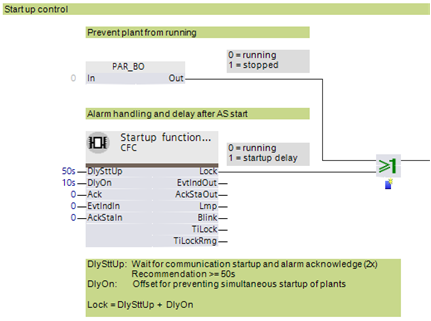
The terms events and alarms are synonymous below for our purposes.
Individual plants can be switched off in the Programming editor. PAR_BO is set to 1 to this end. This may be desirable, for example, if multiple plants are included on one automation station, but only a portion of the plants are operated, since not all parts are operational.
Startup behavior
The following functionality is available for an automatic startup of the plant, e.g., after a loss and subsequent return of power:
- Fixed switch-on times. These can be set on input [DlySttUp]. The output [Lock] is "True" and the plant remains switched off. The plant remains off to ensure that communications are reliable and cross-check references are triggered.
- Automatic acknowledge (2x) of possible pending alarms during a fixed switch-on delay.
- Additional adjustable delay for staged plant ramp-up. This can be set on input pin [DlyOn].
- Output [TiLock] displays the entire period of the delay, i.e., [DlySttUp] + [DlyOn].
- Output [TiLockRmg] displays the remaining time until the output [Lock] is set to "False".
Example: Return of power after a power outage
- Fixed switch-on delay [DlySttUp] = 50 [s]
- Timeframe for automatic acknowledge = 20 [s]. Can be set in the nested chart SttUpFnct at input [In] of PAR_TI.
- Plant delay [DlyOn] = 10 [s] to prevent all plants from starting at the same time (avoiding voltage peaks).
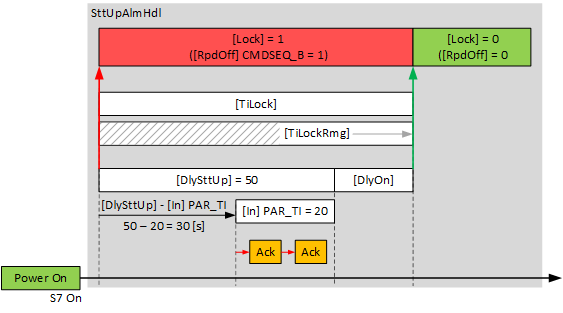
Workflow in nested plant SttUpAlmHdl
The controller starts and the S7 process (Simatic version 7) operates.
- Output [Lock] is 1, activating the general exception mode. This switches off all plant components at priority 5.
- The first 30 [s] are used to establish communications (50 [s] - 20 [s]).
- In the following 20 [s], all alarms pending on a plant are automatically acknowledged twice (Ack).
- The entered additional delay [DlyOb] takes effect.
- Output [Lock] is set to 0 and the plant goes to normal operation.
Output [TiLock] displays the entire period of the delay, in other words [DlySttUp] + [DlyOn].
An exception is reported as the reason for the present operating mode.
Output [TiLockRmg] displays the remaining time until the output [Lock] is set to 0.
Alarm handling in nested plant SttUpAlmHdl
The state of events on the plant is acquired by BACnet object 'Plant state'. The state is mapped on CMN_EVT.
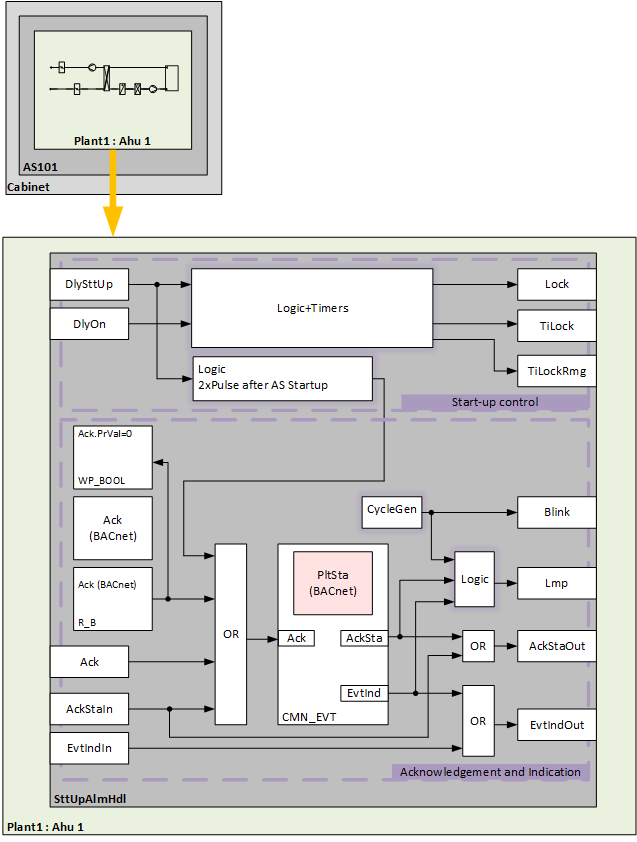
The following functions are available:
- Automatic acknowledge (2x) after startup
- Alarm acknowledgement with a value object
- Logic for alarm indication:
- On for pending alarms
- Flashing for unprocessed alarms - Connect an acknowledge button [BI]
- Connect an alarm indication, e.g. an alarm lamp through an output block [BO]
- Connect to other alarm handling functions on other plants, e.g. acknowledge button and alarm indication for multiple plants in the same control cabinet
Automatic acknowledge (2x) after startup
After controller startup and a short delay, a logic automatically generates two impulses that affect the input [Ack] of CMN_EVT.
Alarm acknowledgement with a value object
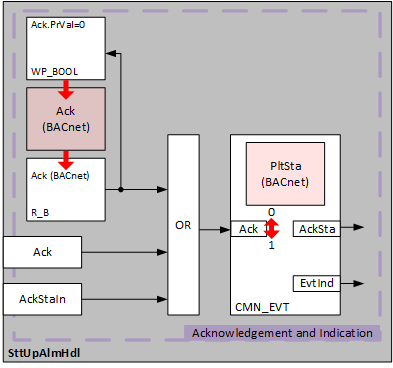
Within the nested chart SttUpAlmHdl, alarm acknowledgement is prepared using a software acknowledge button.
The BACnet object Acknowledgement (Ack) acknowledged the impulses. The present value is acquired using an input block R_B (Read Binary) and transferred to input [Ack] of function block CMN_EVT. The property 'Present value' of the BACnet object Ack acknowledges by setting a BACnet client to 1.
In order for operation to mimic a button, the property 'Present value' of the BACnet object ACK must automatically reset to 0. A timer logic is prepared for this. If [Ack.PrVal] = 1, the logic writes, after a period of 2 [s] via function block WP_BOOL connected to [Ack.PrVal], the value [Ack.PrVa] l= 0.
Alarm indication
The CMN_EVT has two outputs for alarm indication:
- EvtInd
The value of the output is 1 on a pending alarm, in other words, if, in the hierarchy level (or lower) of the object Alarm state, at least one event of BACnet type 'Offnormal' or 'Fault' is active. - AckSta
The value of the output is 1 on an unprocessed alarm, in other words, if, in the hierarchy level (or lower) of object Plant state, a state transition (To-Fault, To-OffNormal) is unacknowledged on at least one object.
The two outputs are evaluated and are forwarded to output [Lmp] of the nested chart SttUpAlmHdl. An output block BO can be connected via a CMD_B to control an alarm lamp.
Pending alarm [EvtInd] | Unprocessed alarm [AckSta] | [FltInd] |
|---|---|---|
|
0 | 0 | Off |
1 | 0 | Steady on |
1 | 1 | Flashing |
0 | 1 | Flashing |
The cycle generator for flashing is designed as an output [Blink]. The same cycle can be used from the output for other indications, e.g. for an operating lamp during startup.
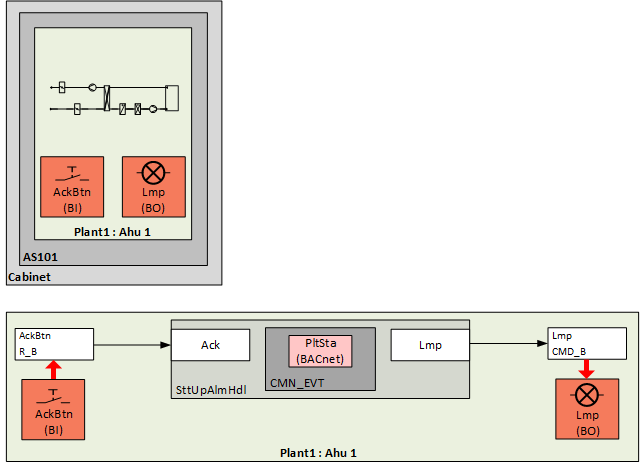
Example: Alarm indication and acknowledge button for 1 automation station with 1 plant
1 automation station includes 1 plant.
Events are indicated by an alarm indication (e.g. lamp) on the front of the control cabinet and acknowledged using an acknowledge button.
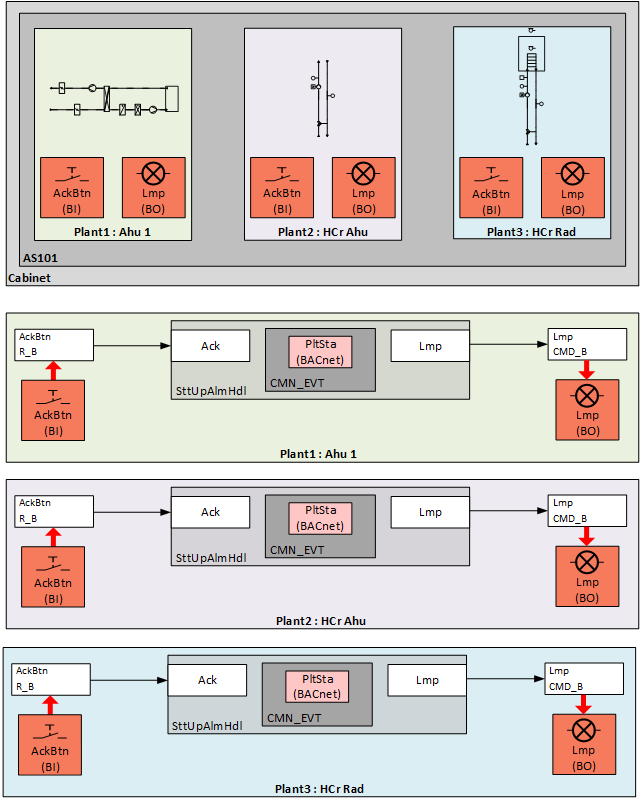
Example: Separate indication and acknowledge button for 1 automation station with 3 plants
1 automation station includes 3 plants.
Events for each of the three plants are indicated by an alarm indication (e.g. lamp) on the front of the control cabinet and acknowledged using an acknowledge button.
Example: Common alarm indication and acknowledge button for 1 automation station with 3 plants
1 automation station includes 3 plants and alarm handling
Events collected for the three plants are displayed on the front of the control cabinet via an alarm indication (e.g. lamp) and acknowledged with an acknowledge button.
Alarm handling is defined on the same automation station as the additional plant.
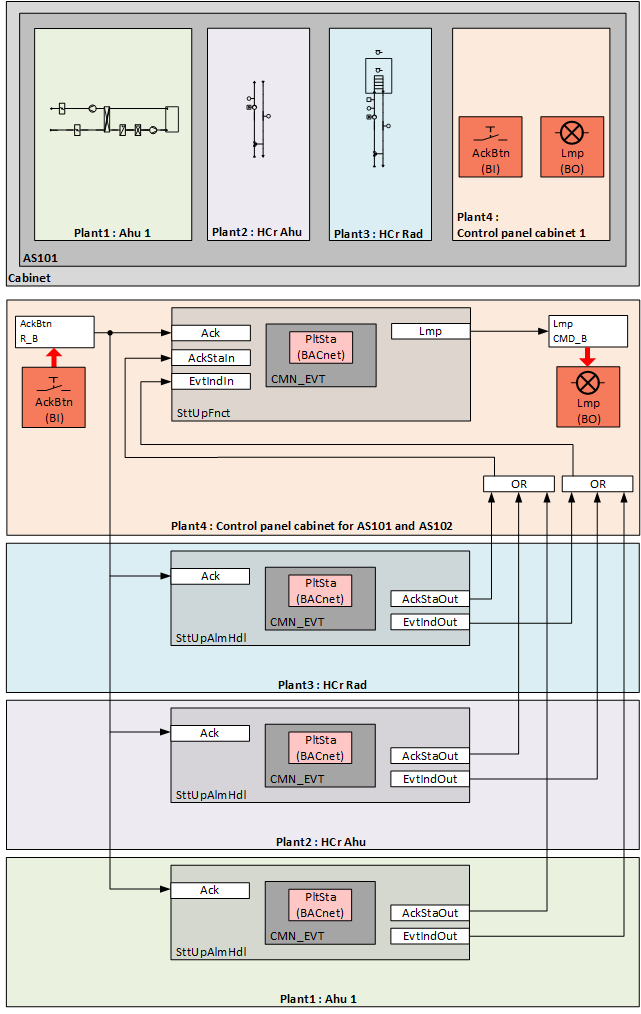
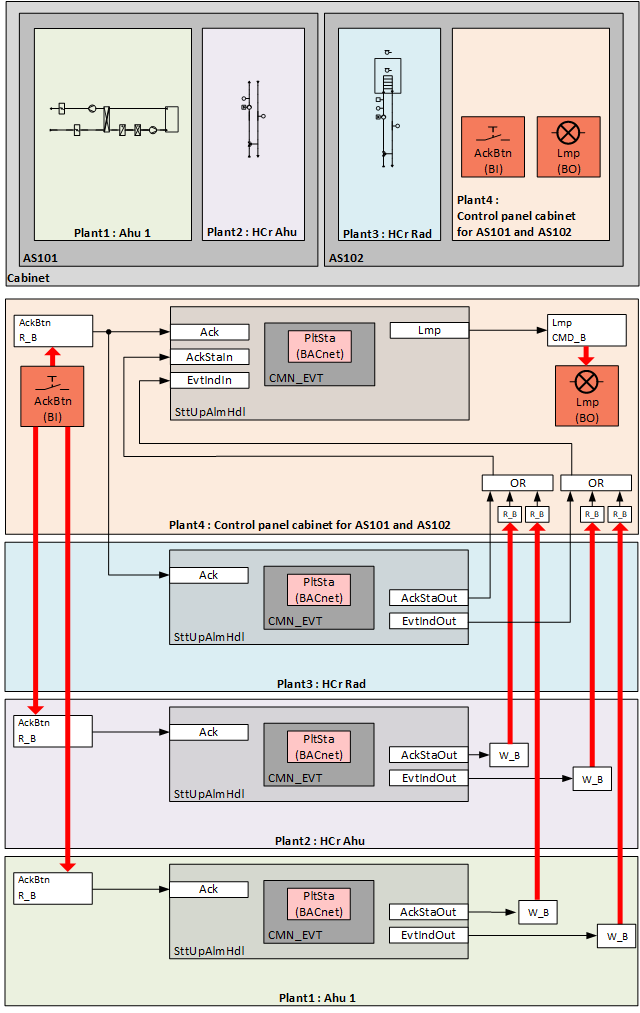
Example: Common alarm indication and acknowledge button for 2 automation stations with 3 plants in the same control cabinet.
2 automation stations include 3 plants and alarm handling
Events collected for the three plants are displayed on the front of the control cabinet via an alarm indication (e.g. lamp) and acknowledged with an acknowledge button.
Alarm handling is defined on the second automation station as the additional plant.