Binary process value (BPrcVal)
Object type binary process value (BPrcVal) includes the BACnet properties for one binary process value.
There is a dependency between 'Name', 'Description' and 'Naming extension'. Any changes to one impacts the other two properties.
Note:
The dependency can be eliminated by entering a project-specific text.
Example 1:
The preconfigured 'Description' "Supply air humidity" sets the 'Name' to "HuSu" if selected. If "Abs" is selected as a supplement to the 'Naming extension', the description is supplemented by "(Absolut)" to "Supply air humidity (absolute)" and the name becomes "HuSu(Abs)". The name also forms the last element of the object name.
Example 2:
The preconfigured 'Description' "Room temperature" sets the 'Name' to "TR" if selected. Selecting "01" (project-specific text) in addition to 'Naming extension', results in the 'Name' "TR(01)". The name also forms the last element of the object name.
Name |
|
|
|---|---|---|
'Name' is a name specific to the instance. It is used to set up a hierarchical object name. | ||
Property ID: 4438 | ||
Description |
|
|
|---|---|---|
'Description' describes a BACnet object. The 'Description' is a translatable string that is saved internally as a text reference or directly as a string. | ||
Property ID: 28 | ||
Name extension |
|
|
|---|---|---|
'Name extension' is an optional extension of the name. It uniquely identifies an object or to distinguish objects. | ||
Property ID: 4437 | ||
Note
Designations from the text catalog can also be used for the 'Naming extension'.
Alarming is implemented under the principle of intrinsic reporting within a BACnet object.
Select the "Properties" tab to add the extension, select 'Yes' in the "Enable event" field. The BACnet properties required for the setting are displayed in ABT Site and the Programming Editor under the "Properties" tab.
Alarming
Overview
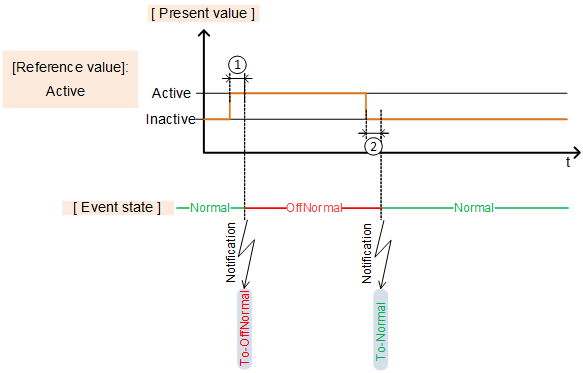
① 'Monitoring time deviation'
② 'Monitoring time deviation to normal'
Enable event |
|
|
|---|---|---|
'Enable event' enables the alarm function. The BACnet properties required to set the function are displayed. For setting 'Yes', the settings 'Extension with event configuration' is set to 'Intrinsic event registration'. | ||
Property ID: 35 | ||
Reference value |
|
|
|---|---|---|
'Reference value' determines the value that results in state "OffNormal". | ||
Property ID: 6 | ||
Monitoring time deviation |
|
|
|---|---|---|
'Monitoring time deviation' determines the time in [s], during which the present value must be equal to the reference value before an event "To-OffNormal" is triggered. | ||
Property ID: 113 | ||
Monitoring time deviation to normal |
|
|
|---|---|---|
'Monitoring time deviation to normal' determines the time in [s], during which the present value cannot be not equal to the reference value before an event "To-Normal" is triggered. | ||
Property ID: 356 | ||
Notification class |
|
|
|---|---|---|
'Notification class' determines the priority of an event and whether the event must be acknowledged or reset. The following are the notification classes: | ||
Property ID: 17 | ||
Enable event detection |
|
|
|---|---|---|
'Enable event detection' enables event detection. The "Event state" is always "Normal" with setting 'No'. | ||
Property ID: 353 | ||
Suppress event notification |
|
|
|---|---|---|
'Suppress event notification' determines whether event notifications are suppressed. | ||
Property ID: 4972 | ||
Suppress event detection |
|
|
|---|---|---|
'Suppress event detection' determines whether event detection is suppressed. | ||
Property ID: 354 | ||
Change-of-state time |
|
|
|---|---|---|
Change-of-state time represents the date and time at which the most recent change of state of Present value occurred. | ||
Property ID: 16 | ||
Change-of-state count |
|
|
|---|---|---|
Change-of-state count represents the number of times that Present value changed its state (all active -> inactive and inactive -> active transitions) since the date and time indicated by the Time for state count reset property. | ||
Property ID: 15 | ||
Time for state count reset |
|
|
|---|---|---|
Time for state count reset indicates the date and time at which the counting of state changes of Present value. | ||
Property ID: 115 | ||
Enable Trend |
|
|
|---|---|---|
'Enable trend' enables the trend function. A new BACnet object for type TRENDLOG is instantiated, automatically connected to property "Present value" of the selected object and the BACnet properties required for setting are shown in tab "Properties". | ||
Enable logging |
|
|
|---|---|---|
'Enable logging' enables trend logging. Logging of data points begins as of the start date and start time is reached. Trend logging stops if the stop date and stop time are reached or when the buffer is full (if set). Start date and start time (wildcards) are not defined by default. In other words, the setting 'Enable logging' = 'Yes' immediately starts trending. | ||
Property ID: 133 | ||
Logging Type |
|
|
|---|---|---|
'Logging Type' determines when a data point is trended. | ||
Property ID: 197 | ||
Logging interval |
|
|
|---|---|---|
'Logging interval' determines the interval (cycle) at which the value is logged. The setting takes effect by setting 'polled' for 'Logging Type'. | ||
Property ID: 134 | ||
Start time |
|
|
|---|---|---|
'Start time' determines the date and time to start trend logging. | ||
Property ID: 142 | ||
Stop time |
|
|
|---|---|---|
'Stop time' determines the date and time to end trending logging. | ||
Property ID: 143 | ||
Stop when full |
|
|
|---|---|---|
'Stop when full' determines whether to stop trend logging if the buffer is full. | ||
Property ID: 144 | ||
The setting 'Notification threshold' can determine when an event to retrieve data, e.g. by Desigo CC is triggered before the buffer becomes full.
Buffer size |
|
|
|---|---|---|
'Buffer size' determines the maximum number of values that can be saved to the buffer. The setting 'Stop if full' determines how to proceed if the buffer is full. Note The value for property 'Buffer size' must be greater than or equal to the value for property 'Notification threshold'. | ||
Property ID: 126 | ||
Align intervals |
|
|
|---|---|---|
'Align intervals' determines whether the periodic polling interval is aligned at the start of a specific second, minute, hour, or day. The setting has no effect for 'Logging Type' = 'COV'. This ensures that values from multiple, simultaneous trend logs can be saved at the same time and compared. Alignment is only possible for whole number multiples (1…x) of a second, minute, hour, or day. | ||
Property ID: 193 | ||
Interval offset |
|
|
|---|---|---|
'Interval offset', measured in hundredths of a second, permit cyclical trend logs to be spread out. With lots of active trend logs, this prevents a situation where all values are polled at the same time. Polling can be subdivided by staging in groups. 'Interval offset' is only active if the setting 'Align interval' = 'Yes'. | ||
Property ID: 195 | ||
Notification threshold |
|
|
|---|---|---|
'Notification threshold ' determine when the buffer sends a request to retrieve data. As soon as the set number of data entries is reached, an event notification is sent for the management station to retrieve the data. Data points are deleted from the buffer after retrieval. | ||
Property ID: 137 | ||
Default command |
|
|
|---|---|---|
'Default command' is the default value to be used for property 'Present value' if all priority values for commands have a value of zero in property 'Priority array'. | ||
Property ID: 104 | ||
Suppress fault monitoring |
|
|
|---|---|---|
'Suppress fault monitoring' determines whether the fault supervision (fault events) is suppressed ('Yes'/'No'). The setting 'Yes' suppresses the evaluation of 'Reliability' and the value for 'Reliability' remains on "No fault". | ||
Property ID: 357 | ||
State text |
|
|
|---|---|---|
'State text' specifies the enumeration of the multistate value. Preconfigured enumerations can be selected or set to a project-specific enumeration. | ||
Property ID: 110 | ||
Data aggregation takes place with an extension (data aggregation) within a BACnet object. This includes the corresponding algorithm for data aggregation during a period. The aggregated value of the present period and last period are always displayed. Data aggregation permits operating hours counting as well as virtual metering, calculating key performance indicators and data analysis.
The extension is added with the following setting in tab "Properties":
- 'Enable aggregation' with setting 'Yes'
The setting 'Enable aggregation' = 'Yes', the extension is enabled and the required BACnet properties are displayed.

One BACnet object can have a maximum of one extension with data aggregation. A value that is aggregated to multiple types, requires multiple BACnet objects, each with a data aggregator that references the original object, e.g. one BACnet object for determining the 'Operating hours' and another for determining the 'Average value'.
Aggregation: Operating hours & others |
|
|
|---|---|---|
'Aggregation: Operating hours & others' permits data aggregation. | ||
Property ID: 4580 | ||
Select checkboxes for the following settings:
- 'None': No data aggregation takes place.
- 'Operating hours': No data aggregation takes place. The time is aggregated, while 'Active' applies as the 'Present value' (PrVal=1).
- 'Switch-on count': No data aggregation takes place. The number of switch-ons of the present value are counted.
Enable aggregation |
|
|
|---|---|---|
'Enable aggregation' enables or disables aggregation. | ||
Property ID: 4514 | ||
Aggregation period |
|
|
|---|---|---|
'Aggregation period' sets the duration of the aggregation period. Note | ||
Property ID: 4513 | ||
Select checkboxes to set 'Aggregation period' to 15 minutes, 1 hour, or 1 day. 'Aggregation period' is adapted to the present time on the device and automatically triggers the period at the start of a quarter hour, hour, or day. The aggregation starts at the time the device is started.
Binary operating hours
The binary operating hours permits data aggregation to determine the runtime of the present value.
Note
The time is measured as active time during which the 'Present value' was active (PrVal=1).
Elapsed active time present period |
|
|
|---|---|---|
'Elapsed active time present period' is the expired time in [s] in the present period during which the 'Present value' was active (PrVal=1). | ||
Property ID: 4512 | ||
Elapsed active time previous period |
|
|
|---|---|---|
'Elapsed active time previous period' is the expired time in [s] in the previous period during which the 'Present value' was active (PrVal=1). | ||
Property ID: 4511 | ||
Operating hours |
|
|
|---|---|---|
'Operating hours' represents the aggregated number in [s] during which the property 'Present value' was 'active' (since the property 'Operating hours' was last reset). 'Operating hours' is synonymous with the expired active time. | ||
Property ID: 33 (Standard BACnet property, used for binary objects only) Property ID: 4490 (Proprietary BACnet property, used for analog and multistate objects) | ||
Time stamp for op.hour reset ✳ |
|
|
|---|---|---|
"Time stamp for op.hour reset" includes the date and time at which the property "Operating hours" was most recently set to a zero value. | ||
Property ID: 114 | ||
Elapsed active time limit present period |
|
|
|---|---|---|
'Elapsed active time limit present period' sets the time limit for the present period in [s] for the 'Expired active time present period' after which the 'Maintenance indication' is enabled. | ||
Property ID: 4509 | ||
Elapsed active time limit |
|
|
|---|---|---|
'Elapsed active time limit' sets the time limit in [s] for 'Operating hours' after which the 'Maintenance indication' is enabled. | ||
Property ID: 4510 | ||
Maintenance indication |
|
|
|---|---|---|
'Maintenance indication' supplies a maintenance note. The following maintenance notes can be indicated: 'Normal mode', 'Present period limit exceeded', 'Time limit exceeded'. | ||
Binary switch-on count
The binary switch-on count permits data aggregation to determine the number of switch-ons of the present value.
Switch-on count present period |
|
|
|---|---|---|
'Switch-on count present period' indicates the number of switch-ons of 'Present value' from the present period. | ||
Property ID: 4508 | ||
Switch-on count previous period |
|
|
|---|---|---|
'Switch-on count previous period' indicates the number of switch-ons of 'Present value' from the previous period. | ||
Property ID: 4507 | ||
Switch-on count |
|
|
|---|---|---|
'Switch-on count' indicates the number of switch-ons of 'Present value' since the switch-on count was reset. | ||
Property ID: 4506 | ||
Time of switch-on count reset |
|
|
|---|---|---|
'Time of switch-on count reset' indicates the date and time of the last reset. | ||
Property ID: 4505 | ||
Switch-on count limit present period |
|
|
|---|---|---|
'Switch-on count limit present period' sets the number of switchings after which the 'Maintenance indication' is enabled. | ||
Property ID: 4503 | ||
Switch-on count limit |
|
|
|---|---|---|
'Switch-on count limit' sets the number of switchings after which the 'Maintenance indication' is enabled. | ||
Property ID: 4504 | ||
Maintenance indication |
|
|
|---|---|---|
'Maintenance indication' supplies a maintenance note. The following maintenance notes can be indicated: 'Normal mode', 'Present period limit exceeded', 'Time limit exceeded'. | ||