Updating text databases of devices
Devices contain text databases and translations for applications in max. four languages.
Object naming
The database is created during first time engineering or when the required runtime languages are defined or changed in Settings > Localization.
Localization
By default and as long as the runtime language settings remain unchanged, the text database on the devices remains unchanged when downloading the configuration to the device.
In order to update the text database on primary plant automation stations, the user needs to force an update of the text database.
- A newer text database is available in the ABT Site installation.
- Go to Building.
- Open the Application & device overview task.
- Click Check for updates.
- The system checks for new versions of application templates, graphics libraries and text databases. If a new version is found, Update displays in the Version column of the list.
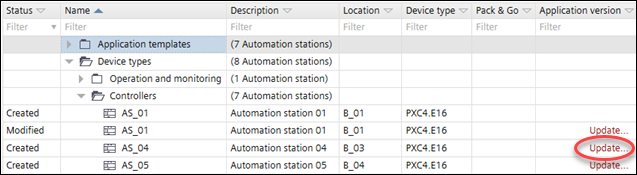
- Click Update for each item you want to update.
- A message displays the dates of the text database on the device and in the local ABT Site installation.
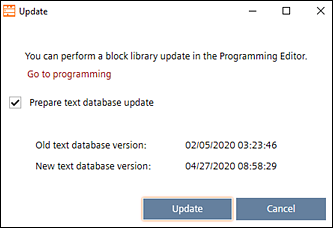
- Select Prepare text database update.
- Click Update.
- The text database is updated.
For application type based devices the texts in the various languages are part of the application templates. An update of the texts is only possible via update of the application template.
- A newer version of the ABT Site library has been installed.
- Go to Building.
- Open the Application & device overview task.
- Click Check for updates.
- The system checks for new versions of all application templates and graphics libraries. If a new version is found, Update displays in the Version column of the list.

- Click Update for each item you want to update.
- A message displays details about the update, e.g. the type version numbers. An info might display telling you that a firmware update is required.
- For operating and monitoring devices select Library content update.
- Select the new version from the New type version drop-down list.
- Click Update.
- The application templates or graphics are updated to the selected library version.