Accumulator (Accu)
Object type Accumulator (Accu) includes the BACnet properties for meter features that are visible externally.
There is a dependency between 'Name', 'Description' and 'Naming extension'. Any changes to one impacts the other two properties.
Note:
The dependency can be eliminated by entering a project-specific text.
Example:
"Aceg" is set as 'Name' If selected as preconfigured 'Description' "Active energy". Entering "01" (project-specific text) in addition to 'Naming extension', results in the 'Name' "Aceg(01)". The name also forms the last element of the object name.
Name |
|
|
|---|---|---|
'Name' is a name specific to the instance. It is used to set up a hierarchical object name. | ||
Property ID: 4438 | ||
Description |
|
|
|---|---|---|
'Description' describes a BACnet object. The 'Description' is a translatable string that is saved internally as a text reference or directly as a string. | ||
Property ID: 28 | ||
Name extension |
|
|
|---|---|---|
'Name extension' is an optional extension of the name. It uniquely identifies an object or to distinguish objects. | ||
Property ID: 4437 | ||
Note
Designations from the text catalog can also be used for the 'Naming extension'.
Present value |
|
|
|---|---|---|
'Present value' indicates the present value of the virtual variable. | ||
Property ID: 85 | ||
Present value truncated |
|
|
|---|---|---|
'Present value truncated' is derived from 'Present value' to depict the lower 32 bits from 'Present value' (64 bit, unsigned). Control programs use 'Present value truncated' to calculate precise consumption deltas, e.g. to determine the present volume flow or present electrical power. | ||
Property ID: 4432 | ||
Present value scaled |
|
|
|---|---|---|
'Present value scaled' is derived from 'Present value' and lossy converted to a 32-bit real value per the 'scale' property. | ||
Property ID: 4433 | ||
Change of value, COV ✳ |
|
|
|---|---|---|
'Change of value, COV' specifies the minimum change in 'Present value' property that will cause a COV notification to be issued to change-of-value subscribers of this object. | ||
Property ID: 22 | ||
Tracking value |
|
|
|---|---|---|
'Tracking value' represents the present, converted value as read from the measuring device, or the accumulated and transformed pulse as counted by the actual controller.
| ||
Property ID: 5107 | ||
Reliability |
|
|
|---|---|---|
'Reliability' indicates whether the property value 'Present value' is reliable. If the 'Present value' is not reliable, the property 'Reliability' indicates the cause of the fault and the bit "Fault" of the state indication is set to 'True'. In a normal case, the property 'Reliability' is set to "No fault". | ||
Property ID: 103 | ||
Suppress fault monitoring |
|
|
|---|---|---|
'Suppress fault monitoring' determines whether the fault supervision (fault events) is suppressed ('Yes'/'No'). The setting 'Yes' suppresses the evaluation of 'Reliability' and the value for 'Reliability' remains on "No fault". | ||
Property ID: 357 | ||
Event state |
|
|
|---|---|---|
"Event state" provides a way to determine if this object has an active event state associated with it. The "Event state" property indicates the event state of the object. Changes in the "Event state" property to the value FAULT are considered to be fault events. If the object does not support intrinsic reporting, then the value of this property is NORMAL. | ||
Property-ID: 36 | ||
Units |
|
|
|---|---|---|
'Units' display the physical unit for 'Present value' if multiplied by the scaling factor from 'Scale'. | ||
Property ID: 117 | ||
Prescale |
|
|
|---|---|---|
'Prescale' defines the coefficient for converting a measured value as supplied by a networked peripheral device or accumulated pulses as counted by the controller in 'Tracking value' and displayed under 'Present value'. | ||
Property ID: 185 | ||
Scale |
|
|
|---|---|---|
'Scale defines the conversion factor used to multiply the 'Present value' to receive a measured value in the technical units as indicated in 'Units'. | ||
Property ID: 187 | ||
Floating scale and integer scales can be selected for the 'Scale' property.
- "Float Scale" is a flexible variable floating point that does not allow for lossless depiction.
- "Integer Scale" is a whole number that does allow for lossless depiction and editing.
Values can be entered manually for each option.
Signal type |
|
|
|---|---|---|
'Signal type' defines the signal type for its I/O channel. The available signal types depend on the specific hardware, e.g. I/O module type or Onboard-I/O type. | ||
Property ID: 4968 | ||
Select the check boxes for preconfigured signals (mechanical contact (10/25 Hz), electric contact (100 Hz)).
Set value |
|
|
|---|---|---|
'Set value' modifies the 'Present value'. | ||
Property ID: 191 | ||
Value before correction |
|
|
|---|---|---|
'Value before correction' indicates the 'Present value' just prior to the last write operation to 'Set value'. | ||
Property ID: 190 | ||
Last update time |
|
|
|---|---|---|
'Last update time' indicates the date and time of the last change of 'Present value'. | ||
Property ID: 4782 | ||
Change time stamp |
|
|
|---|---|---|
'Change time stamp' indicates date and time of last modification to 'Present value' due to a write operation from 'Set value'. | ||
Property ID: 192 | ||
Trend is a separate BACnet object (Trendlog object). It is not, however, depicted in ABT Site and in programming editor as a separate BACnet object, but rather as the trend function of a BACnet object.
Enable Trend |
|
|
|---|---|---|
'Enable trend' enables the trend function. A new BACnet object for type TRENDLOG is instantiated, automatically connected to property "Present value" of the selected object and the BACnet properties required for setting are shown in tab "Properties". | ||
Enable logging |
|
|
|---|---|---|
'Enable logging' enables trend logging. Logging of data points begins as of the start date and start time is reached. Trend logging stops if the stop date and stop time are reached or when the buffer is full (if set). Start date and start time (wildcards) are not defined by default. In other words, the setting 'Enable logging' = 'Yes' immediately starts trending. | ||
Property ID: 133 | ||
Logging Type |
|
|
|---|---|---|
'Logging Type' determines when a data point is trended. | ||
Property ID: 197 | ||
Logging interval |
|
|
|---|---|---|
'Logging interval' determines the interval (cycle) at which the value is logged. The setting takes effect by setting 'polled' for 'Logging Type'. | ||
Property ID: 134 | ||
Start time |
|
|
|---|---|---|
'Start time' determines the date and time to start trend logging. | ||
Property ID: 142 | ||
Stop time |
|
|
|---|---|---|
'Stop time' determines the date and time to end trending logging. | ||
Property ID: 143 | ||
Stop when full |
|
|
|---|---|---|
'Stop when full' determines whether to stop trend logging if the buffer is full. | ||
Property ID: 144 | ||
The setting 'Notification threshold' can determine when an event to retrieve data, e.g. by Desigo CC is triggered before the buffer becomes full.
Buffer size |
|
|
|---|---|---|
'Buffer size' determines the maximum number of values that can be saved to the buffer. The setting 'Stop if full' determines how to proceed if the buffer is full. Note The value for property 'Buffer size' must be greater than or equal to the value for property 'Notification threshold'. | ||
Property ID: 126 | ||
Align intervals |
|
|
|---|---|---|
'Align intervals' determines whether the periodic polling interval is aligned at the start of a specific second, minute, hour, or day. The setting has no effect for 'Logging Type' = 'COV'. This ensures that values from multiple, simultaneous trend logs can be saved at the same time and compared. Alignment is only possible for whole number multiples (1…x) of a second, minute, hour, or day. | ||
Property ID: 193 | ||
Interval offset |
|
|
|---|---|---|
'Interval offset', measured in hundredths of a second, permit cyclical trend logs to be spread out. With lots of active trend logs, this prevents a situation where all values are polled at the same time. Polling can be subdivided by staging in groups. 'Interval offset' is only active if the setting 'Align interval' = 'Yes'. | ||
Property ID: 195 | ||
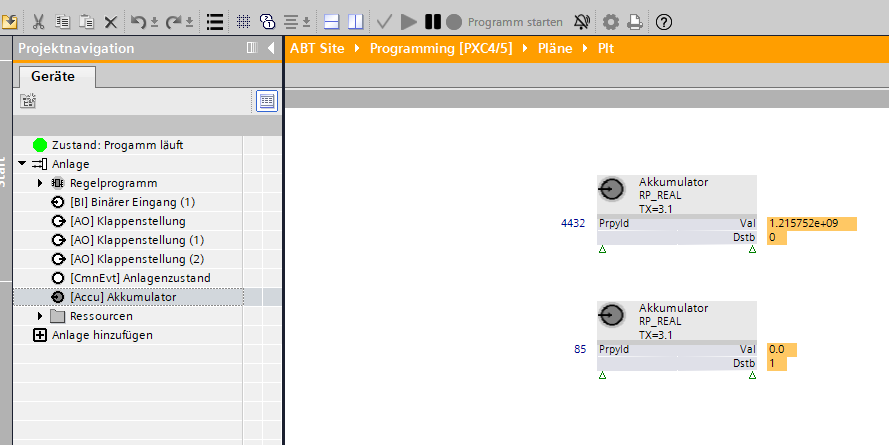
The programming editor does not have a special function block for the accumulator object. The accumulator object must be used together with the read property function block to access 'Present value truncated'.
Instantiation of the accumulator object in programming editor
The accumulator object can be added to I/O configuration in ABT Site and can be displayed by dragging the read property function block to the programming editor.
Property 'Present value' and 'Present value truncated'
The function block cannot read 'Present value' (Property ID 85) since it is 64 bits (Dstb = 1). Property 'Present value truncated' (Property ID 4432) is derived from 'Present value' and shortened to 32 bits. 'Present value truncated' can be read and used as an alternative to 'Present value'. 'Present value truncated' has the same value as in ABT Site.