Assigning hierarchical descriptions for BACnet objects
When the project is connected to a 3rd party management station, Assigning hierarchical descriptions allows to efficiently set the descriptions of the BACnet objects to a hierarchical structure. This can be done across the entire automation station. INFO: Desigo CC, Desigo Control Point and Web Interface do not require this assigning, since they recognize the system hierarchy.
Note: The hierarchical description is defined in the active system language (see that section) and is not translatable with standard system mechanisms.
- The hierarchy structure is set to
Including building structure, plant & folders
or
Include only plant & folders.
Plant automation tab - The plant is assigned to a device and a building hierarchy.

- Go to Building > Building structure.
- Right-click the automation station and select Go to engineering.
- Open the BACnet objects task.
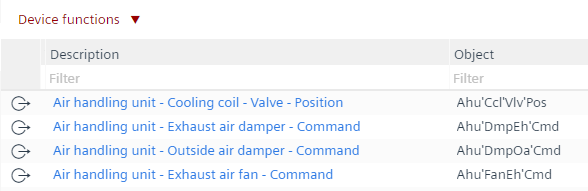
- From the Device functions drop-down list, select Set hierarchical descriptions.
- The Device function dialog box opens.
- Click OK.
- In the Description column, the hierarchical description text is added to each object.

Use Undo  to reject the changes.