Changing BACnet object instance numbers (CSV)
This function allows to change the BACnet object instance name. This is required, if the BACnet object instance name is not accepted by the customer, for example:
Siemens | Customer | ||
|---|---|---|---|
Object name | Object instance number | Object name | Object instance number |
B1’Plt1’TOa | 15 | B1’Plt1’TOa | 5 |
B1’Plt1’TSu | 19 | B1’Plt1’TSu | 3 |
Limitations and rules
Change object instance numbers in the csv file (for example, by Excel):
- Only the object instance numbers are changeable. All other changes (for example, name, descriptions, types or adding additional objects) will be ignored ABT Site.
- ABT Site checks the uniqueness or format the BACnet object instance numbers before import. Faulty instance numbers (for example, duplicated numbers or wrong format) file will block the import. The user gets a generic error message in this case. Use Excel to find the duplication, for more information see https://trumpexcel.com/find-and-remove-duplicates-in-excel/.
Select Home > Conditional Formatting > Highlights Cells Rules > Duplicate Values. - After instance number changes (even for 1 object only) ABT Site force full load - no delta load (over Play/Pause) possible.
- After instance number changes, Desigo CC and Desigo Control Point must re-learn /engineer from scratch. If that engineering is not started yet, in that case it has not impact for Desigo CC and Desigo Control Point.

The user is responsible to insure the uniqueness of the instance numbers => each object type counts up separately from 0 (zero).
Workflow
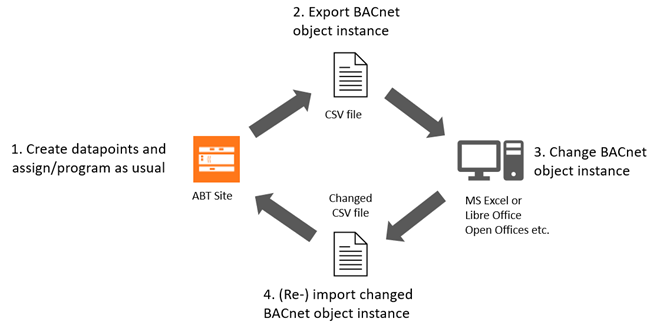
Create a data export
- Go to Building > Building structure.
- Select a device or a hierarchy object.
- Right-click and select Create export.
- The Create export dialog box opens.
- Select the Scope of content to export.
- Select the BACnet object instance numbers (PXC4/5/7 only) option.
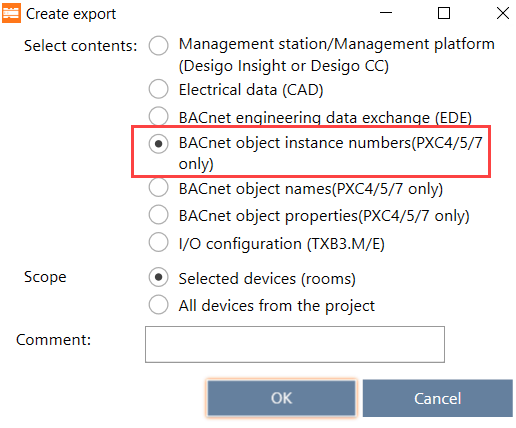
- (Optional) Enter a comment.
- Click OK.
- The selected content is exported to the default directory for exports [drive]:\Users\Public\Documents\Siemens\DESIGO\Exports.
- The Create export dialog box displays allowing you to open the containing folder.
- Click Open folder.
- The file explorer opens.
- Extract the created zip.file.
- For each device is a csv.file created with the corresponding device name.
Modify BACnet object instance number
- Open the csv.file with Excel.
- Rename the BACnet object instance number (column E) as required.
INFO:
- Do not change names in the column object-instancobjecte, if the object-instance-modifiable contains a No.
- Do not rename column names or delete the header row.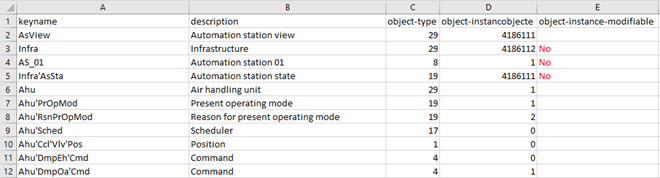
- Save the changes.
- Import the file back to ABT Site.
Importing modules and I/Os
Additional rows created are skipped and not imported. Deleted rows remain unchanged in the project.