Importing modules and I/Os (for TXB3.M only)
Instead of creating modules and I/Os in the I/O configuration task, you can also import the data via an xml file. In a second step you can edit the data point properties of the TX-I/O modules.
Exporting modules and I/Os (for TXB3.M only)
Basic rules for importing xml files
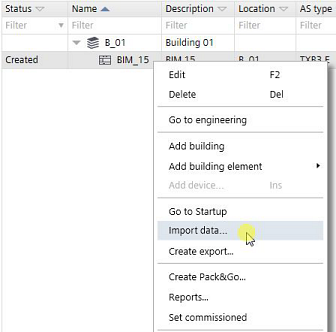
Import modules and I/Os
- You have added a bus interface module.
Adding devices
- Go to Building > Building structure.
- Right-click a bus interface module and select Import data.
- Select a file to import.
- You have imported am xml file. You can edit the data point properties in Engineering > I/O configuration.
I/O configuration

If a bus interface module was already open in the I/O configuration task, close and open it again in order to refresh the import data in the device.