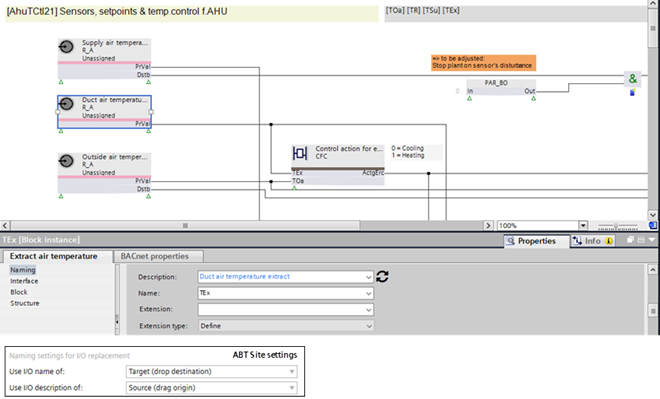
Replacing names and descriptions
The customer does not accept the text template from the library. For this reason, you can define your own names and descriptions within ABT Site.
Note: If you change the standard name, for example, TSu to myTSu, the automatism in Desigo CC and Desigo Control Point does not work anymore. A re-engineering is requested and leads to additional costs on the management stations.
- The naming rules are defined in Settings > Naming defaults > Naming rules tab.
Naming settings for I/O replacment - The objects are created in ABT Site according to customer requirements.
- Right-click the data point in ABT Site and select Show in program.
- The Programming editor opens.
- Drag a plant from the Plants folder in the Library to Add plant in the Project tree.
- Drag the source data point to the target data point.
- The I/O replacement dialog box opens.
- Click Replace.
- The names and description are changed according the settings.
- Changed texts appears in blue.
- Check the changes in the Element properties tab.